Change Mobile IMEI: What It Means, How IMEI Works & What to Know
Change mobile IMEI is a search term used by people researching mobile-device identifiers, IMEI-related software, phone servicing, network problems, and situations where an IMEI is missing or no longer reported correctly. However, changing an IMEI, checking an IMEI, repairing an IMEI, and dealing with a carrier restriction are four different things. Understanding that difference is important before doing anything to a phone.
An IMEI is tied to the cellular identity of a mobile device, so it should not be treated like an ordinary setting that can simply be replaced whenever a user wants. The correct approach depends on why you are researching the subject in the first place.
What Does “Change Mobile IMEI” Mean?
The phrase change mobile IMEI can refer to several different situations.
Someone searching for it may want to understand:
- What an IMEI number actually identifies
- What IMEI-changing software is supposed to do
- Why some mobile-service tools mention IMEI writing
- What happens when a phone loses its original IMEI
- Why an IMEI can show as Invalid or Unknown
- Whether an IMEI is related to a SIM card or phone number
- Why different phones require different servicing methods
- Whether an IMEI problem can be repaired
- How to check the IMEI of a used phone
- What an IMEI blacklist means
These are related topics, but they do not represent the same search intent.
If you are starting from the basics, our guide to what an IMEI number is and what it is used for explains the identifier itself before you get into more advanced terminology.
What an IMEI Actually Identifies
IMEI stands for International Mobile Equipment Identity.
Unlike a phone number, which is associated with mobile service, the IMEI is associated with the cellular equipment inside the device.
This distinction becomes important because a modern phone can contain many different identifiers at the same time.
| Information | What it relates to |
|---|---|
| IMEI | Cellular mobile equipment |
| Phone number | Mobile service or subscriber |
| SIM information | SIM or mobile subscription |
| Serial number | Manufacturer device identification |
| Account information | User or service account |
Because these identifiers have different purposes, changing one does not automatically change the others.
Why People Search for Change Mobile IMEI
Search behavior around IMEI modification is unusually broad.
One person may be researching mobile-service software, while another may have purchased a used phone and wants to understand its IMEI. Someone else may be dealing with an IMEI that disappeared after firmware work.
There are also users who encounter terms such as:
- IMEI changer
- IMEI changer tool
- IMEI repair
- IMEI writer
- IMEI rebuilder
- Invalid IMEI
- Null IMEI
- IMEI Unknown
- Baseband Unknown
These terms can overlap in search results even though their practical meaning is different.
That is why the first question should always be: What is actually wrong with the phone?
Changing an IMEI Is Not the Same as Checking One
IMEI checking is one of the most common legitimate reasons for working with an IMEI.
If you are buying a used phone, troubleshooting a device, confirming information, or investigating a mobile phone you already own, you may simply need to check the identifier rather than change it.
Our IMEI Number Check Online Tool guide explains the purpose of checking an IMEI and what you should consider when investigating device information.
An IMEI check does not modify the phone. It is an information-gathering process.
Changing an IMEI Is Not the Same as Repairing One
This distinction is particularly important when a phone has developed an IMEI problem.
Imagine that a phone has been working normally and then suddenly begins displaying:
- Invalid IMEI
- Null IMEI
- IMEI Unknown
- Missing IMEI
- Baseband Unknown
In this situation, the problem may be that the phone has lost or damaged information associated with its legitimate device configuration.
That is a repair problem, not simply a reason to assign an unrelated identifier to the phone.
Our IMEI Repair Tool guide is designed around this type of troubleshooting and explains why an IMEI problem should be approached differently from general IMEI-changing terminology.
What Can Cause an IMEI to Become Invalid?
An IMEI-related problem can have more than one cause.
Firmware Problems
A failed, incomplete, or incompatible firmware operation can affect the software responsible for the phone’s cellular functions.
Unsuccessful Flashing
Flashing a phone involves changing or reinstalling software components. If something goes wrong during that process, the phone may develop cellular or configuration problems.
Device Configuration Problems
Some phones rely on protected configuration areas for important device and modem information. Damage to those areas can produce symptoms that appear to be an IMEI problem.
Baseband Problems
The modem or baseband system is responsible for important parts of cellular communication. A baseband problem can therefore appear alongside an IMEI problem.
Hardware Failure
Not every IMEI-related problem is caused by software. A fault involving the motherboard, storage, modem or other hardware can produce similar symptoms.
This is why downloading another IMEI application is not necessarily the answer.
How to Find the IMEI Before Doing Anything
Before researching how to change mobile IMEI, establish what the phone currently reports.
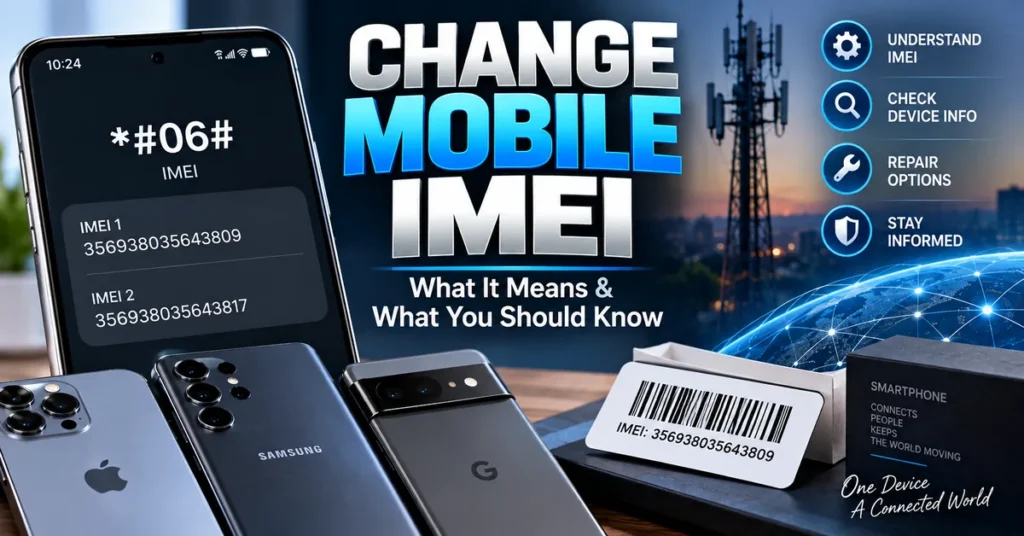
On many mobile phones, entering:
*#06#
can display the device’s IMEI information.
The IMEI may also be available through the phone’s settings, on the original packaging, or in legitimate purchase and carrier documentation.
If a phone supports more than one cellular connection, it may display more than one IMEI.
Keeping a record of the legitimate IMEI associated with your phone can be useful if you later encounter a device-identification or repair problem.
Why the Original IMEI Matters
An IMEI is not simply a random number chosen for convenience.
It is associated with the mobile equipment, which is why the original identifier is important when dealing with repair, device verification, carrier support, or used-phone purchases.
If your phone develops an IMEI problem, useful sources for confirming the original information can include:
- Original retail packaging
- Purchase documentation
- Carrier records
- Manufacturer documentation
- Professional repair records
- The phone’s own device information, when still available
Do not assume that an IMEI found on another phone, website, or forum is appropriate for your device.
IMEI Changer Tools: What Are They?
An IMEI changer tool is a broad term used for software or mobile-service equipment associated with IMEI-related operations.
However, the term can be misleading because different tools can have completely different purposes.
Depending on the device and software, an IMEI-related tool may be associated with:
- Reading device information
- Checking an IMEI
- Diagnosing cellular problems
- IMEI repair
- IMEI restoration
- Device servicing
- Modem configuration
- IMEI writing
The important point is that the name of a tool does not tell you whether it supports your specific phone.
Why There Is No Universal Mobile IMEI Tool
Mobile phones are built around many different hardware and software platforms.
Two devices can have completely different:
- Chipsets
- Modems
- Firmware
- Operating-system versions
- Security systems
- Storage configurations
- Manufacturer protections
- Service interfaces
A tool designed for one device may therefore be completely unsuitable for another.
This is especially important when reading older tutorials. A procedure that worked on a particular phone years ago may not work on a current device with newer security protections.
Android and Other Mobile Platforms Are Not Identical
The phrase change mobile IMEI is broader than an Android-specific search.
Android phones come from many manufacturers and use a wide range of hardware platforms. Even within Android, IMEI-related behavior can vary considerably between models.
Apple devices have their own tightly controlled hardware and software environment, while other mobile platforms can have completely different servicing requirements.
That is why an IMEI tool advertised for one type of phone should not automatically be assumed to work on another.
What About Root, Modules and Advanced Phone Tools?
Some IMEI-related searches lead to discussions about root access, modules, frameworks, service modes, or low-level phone utilities.
These subjects are generally connected with deeper access to the operating system or device hardware.
However, having elevated software access does not automatically mean that the phone’s cellular identity can be safely or legitimately modified.
Modern mobile devices use multiple layers of security, and manufacturer implementations vary considerably.
This is one reason older IMEI tutorials should not be treated as universal instructions for modern phones.
Does Changing an IMEI Unlock a Phone?
No. An IMEI and a carrier lock are different things.
If a phone is locked to a particular mobile network, the appropriate solution is normally the carrier’s official unlocking process.
Changing an IMEI should not be treated as a substitute for a network unlock.
Similarly, an IMEI checker does not unlock a phone, and an IMEI repair tool does not automatically remove a carrier restriction.
Does Changing an IMEI Remove a Blacklist?
An IMEI blacklist relates to the reported or restricted status of a device identifier.
A phone can be reported lost, stolen, or otherwise restricted by a carrier or relevant device-status system.
Changing or attempting to disguise an identifier should not be treated as a legitimate way to bypass such a restriction.
If you are buying a used phone, the better approach is to investigate the device’s status before completing the purchase.
Our IMEI Blacklist Checker guide explains what blacklist checking means and why it matters when evaluating a used device.
Change Mobile IMEI vs Phone Number Change
An IMEI should not be confused with a phone number.
Your phone number is associated with mobile service and can normally be transferred, replaced, or changed through your carrier.
The IMEI is associated with the cellular equipment.
Replacing a SIM card does not normally mean that the phone’s IMEI changes.
Likewise, changing your phone number does not normally change the device’s IMEI.
These are separate layers of mobile identity.
Change Mobile IMEI vs SIM Card
A SIM card and an IMEI serve different purposes.
The SIM is associated with mobile subscription information, while the IMEI identifies the cellular equipment.
This means that the same phone can use different SIM cards while retaining the same device IMEI.
It also means that changing a SIM card is not an IMEI-changing operation.
Can a Factory Reset Change the IMEI?
A normal factory reset is not designed to replace the phone’s IMEI.
A factory reset generally returns user-facing software and settings to a default state. It should not be treated as a method for assigning a new cellular device identifier.
If an IMEI problem appears after resetting or repairing a phone, the cause should be investigated rather than assuming that the reset itself intentionally changed the identifier.
Why Used-Phone Buyers Should Care About IMEI
IMEI information can be particularly useful when buying a second-hand mobile phone.
A phone may look perfect physically while still having a device-status or network problem.
Before buying a used phone, consider checking:
- IMEI number
- Blacklist status
- Exact model
- Serial number
- Carrier compatibility
- Activation status
- Ownership information
- Network functionality
- Physical condition
An IMEI check is not a complete used-phone inspection, but it can be an important part of one.
You can use our IMEI Number Check Online resource as a starting point when investigating a device.
Updated: September 10, 2026
This article was updated to focus specifically on the broader change mobile imei search intent and to distinguish IMEI modification terminology from IMEI checking, repair, device verification, carrier unlocking, and blacklist-related searches.
What to Check Before Using IMEI Software
If you are researching mobile IMEI software, start with the phone rather than the download page.
Identify:
- The exact manufacturer
- The exact model number
- The operating system and version
- The chipset, where relevant
- The current IMEI status
- The current baseband status
- The phone’s recent repair or firmware history
- Whether the phone is carrier locked
- Whether the device has a reported status
This information can tell you whether you are actually dealing with an IMEI problem or something completely different.
Common Mistakes When Searching for Change Mobile IMEI
Looking for a Universal Tool
There is no reason to assume that software designed for one phone will work on every mobile device.
Confusing IMEI With the Phone Number
Changing a phone number through a carrier does not mean that the device’s IMEI changes.
Confusing IMEI With SIM Information
A SIM card and the phone’s cellular hardware have different identifiers and different functions.
Assuming an IMEI Problem Always Means the IMEI Needs to Be Changed
An Invalid or missing IMEI may indicate a firmware, configuration, modem, or hardware problem that requires diagnosis and repair.
Using an IMEI From Another Device
The identifier associated with another phone should not simply be treated as a replacement for your own device’s legitimate information.
Ignoring the Phone’s History
If the problem appeared immediately after flashing, updating, repairing, or modifying the phone, that event can provide an important clue.
How to Approach an IMEI Problem Logically
There is a simple way to avoid choosing the wrong IMEI resource.
Start with identification. Determine the exact phone model and record its original IMEI if you have legitimate documentation.
Check the current status. Find out whether the IMEI is visible, invalid, missing, or unknown.
Check the cellular system. If the phone also reports a baseband or network problem, the issue may be broader than the IMEI itself.
Review recent changes. Firmware flashing, repairs, updates, resets, or hardware work may explain when the problem started.
Choose the correct resource. A checker, lookup tool, blacklist checker, and repair guide each serve a different purpose.
Which IMEI Resource Do You Need?
| Your situation | Best starting point |
|---|---|
| You want to understand IMEI | What Is an IMEI Number? |
| You want to check an IMEI | IMEI Number Check Online Tool |
| You want device information | IMEI Lookup Tool |
| Your phone has Invalid or Missing IMEI | IMEI Repair Tool |
| You want to investigate a blacklist | IMEI Blacklist Checker |
| You are researching IMEI software | IMEI Changer Tool |
Frequently Asked Questions About Change Mobile IMEI
What does change mobile IMEI mean?
Change mobile IMEI is a search term used for information about modifying, servicing, repairing, checking, or understanding the IMEI associated with a mobile phone. The correct approach depends on the reason for the search.
Is an IMEI the same as a phone number?
No. The IMEI identifies the cellular device, while the phone number is associated with mobile service or the subscriber.
Is an IMEI the same as a SIM number?
No. The IMEI relates to the mobile equipment, while SIM-related identifiers belong to the SIM or mobile subscription.
Can changing a SIM change the IMEI?
No. Replacing a SIM card does not normally change the IMEI associated with the phone.
Can a factory reset change an IMEI?
A normal factory reset is not intended to change the device’s IMEI.
Why would an IMEI become invalid?
Possible causes include firmware problems, unsuccessful flashing, device configuration damage, modem or baseband problems, and hardware faults. The cause depends on the particular phone.
What is a Null IMEI?
Null IMEI is a term commonly used when a phone fails to report a valid IMEI. If the device previously had a legitimate IMEI, the underlying cause should be investigated.
Can an IMEI problem be repaired?
Some legitimate IMEI-related problems can be diagnosed and repaired, depending on the phone and the cause. If the original IMEI has become unavailable, the goal should be to restore the device’s legitimate information rather than simply substitute an unrelated identifier.
Can changing an IMEI unlock a carrier-locked phone?
No. Carrier unlocking and IMEI identification are separate issues. A carrier’s official unlocking process should be used for a network lock.
Can changing an IMEI remove a blacklist?
IMEI modification should not be treated as a legitimate method for bypassing a blacklist or reported-device restriction.
Can I use another phone’s IMEI?
You should not treat another device’s IMEI as a replacement for your phone’s legitimate identifier.
Where can I find my IMEI?
On many phones, entering *#06# can display the IMEI. It may also appear in the phone’s settings, original packaging, purchase documentation, or carrier records.
Should I publish my IMEI online?
It is better not to publish your complete IMEI unnecessarily on public websites, forums, or social media.
Final Thoughts
Change mobile IMEI is a broad search, and that is exactly why it is important to separate the different problems hidden behind the phrase.
If you are simply trying to identify a phone, start with an IMEI lookup or IMEI check.
If you are buying a used phone, investigate its IMEI and reported device status before completing the purchase.
If your phone suddenly shows Invalid IMEI, Null IMEI, IMEI Unknown, or another cellular-identification problem, investigate the cause and look at legitimate repair options.
If your phone is carrier locked, use the carrier’s official unlocking process rather than treating an IMEI change as an unlock.
And if you are researching IMEI changer software, remember that compatibility depends heavily on the exact mobile device, its hardware, firmware, security system, and the problem you are trying to solve.
The most useful starting point is therefore not simply finding a tool with “IMEI changer” in its name. It is understanding why you are looking at the IMEI in the first place.
For more information, explore our IMEI number guide, IMEI Lookup Tool, IMEI Number Check Online Tool, IMEI Blacklist Checker, IMEI Repair Tool, or IMEI Changer Tool guide.