What Is an EID Number on a Phone?
What is an EID number on a phone? An EID is a unique identifier associated with the eSIM hardware inside a compatible device. Unlike an IMEI, which identifies cellular equipment, the EID identifies the eSIM environment that allows a carrier to provision a mobile plan digitally. If you have ever been asked for an EID while activating an eSIM, transferring a mobile plan, or troubleshooting cellular service, this is the number the carrier is referring to.
The EID is usually not something you need during everyday phone use. You may never look at it until a carrier, eSIM provider, manufacturer, or support technician specifically asks for it.
Once you understand what the EID identifies, however, several confusing phone identifiers become much easier to distinguish.
What Does EID Stand For?
EID commonly stands for Embedded Identity Document.
In technical terms, it identifies the eUICC—the secure component responsible for managing eSIM profiles inside a compatible device. Apple documentation also identifies EID as the device’s eSIM identifier, while Apple device-management documentation refers to EID numbers as 32-digit Embedded Identity Document numbers.
Think of the EID as the identity of the eSIM hardware environment, rather than the identity of your cellular subscription.
That distinction is important.
Your mobile plan can change.
Your phone number can change.
An eSIM profile can be replaced.
But the EID belongs to the device’s embedded eSIM hardware.
What Is an EID Number Used For?
The EID primarily becomes useful when a mobile service needs to identify the eSIM-capable hardware in your phone.
Common situations include:
- Activating an eSIM
- Transferring an eSIM between compatible devices
- Setting up a cellular plan
- Troubleshooting eSIM activation
- Contacting a carrier’s technical support
- Identifying the correct eSIM hardware
- Managing cellular devices in business or school environments
A carrier may ask for your EID because it needs to know which eSIM hardware should receive the mobile profile.
This is different from asking for your IMEI.
EID vs IMEI: They Are Not the Same
This is probably the most important distinction to understand.
An IMEI identifies cellular equipment.
An EID identifies the eSIM hardware environment.
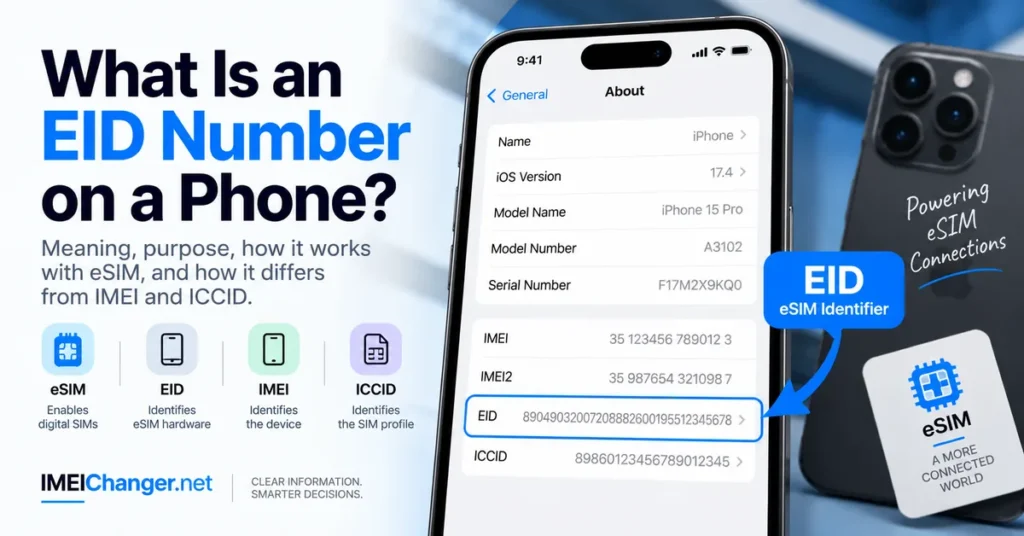
For example, a compatible phone may show several identifiers together:
| Identifier | What it identifies |
|---|---|
| IMEI | Cellular device/equipment |
| IMEI2 | A second cellular device identifier on supported phones |
| EID | eSIM/eUICC hardware |
| ICCID | SIM or eSIM subscription identifier |
| Serial Number | Manufacturer’s device identifier |
| Phone Number | Your mobile service number |
This is why entering an EID into an IMEI checker will not produce the same type of result as entering an IMEI.
If you want to understand the IMEI itself in more detail, see our guide What Is an IMEI Number and What Is It Used For?.
EID vs ICCID: Another Common Confusion
EID and ICCID can appear next to one another on a phone, particularly when you are looking through cellular or device information.
They still identify different things.
EID
The EID identifies the eSIM hardware environment.
ICCID
The ICCID identifies the SIM/eSIM subscription or profile associated with the cellular service.
A simple way to remember the relationship is:
EID = the eSIM hardware
ICCID = the SIM/eSIM profile
IMEI = the cellular device
Phone number = the mobile service number
That distinction becomes especially useful when a carrier support representative asks for one specific identifier.
How Many Digits Does an EID Have?
An EID is commonly represented as a 32-digit identifier. Apple documentation also refers to EID numbers as 32-digit Embedded Identity Document numbers.
This makes it visually different from a standard IMEI, which is normally 15 digits.
For example, an IMEI might look like:
356789123456789
An EID is much longer:
89049032007208882600195512345678
The numbers above are examples only.
Do not attempt to use an example EID for a real activation or device check.
Where Can You Find the EID on a Phone?
The exact menu can vary between manufacturers and operating systems, but eSIM-compatible phones generally provide the EID somewhere within their device or cellular information.
On an iPhone, Apple provides a particularly straightforward path.
Go to:
Settings → General → About
Scroll down through the device information until you see EID.
Apple confirms that the EID, IMEI/MEID and ICCID can be displayed on the iPhone’s About screen.
You can also touch and hold the identifier to copy it when you need to provide it to Apple or another legitimate service.
How to Find EID on iPhone Before Setup
You may need the EID before an iPhone has been completely configured.
Apple provides an information option on the initial Hello screen that can display device identifiers before setup is completed.
This can be useful when:
- Activating a newly purchased iPhone
- Setting up an eSIM
- Preparing a device for a carrier
- Checking a device before completing setup
- Troubleshooting activation
If you are buying a used iPhone, this can also give you access to device information without first completing the entire setup process.
How to Find EID Without Using the Phone
If you cannot access the phone’s Settings menu, there are other possibilities.
Apple documents several alternatives for finding an iPhone’s EID.
Apple Account
Sign in to the Apple Account associated with the device and open the Devices section.
Apple says the device information can include the EID and IMEI/MEID.
Finder or Apple Devices
Connect the iPhone to a computer.
Depending on your computer and operating system, Apple provides device information through:
- Finder
- Apple Devices
- iTunes
Apple’s current instructions explain that the EID can be accessed through the device information shown by these tools.
Original Packaging
If you still have the original box, check the barcode/device-information label.
Apple states that the original packaging can contain the serial number, EID and IMEI/MEID.
This can be particularly helpful when the phone cannot be powered on.
Why Would a Carrier Ask for Your EID?
An EID request usually has something to do with the eSIM side of your device.
For example, a carrier might request it when:
Activating a New eSIM
The carrier needs to associate the digital SIM profile with the appropriate eSIM hardware.
Transferring a Mobile Plan
During an eSIM transfer, the carrier may need device-specific information.
Troubleshooting Activation
If an eSIM installation fails, customer support may ask for the EID while investigating the problem.
Setting Up a Business Device
Organizations managing large numbers of cellular devices may use EID information as part of device and eSIM management.
The important thing is that an EID request does not mean the carrier is asking for your phone number or your IMEI.
It is asking for a different identifier.
Does Every Phone Have an EID?
No.
An EID is associated with devices that contain the appropriate eSIM hardware.
A phone that supports only traditional removable SIM cards will not necessarily have an EID.
Modern phones with eSIM support may display one.
The exact combination of physical SIM and eSIM capabilities varies by model and region.
This is one reason why two phones that look almost identical can display different sets of identifiers.
Does an EID Change?
The EID is tied to the device’s eSIM hardware environment.
It is not normally something that changes when you:
- Change your phone number
- Change your carrier
- Remove an eSIM profile
- Add another eSIM profile
- Change a mobile plan
The eSIM profile and the EID serve different roles.
Think of it this way:
The EID identifies the hardware.
The eSIM profile represents the cellular subscription loaded onto that hardware.
That is why a new mobile plan does not normally give the phone a new EID.
EID vs eSIM: Are They the Same Thing?
No.
This is another subtle but important difference.
An eSIM is the embedded SIM technology that allows a compatible device to use a digital cellular profile without requiring a removable physical SIM card.
The EID is the identifier associated with the eSIM hardware/eUICC.
So when someone says:
“I need the EID for my eSIM.”
They are not asking for the eSIM itself.
They are asking for the identifier of the eSIM hardware environment.
Is the EID the eSIM Activation Code?
No.
An EID should not be confused with an eSIM activation code or QR code.
An eSIM activation process may involve several pieces of information depending on the carrier, including:
- EID
- QR code
- Activation code
- SM-DP+ information
- Confirmation code
- Carrier account information
These are not interchangeable.
If a carrier sends you an activation QR code, that QR code is not your EID.
If the carrier asks for your EID, provide the EID shown by your device.
Can You Check an EID Like an IMEI?
Not in the same way.
IMEI checking services are designed around the IMEI ecosystem and the databases associated with mobile-device identifiers.
An EID has a different purpose.
Our IMEI Lookup Tool, for example, is designed to investigate information associated with an IMEI—not to treat an EID as though it were an IMEI.
This distinction matters because entering the wrong identifier can produce confusing or unusable results.
Can an EID Be Used to Find a Phone’s Location?
No.
An EID is not a public location-tracking number.
Neither an EID nor an ordinary IMEI lookup should be treated as a way to obtain the live GPS location of a phone.
If your phone is lost, use the official device-location features available through its operating system and contact your carrier when appropriate.
Be cautious with websites claiming that an EID or IMEI can instantly reveal a phone’s exact current location.
Is an EID the Same as a Serial Number?
No.
The serial number and EID identify different aspects of the device.
The serial number is the manufacturer’s device identifier.
The EID identifies the eSIM hardware environment.
You may see both on the same About screen.
That does not mean they are alternative versions of the same number.
Is an EID the Same as IMEI2?
No.
This is especially important on modern dual-SIM iPhones.
A device might display:
- IMEI
- IMEI2
- EID
- ICCID
- Serial Number
These numbers can appear close together, but each has a different role.
If a carrier asks for IMEI2, provide IMEI2.
If the carrier asks for EID, provide EID.
If it asks for ICCID, provide ICCID.
Do not substitute one for another simply because they are displayed on the same screen.
If you need the second IMEI specifically, see our guide How to Find IMEI2 on iPhone.
Can Two Phones Have the Same EID?
The EID is intended to uniquely identify the eSIM hardware associated with a device.
It should therefore be treated as a device-specific identifier rather than a number shared between ordinary phones.
If two devices appear to have identical EIDs, stop and verify the information rather than assuming it is normal.
For a used device, compare the information directly on the phone with the original packaging and seller documentation.
What If My EID Is Missing?
If you expect an EID but cannot find one, first determine whether the device actually supports eSIM.
Then check:
- Settings → General → About
- The device’s cellular information
- The initial setup information screen
- Apple Account device information
- Finder or Apple Devices
- Original packaging
Apple lists these as available places to find device identifiers such as EID.
If an eSIM-compatible device should display an EID but does not, and you are also experiencing cellular or activation problems, contact the carrier or manufacturer before attempting advanced modifications.
What If a Carrier Says My EID Is Wrong?
First, make sure you copied the entire identifier.
Because an EID is long, manually typing it can introduce errors.
The safer approach is to use the phone’s copy function whenever possible.
On iPhone:
Settings → General → About → EID
Touch and hold the number and copy it.
Then paste it into the carrier’s approved activation or support channel.
Also check that the carrier is asking for EID rather than:
- IMEI
- IMEI2
- ICCID
- Serial number
If the wrong identifier is submitted, the activation process may fail even though the phone itself is working correctly.
EID and Dual-SIM Phones
Dual-SIM terminology can make phone identifiers confusing.
A modern phone can have multiple cellular-related identifiers because it may support multiple cellular connections or eSIM profiles.
For example:
IMEI 1 — cellular device identifier
IMEI 2 — second cellular device identifier
EID — eSIM hardware identifier
ICCID — SIM/eSIM profile identifier
These numbers are related to the same device, but they do not perform the same job.
This is also why you should not assume that IMEI2 = EID.
They are separate identifiers.
Does an EID Identify Your Mobile Plan?
No.
The EID identifies the eSIM hardware environment, not your particular tariff or phone number.
Your carrier may associate a mobile plan with that hardware during provisioning, but the EID itself is not your:
- Phone number
- Account number
- Data plan
- Monthly subscription
- SIM activation code
This distinction becomes important when switching carriers.
You can change your mobile service without changing the underlying EID of the device.
Is It Safe to Share an EID?
Treat your EID as device information rather than something that should be posted publicly.
There are legitimate situations where you may need to provide it to:
- Your carrier
- Your eSIM provider
- Apple or another manufacturer
- An authorized repair or support service
- A legitimate device-management system
If a random website asks for your EID without clearly explaining why it needs it, consider whether providing it is necessary.
Avoid posting complete device identifiers publicly on social media, forums, or public screenshots unless there is a specific reason to do so.
EID Problems Are Not Automatically IMEI Problems
This distinction can save a lot of unnecessary troubleshooting.
Suppose your phone says:
eSIM cannot be activated
That does not automatically mean the IMEI is damaged.
Likewise, if an IMEI is missing, that does not automatically mean the EID is defective.
Different identifiers relate to different parts of the cellular system.
Before trying to repair anything, identify exactly which identifier the phone, carrier, or service is reporting as problematic.
For legitimate IMEI-related problems, our IMEI Repair Tool resource covers the separate issue of missing, invalid, or corrupted IMEI information.
EID When Buying a Used Phone
An EID can be another useful piece of information when inspecting a used eSIM-capable phone.
It should not, however, be treated as a complete phone-history report.
If you are buying a second-hand iPhone or Android phone, consider checking:
- IMEI
- IMEI2 where applicable
- EID
- Serial number
- Carrier compatibility
- Activation/account status
- Physical condition
- Network functionality
- Proof of ownership
- Blacklist/device status
Our IMEI Blacklist Checker can be used when your concern specifically involves the reported or restricted status of an IMEI.
The EID is useful information, but it is only one part of a proper used-phone inspection.
Why EID Matters More as eSIM Adoption Grows
Physical SIM cards made cellular identification relatively intuitive: you could remove the card and see that the subscription was associated with that removable component.
eSIM changes that relationship.
The SIM functionality is built into the device’s hardware, while mobile plans can be provisioned digitally.
The EID provides an identifier for that embedded eSIM environment.
That is why EID requests have become more common during:
- New eSIM activation
- Carrier transfers
- International travel setup
- Device replacement
- Business device deployment
- eSIM troubleshooting
You may rarely need to look at your EID yourself, but the carrier’s systems can use it behind the scenes when setting up your digital cellular service.
Quick Comparison: EID, IMEI, IMEI2 and ICCID
| Identifier | Main purpose | Typical length |
|---|---|---|
| EID | Identifies eSIM/eUICC hardware | 32 digits |
| IMEI | Identifies cellular equipment | 15 digits |
| IMEI2 | Identifies a second cellular connection on supported devices | 15 digits |
| ICCID | Identifies a SIM/eSIM subscription/profile | Typically 18–22 digits |
| Serial Number | Manufacturer’s device identifier | Varies |
Lengths can vary in how identifiers are displayed or represented, so the purpose of the identifier is more important than memorizing its format.
Frequently Asked Questions
What is an EID number on a phone?
An EID is a unique identifier associated with the eSIM hardware in a compatible device. It is commonly expanded as Embedded Identity Document.
What does EID stand for?
EID commonly stands for Embedded Identity Document. In technical eSIM terminology, it identifies the eUICC used to manage eSIM profiles.
How many digits is an EID?
An EID is commonly a 32-digit identifier.
Is EID the same as IMEI?
No. IMEI identifies cellular equipment, while EID identifies the eSIM hardware environment.
Is EID the same as IMEI2?
No. IMEI2 is a second cellular device identifier on supported phones. EID identifies the eSIM/eUICC hardware.
Is EID the same as ICCID?
No. EID identifies the eSIM hardware, while ICCID identifies a SIM/eSIM subscription or profile.
Where do I find my EID on iPhone?
Go to Settings → General → About and scroll down until you see EID. Apple confirms that EID is displayed in the About section on supported devices.
Can I find my EID without the phone?
For Apple devices, you may be able to find the EID through your Apple Account, Finder/Apple Devices/iTunes, or the original packaging.
Do all phones have an EID?
No. EID is associated with eSIM-capable hardware. A device without the appropriate eSIM hardware may not have an EID.
Does an EID change when I change carriers?
Normally, no. The EID is associated with the device’s eSIM hardware, while the carrier profile can change.
Does an EID change when I change my phone number?
No. Your phone number is a service identifier and is separate from the EID.
Can an EID track a phone?
No. An EID is not a public GPS tracking number.
Do I need an EID to activate every eSIM?
Not necessarily. The exact activation process depends on the carrier and eSIM provider. Some services may ask for the EID, while others use a QR code or another activation method.
Why is my carrier asking for my EID?
The carrier may need the EID to identify the eSIM hardware in your phone during activation, transfer, or troubleshooting.
Can I use an EID in an IMEI checker?
No. An EID and IMEI serve different purposes. Use an IMEI when a service specifically requests an IMEI.
Is an EID printed on the phone box?
On supported Apple devices, the original packaging can contain the EID along with other device identifiers.
Should I post my EID online?
It is better to treat the EID as private device information and only provide it when there is a legitimate reason.
The Easiest Way to Remember What an EID Is
There are many numbers on a modern phone, and the easiest way to get confused is to treat them as interchangeable.
They are not.
Think of the four most important ones like this:
IMEI → the cellular device
IMEI2 → another cellular device identifier on supported phones
EID → the eSIM hardware
ICCID → the SIM/eSIM profile
Once you separate those four concepts, an EID becomes much less mysterious.
If your carrier asks for your EID, open your device information and provide the EID, not the IMEI or ICCID.
If you are investigating the device itself, use our IMEI Lookup Tool for IMEI-related information, and use the IMEI Blacklist Checker when you specifically need to investigate reported or restricted IMEI status.
And if the problem is an invalid or missing IMEI rather than an eSIM issue, our IMEI Repair Tool is the more relevant resource.
The EID has one central job: identifying the embedded eSIM hardware so digital cellular service can be provisioned and managed on the correct device.