What Is an IMEI Number and What Is It Used For?
An IMEI number is a unique identifier associated with a mobile device that connects to a cellular network. Unlike a phone number, which identifies your mobile service, the IMEI identifies the actual cellular device. Understanding what an IMEI number is and what it is used for can help you check a phone before buying it, report a lost device, investigate network problems, or provide the correct information to a carrier or repair technician.
The IMEI is one of the most important identification numbers attached to a modern smartphone, but it is often confused with the phone number, SIM card number, serial number, or account information.
What Does IMEI Stand For?
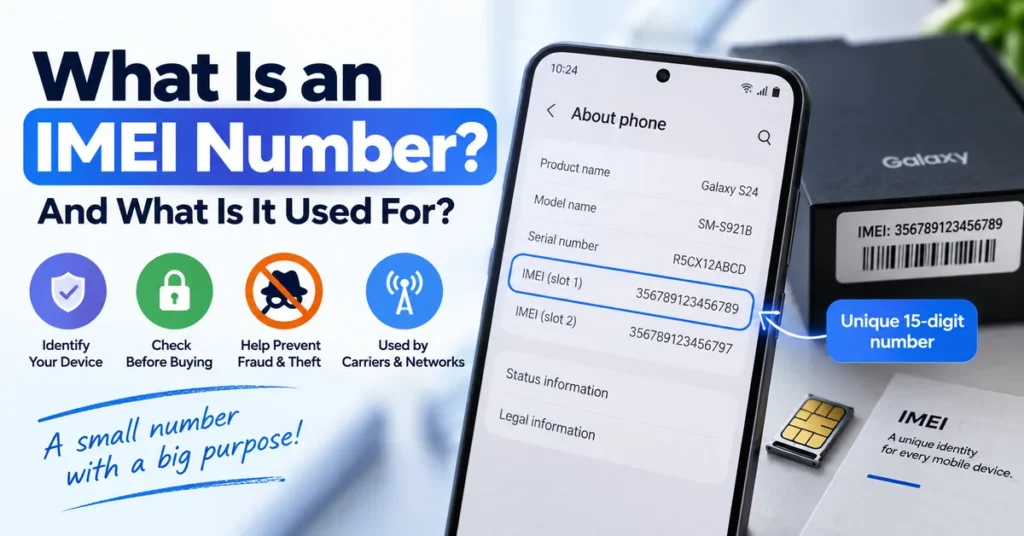
IMEI stands for International Mobile Equipment Identity.
The name describes its basic purpose: identifying mobile equipment used with cellular networks.
A standard IMEI is normally 15 digits long. Some modern phones support multiple cellular connections, such as dual-SIM configurations, and may therefore display more than one IMEI.
For example, a phone may show:
- IMEI 1
- IMEI 2
These numbers belong to the device’s separate cellular connections. If you are checking a dual-SIM phone, always make sure you know which IMEI you are investigating.
What Does an IMEI Number Identify?
An IMEI identifies the mobile equipment, not the person using it.
This distinction is important because several different numbers can appear on the same phone.
| Identifier | What it identifies |
|---|---|
| IMEI | Cellular mobile equipment |
| Phone number | Mobile service/subscriber |
| Serial number | Manufacturer’s device identification |
| SIM information | SIM/subscription environment |
| EID | eSIM identification on supported devices |
| Account ID | User account or service account |
The IMEI therefore remains associated with the physical cellular device even when the SIM card or phone number changes.
For example, replacing your SIM card does not normally mean that the phone receives a new IMEI.
What Is an IMEI Number Used For?
The IMEI has several practical uses beyond simply identifying a phone.
1. Identifying a Mobile Device
The most basic purpose of an IMEI is device identification.
When a carrier, repair technician, manufacturer, or device-checking service asks for your IMEI, they are using it to distinguish your particular cellular device from other devices.
This is especially useful when multiple phones have the same model, color, storage capacity, or appearance.
2. Checking a Used Phone
An IMEI can be extremely useful when buying a second-hand smartphone.
Before paying for a used phone, you can compare the IMEI shown by the device with the number provided by the seller and investigate the available device information.
You can also use our IMEI Lookup Tool to investigate information associated with an existing IMEI.
For a more specific status investigation, our IMEI Blacklist Checker can help you understand whether a device identifier may have a reported or restricted status.
An IMEI check should not be the only thing you do when buying a used phone. You should also verify ownership, physical condition, account locks, carrier compatibility, and other relevant details.
3. Reporting a Lost or Stolen Phone
If a phone is lost or stolen, the IMEI can help identify the device when dealing with a carrier, manufacturer, insurer, or other relevant organization.
The IMEI itself does not act as a public GPS tracker.
If you are trying to locate your own lost phone, you should use the appropriate device-location service rather than relying on an online website claiming that an IMEI can reveal a phone’s live location.
The IMEI is primarily an identification tool.
4. Investigating a Blacklisted Device
Carriers and other organizations may use device identifiers when dealing with phones that have been reported lost, stolen, involved in fraud, or otherwise restricted.
This is why the IMEI is important when investigating the status of a used smartphone.
A blacklist check and an IMEI lookup are not exactly the same thing. A lookup can investigate information associated with a device, while a blacklist check focuses more specifically on reported or restricted status.
A blacklist checker also does not automatically remove a legitimate restriction.
5. Providing Information to a Mobile Carrier
Your carrier may ask for the IMEI when you contact support about a particular device.
It can help the carrier identify the equipment involved in a network or account-related problem and determine which device is being discussed.
This is particularly useful when you have multiple phones, multiple SIMs, or several devices associated with the same account.
6. Troubleshooting Network Problems
The IMEI can also become relevant when diagnosing certain cellular problems.
For example, a phone that suddenly shows:
- Invalid IMEI
- Null IMEI
- IMEI Unknown
- Missing IMEI
- Baseband-related errors
- No cellular registration
may have a software, firmware, configuration, modem, storage, or hardware-related problem.
That is a different situation from simply wanting to look up an IMEI.
If your phone previously had a valid IMEI and it disappeared after a repair, firmware operation, reset, or software problem, see our IMEI Repair Tool guide rather than assuming you need to change the device identifier.
7. Device and Repair Identification
Repair technicians may request the IMEI when diagnosing a phone.
The number can help distinguish the exact device being serviced and may be useful when checking device-specific information.
However, providing an IMEI does not automatically give a technician access to every piece of information about the phone. What can be determined depends on the manufacturer, carrier, database, country, device and available service.
Updated: September 8, 2026
Where Can You Find an IMEI Number?
There are several places where an IMEI may be available.
Use *#06#
On many mobile phones, entering:
*#06#
opens a screen displaying the device’s IMEI information.
This is one of the quickest ways to find the number when the phone is working normally.
If the device has two cellular connections, you may see more than one IMEI.
Check the Phone Settings
Android and iPhone devices normally provide device-identification information through their settings.
The exact location varies according to the manufacturer, operating system version, and model.
On Android, look for sections such as:
Settings → About Phone
The wording can be different between Samsung, Google Pixel, Xiaomi, Motorola, OnePlus and other manufacturers.
On an iPhone, IMEI information can normally be found under:
Settings → General → About
Check the Original Packaging
The IMEI may also be printed on the original phone box or product label.
This can be particularly useful if the phone cannot be turned on.
However, when buying a used phone, do not rely solely on the number printed on the box. Compare it with the IMEI shown by the actual device whenever possible.
Check Your Purchase Records
Depending on where you purchased the phone, the IMEI may appear on:
- Purchase documentation
- Invoices
- Carrier records
- Insurance documents
- Repair records
- Device registration information
This can be useful when trying to recover the IMEI of a phone that you no longer have physical access to.
Is an IMEI the Same as a Phone Number?
No.
This is one of the most common misunderstandings about IMEI numbers.
Your phone number identifies your mobile service, while your IMEI identifies the cellular device.
You can change the SIM card and keep the same phone. In that situation, the phone number or subscriber information may change while the device’s IMEI remains the same.
The opposite can also happen: a phone can have a different user’s SIM card while the physical device retains its IMEI.
This is why a phone number cannot simply be treated as an alternative form of IMEI.
Is an IMEI the Same as a Serial Number?
No.
The IMEI and serial number are two different identifiers.
The IMEI is associated with cellular equipment, while the manufacturer uses the serial number for product identification, service, inventory, support and other purposes.
A smartphone can therefore have both:
- An IMEI
- A manufacturer serial number
If you are checking an iPhone, for example, the serial number can be useful for Apple-related device identification and support, while the IMEI is particularly relevant to cellular-device identification.
Do not enter a serial number into a service that specifically asks for an IMEI.
Can an IMEI Track a Phone?
An IMEI by itself is not a public phone-tracking system.
Entering an IMEI into a random website should not be expected to reveal the phone’s current GPS location.
The IMEI is a device identifier. Location services are a separate system.
If you lose your phone, use the official location and device-management features available for your phone’s operating system, and contact your carrier when appropriate.
Be especially careful with websites promising that an IMEI number alone will show you a phone’s exact live location.
Can You Change an IMEI Number?
IMEI modification is a separate subject from simply understanding or checking an IMEI.
The term “IMEI changer” is used online for different types of software and mobile-service tools, but changing an IMEI should not be confused with repairing a phone that has lost its original identifier.
If your own phone has developed a legitimate IMEI problem, the goal should generally be to diagnose the cause and restore the device’s correct information rather than assigning an unrelated identifier.
Our IMEI Changer Tool guide explains the difference between IMEI changer terminology, IMEI checking and legitimate IMEI repair.
IMEI modification can also have legal and technical consequences depending on the country and circumstances. It should never be presented as a way to conceal a stolen device, bypass a blacklist, defeat security controls, or evade legitimate carrier restrictions.
Why Does My Phone Have Two IMEI Numbers?
Dual-SIM and other multi-cellular-connection phones may have more than one IMEI.
For example, a device can display:
IMEI 1: 15-digit number
IMEI 2: 15-digit number
This does not necessarily mean that something is wrong with the phone.
The important point is to use the correct IMEI when a carrier, manufacturer, checker, repair service, or other legitimate service asks for a specific device identifier.
What Information Can an IMEI Check Provide?
An IMEI check can potentially provide different types of device information depending on the service and databases available.
Possible information can include:
- Manufacturer
- Device model
- Device type
- Network-related information
- Carrier-related information
- Device status
- Blacklist-related information
- Other technical information
There is no universal database that guarantees exactly the same information for every phone.
Results can differ depending on:
- Country
- Carrier
- Device model
- Database
- Service provider
- Age of the device
- Information available to the checking service
For that reason, an online IMEI result should be interpreted in context rather than treated as an absolute record of everything that has ever happened to a phone.
What Should You Do With Your IMEI?
You do not normally need to do anything with your IMEI on a day-to-day basis.
It is simply useful to know where you can find it.
Keeping a record of your own device’s IMEI can be helpful if the phone is lost, stolen, sent for repair, sold, insured, or involved in a carrier-support issue.
If you record it somewhere, keep the information private and only provide it when there is a legitimate reason to do so.
Common IMEI Mistakes to Avoid
Confusing IMEI With a Phone Number
They identify different things.
Confusing IMEI With a Serial Number
Both identify aspects of a phone, but they serve different purposes.
Assuming IMEI Means GPS Tracking
It does not.
Checking Only the Seller’s IMEI
When purchasing a used phone, compare the seller’s information with the actual device.
Assuming Every IMEI Website Has the Same Database
Different services can return different information.
Treating a Blacklist Check as a Repair
A blacklist check tells you about device status. It does not repair the phone or automatically remove a restriction.
Treating a Missing IMEI as a Blacklist
A phone with a missing or invalid IMEI may have a completely different problem involving software, firmware, configuration, modem data, storage, or hardware.
Why the IMEI Matters When Buying a Used Phone
The IMEI is particularly valuable during a second-hand phone purchase because it gives you a device identifier that can be compared against the phone and available records.
Before buying, consider checking:
- The IMEI displayed by the phone.
- The IMEI provided by the seller.
- The device model.
- The serial number where applicable.
- Blacklist or reported status.
- Account and activation locks.
- Physical condition.
- Carrier compatibility.
- Proof of ownership or purchase.
An IMEI check cannot replace all of these steps, but it can reveal inconsistencies that deserve further investigation.
Frequently Asked Questions
What is an IMEI number?
An IMEI number is a device identifier associated with cellular mobile equipment. A standard IMEI is normally 15 digits long.
What is an IMEI number used for?
An IMEI can be used to identify a mobile device, investigate device information, assist with carrier support, check a used phone, investigate certain device-status issues, and help diagnose some network-related problems.
Is an IMEI unique to a phone?
An IMEI is intended to identify a particular piece of cellular mobile equipment. Devices with multiple cellular connections may have more than one IMEI.
Can I find my IMEI without the phone?
Sometimes. Depending on the device and your records, you may be able to find the IMEI on the original packaging, purchase documents, carrier records, insurance records, account information, or previous repair documentation.
Can I find an IMEI using a phone number?
A phone number and IMEI are different identifiers, so there is no universal public conversion from a phone number to an IMEI.
If you are trying to recover the IMEI of your own device, check your carrier records, purchase documents, packaging, account information, or other device records.
Can an IMEI reveal a phone’s location?
An ordinary IMEI lookup does not provide a consumer with the phone’s live GPS location.
Can an IMEI tell me if a phone is stolen?
An IMEI blacklist or device-status check may indicate that an IMEI has been reported or restricted in a relevant database. However, results depend on the databases and organizations involved.
Can I change my IMEI?
IMEI modification is a separate technical and legal issue. If your phone has lost or corrupted its original IMEI, investigate repair and restoration options rather than assuming that changing it is the correct solution.
What if my IMEI is invalid?
An invalid or missing IMEI can result from several possible software, firmware, configuration, modem, storage, repair, or hardware problems. Start by identifying what changed before attempting advanced troubleshooting.
How many digits are in an IMEI?
A standard IMEI normally contains 15 digits.
Does changing the SIM card change the IMEI?
No. Changing the SIM card normally changes the subscriber or network information, not the device’s IMEI.
The Simple Way to Think About an IMEI
If you remember only one thing, remember this:
Your phone number identifies your mobile service. Your IMEI identifies your cellular device.
That distinction explains why the IMEI is useful in so many different situations.
You may need it when checking a used phone, contacting your carrier, reporting a lost device, investigating a blacklist status, identifying a device for repair, or troubleshooting a phone that has suddenly lost its cellular identity.
For an actual device investigation, use the resource that matches the problem:
- Check an IMEI online when you want to investigate an IMEI.
- Use the IMEI Lookup Tool when you want to research information associated with a device.
- Check an IMEI blacklist when you are concerned about reported or restricted status.
- Learn about IMEI repair when your legitimate device has an invalid, missing, or corrupted IMEI.
- Learn about IMEI changer tools when researching the broader IMEI modification and servicing topic.
The IMEI itself is simply a device identifier. Its real value comes from using the number correctly and choosing the right tool or service for the question you are trying to answer.