What Is an IMEI2 Number? IMEI1 vs IMEI2 Explained
An IMEI2 number is a second device identifier assigned to a phone that supports multiple cellular connections. If your phone shows IMEI1 and IMEI2, it does not mean that you have two phones or that one of the numbers is fake. It usually means the device is designed to support two cellular connections, such as a physical SIM and an eSIM, two SIMs, or another multi-SIM configuration.
Modern smartphones increasingly support more than one cellular line, so seeing two IMEI numbers has become normal. Google, for example, explains that compatible Pixel phones can have two IMEIs, while GSMA requirements allow multi-SIM devices to use multiple IMEIs when multiple network connections are supported.
The important question is not “Which IMEI is the real one?”
Both can be legitimate.
The better question is:
“Which IMEI belongs to the cellular connection I am trying to activate, check, or troubleshoot?”
IMEI1 vs IMEI2 at a Glance
The simplest way to understand the two numbers is to treat them as separate device identifiers associated with the phone’s cellular connections.
| IMEI1 | IMEI2 |
|---|---|
| Primary or first IMEI shown by the device | Secondary IMEI shown on supported devices |
| Commonly associated with the first cellular connection | Commonly associated with the second cellular connection |
| Used by carriers for device identification | Used by carriers for the second supported connection |
| Can be associated with a physical SIM or eSIM depending on the device | Can be associated with a second SIM/eSIM connection |
| Unique to the device’s cellular configuration | Also a separate device identifier |
However, IMEI1 does not universally mean “physical SIM” and IMEI2 does not universally mean “eSIM.”
The exact relationship depends on the phone’s hardware and software configuration.
Google specifically notes that on compatible Pixel phones, IMEI1 is usually paired with the first SIM used to set up the phone, while IMEI2 may be used for the second SIM connection.
Why Does a Phone Have Two IMEI Numbers?
The reason is simple: one phone can support more than one cellular connection.
A modern smartphone might support:
- Physical SIM + eSIM
- Two physical SIM cards
- Two eSIMs
- Multiple cellular profiles
- Other multi-SIM configurations
Depending on the architecture, the device may therefore need more than one IMEI.
GSMA’s multi-SIM requirements recognize both single-IMEI devices where several SIMs use one network connection and devices with multiple network connections and multiple IMEIs.
This means the number of SIM cards and the number of IMEIs are related, but they are not always a simple one-to-one rule.
What Does IMEI1 Mean?
IMEI1 normally refers to the first or primary IMEI presented by the phone.
It is a complete device identifier, usually consisting of 15 digits.
IMEI1 may be associated with the first cellular connection recognized by the phone.
On some devices, that may be the physical SIM.
On another device, the primary connection could involve an eSIM.
This is why it is better to think of IMEI1 as the first assigned/displayed cellular device identifier, rather than automatically assuming it means “SIM slot 1.”
What Does IMEI2 Mean?
IMEI2 is the second IMEI associated with a device that supports multiple cellular connections.
It is not simply a copy of IMEI1.
It is a separate identifier used for the phone’s additional cellular connection.
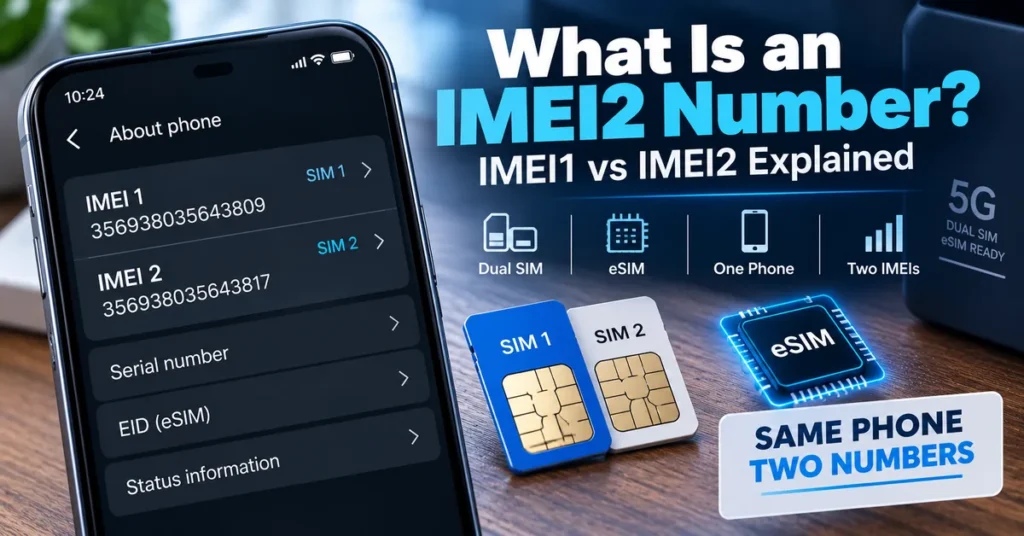
For example, a dual-SIM smartphone might display:
IMEI 1: 356789012345671
IMEI 2: 356789012345689
Both numbers belong to the same physical smartphone.
The difference is that they identify separate cellular connections within that device.
This is why a carrier may specifically ask for IMEI2 when activating or troubleshooting the second SIM or eSIM.
Google’s Pixel documentation explicitly notes that a carrier may ask for IMEI 1, IMEI 2, or the EID when setting up cellular service.
Is IMEI2 a Second Phone?
No.
This is probably the most common misunderstanding.
If your phone shows:
IMEI 1
and
IMEI 2
you do not have two separate phones.
You have one phone with multiple cellular-device identifiers.
Think of the relationship like this:
One physical phone → multiple cellular connections → multiple IMEIs
The phone remains one physical device.
The identifiers allow the network environment to distinguish the cellular connections supported by that device.
Are IMEI1 and IMEI2 Both Real?
Yes.
If both numbers are displayed by the phone’s legitimate system information, both can be genuine identifiers assigned to that device.
There is no rule saying that only IMEI1 is “real.”
The second number is not an error simply because it is different from the first.
In fact, GSMA’s multi-SIM requirements specifically address devices that use multiple IMEIs, including requirements for presenting those identifiers to users.
Are IMEI1 and IMEI2 the Same Number?
No.
They should normally be different identifiers.
For example:
IMEI1: 358240119876543
IMEI2: 358240119876550
The two numbers can belong to the same phone while still being distinct.
Do not expect IMEI1 and IMEI2 to match.
If a device is displaying two identical identifiers or you suspect something is wrong with its IMEI information, investigate the device configuration and software before assuming that the numbers should be the same.
Does IMEI2 Have 15 Digits?
A standard IMEI is normally 15 digits, so IMEI2 on a modern phone is generally presented as a 15-digit IMEI as well.
The structure is the same basic device-identifier format.
For example:
IMEI2: 490154203237518
The fact that it is called IMEI2 does not mean it uses a shorter or completely different numbering system.
It is another IMEI associated with the device.
IMEI1 vs IMEI2: What Is the Actual Difference?
The key difference is which cellular connection the identifier is associated with.
IMEI1 identifies one cellular connection.
IMEI2 identifies another.
The phone manufacturer and network architecture determine how those connections map to physical SIM slots, eSIM profiles, or other supported configurations.
This is why the terms should not be interpreted too literally.
IMEI1 ≠ always physical SIM
IMEI2 ≠ always eSIM
The relationship depends on the specific device.
IMEI2 and Dual SIM Phones
Dual-SIM phones are the most common reason users encounter IMEI2.
A Dual SIM phone allows the device to maintain more than one cellular line or SIM configuration.
For example, a phone may support:
SIM 1 → IMEI1
SIM 2 → IMEI2
But another phone may use:
Physical SIM → IMEI1
eSIM → IMEI2
The exact arrangement varies.
GSMA’s multi-SIM requirements cover multiple configurations, including physical SIM and eUICC/eSIM combinations.
IMEI2 and eSIM
IMEI2 is frequently associated with eSIM setups, but the two terms are not synonymous.
An eSIM is an embedded SIM environment.
IMEI is a mobile equipment identifier.
They belong to different identification systems.
A phone supporting an eSIM can therefore have:
- IMEI1
- IMEI2
- EID
- SIM information
- Other device identifiers
The EID identifies the eSIM environment, while the IMEI identifies cellular equipment.
Google specifically distinguishes IMEI 1, IMEI 2 and EID on Pixel devices.
IMEI2 vs EID: Do Not Confuse Them
This distinction is particularly important when activating an eSIM.
IMEI2
Identifies the phone’s second cellular equipment connection.
EID
Identifies the eSIM/eUICC environment.
They are not interchangeable.
If your carrier asks for the EID, entering IMEI2 is not the same thing.
If the carrier asks for IMEI2, do not substitute the EID.
Your phone may display both numbers in the same settings area, which is why they are easy to confuse.
Does Every Dual-SIM Phone Have Two IMEIs?
Not necessarily.
This is one of the most important technical details.
A multi-SIM device can have a configuration where multiple SIMs share a single cellular network connection and therefore use a single IMEI.
Other devices can have multiple simultaneous cellular connections and multiple IMEIs.
GSMA’s current multi-SIM requirements explicitly describe both types of architecture.
So:
Dual SIM does not automatically mean two IMEIs in every possible device design.
However, many modern dual-SIM smartphones do display two IMEIs.
Why Does My Phone Show IMEI2 Even When I Use Only One SIM?
This is normal on many dual-SIM-capable phones.
The device can have the second IMEI assigned even if you are not currently using the second cellular connection.
Think of it as a built-in capability.
The phone may be capable of supporting another SIM or eSIM connection even when that connection is currently inactive.
Google’s Pixel documentation, for example, explains how compatible devices can display IMEI2 and how it can be used when setting up an additional SIM.
You therefore do not need to have two active phone numbers for IMEI2 to exist.
Why Does My Phone Show IMEI2 But I Don’t Have an eSIM?
Because IMEI2 does not necessarily mean eSIM.
A device can support multiple SIM configurations without currently having an eSIM activated.
Depending on the model, IMEI2 may correspond to:
- A second physical SIM
- An eSIM
- A secondary cellular connection
- Another supported multi-SIM configuration
Check the manufacturer’s specifications and the phone’s cellular settings to determine exactly how your device uses IMEI2.
How to Find IMEI2 on Android
The exact menu depends on the manufacturer and Android version.
On many Android phones, start with:
Settings → About phone
Look for entries such as:
- IMEI
- IMEI 1
- IMEI 2
- SIM status
- SIM slot information
On compatible Google Pixel phones, Google directs users to Settings → About phone to find the IMEI information, including IMEI2 where supported.
You may also be able to display the device’s IMEI information by entering:
*#06#
on compatible phones.
If the phone supports multiple IMEIs, the screen may display both.
How to Find IMEI2 on iPhone
On supported iPhones, open:
Settings → General → About
Then scroll through the device information.
Apple states that the About screen can contain identifiers such as the serial number, EID, IMEI/MEID and ICCID.
The exact identifiers displayed depend on the iPhone model and its cellular configuration.
If you are working with an iPhone that supports Dual SIM, check the available cellular information rather than assuming that every iPhone presents the identifiers in exactly the same way.
Can You Find IMEI2 Without Turning On the Phone?
Sometimes.
Depending on the model, IMEI information may appear on:
- Original packaging
- Device labels
- SIM tray on certain models
- Manufacturer records
- Carrier records
- Account information
- Device-management systems
Apple notes that IMEI/MEID and other device identifiers can be found in several places, including Settings, the device itself, Finder, and original packaging for supported devices.
Google similarly lists the phone’s box and other device locations as possible places to find identification numbers.
However, when buying a used phone, the safest approach is to compare information from the physical device with the packaging rather than relying on only one source.
Can I Check IMEI2 Like IMEI1?
Yes.
IMEI2 is still an IMEI.
If you have a legitimate reason to investigate the device identifier, you can use IMEI2 in an appropriate IMEI lookup or checking service.
However, the result can depend on the database and the purpose of the check.
For example, if a carrier asks you to provide the IMEI associated with a particular SIM connection, you should provide the IMEI that corresponds to that connection rather than automatically using IMEI1.
For general device information, you can use our IMEI Lookup Tool.
Should I Check IMEI1 or IMEI2?
The answer depends on what you are trying to verify.
If a carrier asks for the primary IMEI
Use IMEI1 if that is the identifier the carrier requests.
If you are activating a second SIM or eSIM
The carrier may specifically request IMEI2.
If you are checking a used dual-SIM phone
Record both identifiers when possible.
If you are investigating a blacklist issue
Check the IMEI associated with the cellular connection in question.
If you are troubleshooting a specific SIM slot
Use the IMEI associated with that slot or connection.
The safest rule is:
Use the IMEI the carrier, manufacturer, or legitimate checking service specifically asks for.
Should IMEI1 and IMEI2 Have the Same TAC?
They may or may not, depending on the device’s identifier allocation.
The TAC is the first eight digits of an IMEI and identifies the device type associated with that identifier.
Because IMEI1 and IMEI2 are separate IMEIs, their identifier structures are independent even though they belong to the same physical device.
On many devices, the two IMEIs may be associated with the same general device type, but you should not assume that the first eight digits must always be identical without checking the specific device and allocation.
This is also why our guide on what a TAC number is is useful when you want to understand the first eight digits of an IMEI.
Can IMEI2 Be Used to Identify the Phone Model?
Yes, an IMEI2 can potentially be used for device identification just like IMEI1.
Because IMEI2 is itself an IMEI, its TAC can provide model/type information when the relevant database recognizes the identifier.
However, IMEI2 does not automatically provide a complete device history.
A lookup may return information such as:
- Manufacturer
- Model
- Device type
- Network information
- Carrier information
- Status information
The exact result depends on the lookup database.
For broader device research, use our IMEI Lookup Tool.
Can IMEI2 Be Blacklisted?
Yes, an IMEI2 can be associated with a reported or restricted status.
This is because IMEI2 is a real IMEI, not merely an internal label.
If a device has two IMEIs, it is possible for the status associated with one identifier to differ from the other depending on the records involved.
That is why a dual-SIM phone should not automatically be treated as fully verified simply because one IMEI produces a clean result.
If you are buying a used dual-SIM phone, checking the relevant IMEIs can provide a more complete picture.
For blacklist-related research, use our IMEI Blacklist Checker.
Can IMEI1 Be Clean While IMEI2 Is Blacklisted?
It is possible for different IMEI records associated with a multi-SIM device to have different status information.
The exact behavior depends on the carrier, country, reporting system, and database involved.
This is one reason checking only one identifier on a multi-IMEI device may not always give you the complete picture.
If you are buying a used dual-SIM phone and the seller provides only one IMEI, ask for the other identifier as well and investigate any discrepancy.
Does IMEI2 Belong to the SIM Card?
No.
IMEI2 identifies a cellular equipment connection within the phone.
The SIM card has its own identification information.
This distinction matters because users often assume:
SIM 2 = IMEI2
The relationship can be that simple on some devices, but technically the IMEI identifies the cellular equipment, not the SIM card itself.
The SIM or eSIM environment has separate identifiers and authentication mechanisms.
Does Changing the SIM Change IMEI2?
Normally, no.
Changing the SIM card does not normally create a new IMEI2.
The IMEI is associated with the device’s cellular equipment and remains part of the phone’s device identity.
What changes is the subscriber or SIM information being used with that connection.
For example:
Phone stays the same → IMEI stays the same
SIM changes → subscriber/SIM information changes
This is the same general principle whether you are working with IMEI1 or IMEI2.
Does Activating an eSIM Create IMEI2?
Not necessarily.
The presence of IMEI2 is determined by the device’s hardware and cellular architecture.
Activating an eSIM does not mean the phone suddenly invents a new IMEI2.
A compatible phone may already have IMEI2 assigned before you ever activate the second cellular connection.
Google’s Pixel documentation is a good example: compatible devices can have IMEI2 available for the second SIM connection, and the carrier may request it during eSIM setup.
IMEI2 vs EID vs ICCID
These three identifiers are frequently confused.
| Identifier | What it relates to |
|---|---|
| IMEI1 | First cellular equipment identifier |
| IMEI2 | Second cellular equipment identifier |
| EID | eSIM/eUICC identification |
| ICCID | SIM/eSIM profile identification |
| Phone number | Mobile service/telephone number |
They are not interchangeable.
If your carrier asks for an EID, provide the EID.
If it asks for IMEI2, provide IMEI2.
If it asks for ICCID, provide the ICCID.
Using the wrong identifier can prevent an activation or support process from working correctly.
IMEI2 and Phone Number: Are They Connected?
They can be associated through the carrier’s systems, but they are not the same thing.
A phone number identifies a mobile service or line.
An IMEI identifies cellular equipment.
For example, one smartphone could have:
Phone number 1 → cellular connection 1 → IMEI1
Phone number 2 → cellular connection 2 → IMEI2
This is one reason Dual SIM is useful for people who want two lines on one device.
Apple describes Dual SIM as a way to use two numbers for purposes such as business and personal calls or travel.
IMEI2 on iPhone vs Android
The basic concept is the same, but the user interface and exact cellular architecture vary.
iPhone
Supported iPhones can use combinations such as:
- Physical SIM + eSIM
- Two eSIMs
- Two physical nano-SIMs on certain regional models
Apple documents different Dual SIM configurations depending on the iPhone model and region.
Android
Android devices vary significantly by manufacturer.
A compatible Pixel phone, for example, can use physical SIM and eSIM configurations and display IMEI1 and IMEI2.
Samsung, Motorola, Xiaomi and other manufacturers can organize their SIM and IMEI information differently.
Therefore, the exact menu path and IMEI-to-SIM relationship should always be checked against the specific phone.
IMEI2 When Buying a Used Phone
IMEI2 becomes especially important when buying a used dual-SIM smartphone.
A seller might give you one IMEI because it is the number they normally use.
But if the phone has two IMEIs, you may want to record both before completing the purchase.
Check:
- IMEI1
- IMEI2
- Device model
- Serial number
- Blacklist status where relevant
- Carrier compatibility
- Activation or account locks
- Physical condition
- SIM/eSIM functionality
- Proof of ownership
If one identifier produces unexpected information, investigate before paying.
A clean IMEI result is useful, but it is not a complete inspection of a used phone.
What If IMEI2 Is Missing?
If a phone is supposed to support multiple cellular connections but IMEI2 is not displayed, several explanations are possible.
For example:
- The second SIM function is disabled
- The device configuration is different from what you expected
- The phone model does not actually support two independent IMEIs
- The operating system is not displaying the information correctly
- A firmware problem exists
- A modem or hardware problem exists
- The phone has undergone previous repair
Start by confirming the exact model and its official cellular configuration.
Do not immediately assume that the IMEI has been erased.
If the phone has also lost its primary IMEI or shows an Invalid/Null IMEI condition, that is a different and potentially more serious troubleshooting issue.
See our IMEI Repair Tool guide for information about missing or invalid IMEI situations.
What If IMEI2 Shows “Unknown”?
If IMEI2 appears as Unknown, blank, unavailable, or something similar, investigate the device before attempting any advanced changes.
The cause could be:
- Software configuration
- Firmware issue
- Cellular modem problem
- Unsupported configuration
- Previous repair
- Device-specific behavior
First determine whether the phone is actually designed to have two independent IMEIs.
Not every multi-SIM design uses two IMEIs in exactly the same way.
What If IMEI1 and IMEI2 Don’t Match the Box?
This deserves attention, especially when buying a used phone.
Compare the numbers carefully.
Possible explanations include:
- The box belongs to another device
- The phone was replaced
- The motherboard was replaced
- The device has undergone repair
- The seller provided incorrect packaging
- The displayed information has a technical problem
A mismatch does not automatically prove fraud, but it is a reason to investigate.
The GSMA requires multi-SIM devices to present their IMEIs to users and addresses IMEI labeling for multi-SIM devices, so the identifiers should be treated as meaningful device information rather than arbitrary numbers.
Can IMEI2 Be Changed?
IMEI modification is a separate subject from normal Dual SIM operation.
IMEI2 should not be changed simply because it is different from IMEI1.
The fact that two IMEIs are different is normally expected.
If a legitimate phone has a missing, invalid, or corrupted IMEI, the appropriate question is how to diagnose the underlying problem and restore the device’s correct information.
It is not appropriate to treat IMEI modification as a way to hide a stolen device, bypass a blacklist, defeat carrier restrictions, or conceal device identity.
For information about legitimate troubleshooting, see our IMEI Repair Tool guide.
Does IMEI2 Affect Phone Performance?
Simply having IMEI2 does not mean the phone performs worse or better.
IMEI2 is an identification component of a multi-SIM device.
Performance depends on factors such as:
- Processor
- Modem
- Network technology
- Signal conditions
- Carrier
- Software
- SIM configuration
- Whether both lines are active
- Device architecture
The existence of IMEI2 itself is not a performance feature.
Does IMEI2 Mean I Can Use Two Carriers?
Not automatically.
A phone may support two SIMs but still be carrier locked.
For example, if you want to use two different carriers, the phone must support the required bands and configurations and, where necessary, be unlocked.
Apple explicitly notes that using two different carriers on supported Dual SIM iPhones requires the iPhone to be unlocked.
Therefore:
Two IMEIs ≠ automatically unlocked phone
Two IMEIs ≠ automatically two compatible carriers
The IMEI tells you about the device, while carrier compatibility and locking are separate issues.
Can IMEI2 Be Used for an IMEI Lookup?
Yes.
IMEI2 is an IMEI, so it can be entered into an appropriate IMEI lookup service.
The result depends on the database.
You may be able to identify:
- Manufacturer
- Device model
- Device type
- Network-related information
- Carrier-related information
- Other available device data
If you are investigating both identifiers on a dual-SIM phone, keep the results associated with the correct IMEI.
For general device research, use our IMEI Lookup Tool.
IMEI1 vs IMEI2: Which One Is More Important?
Neither is automatically more important.
IMEI1 is often treated as the primary identifier because it is listed first, but IMEI2 can be equally important when the second cellular connection is being used or investigated.
For example:
Buying a dual-SIM phone: Check both.
Activating SIM 1: Use the identifier requested for that connection.
Activating SIM 2/eSIM: The carrier may request IMEI2.
Investigating a specific cellular problem: Use the IMEI associated with that connection.
Checking a used phone: Record both whenever possible.
The correct identifier is the one connected to the cellular function you are investigating.
IMEI2 Number FAQs
What is an IMEI2 number?
IMEI2 is the second IMEI associated with a phone that supports multiple cellular connections. It is a separate device identifier from IMEI1.
Is IMEI2 the same as IMEI1?
No. Both are IMEIs, but they are normally separate identifiers associated with different cellular connections.
Why does my phone have IMEI1 and IMEI2?
Your phone may support multiple SIMs or cellular connections. Multi-SIM devices can use multiple IMEIs depending on their hardware and network architecture.
Is IMEI2 the eSIM number?
No. IMEI2 is a device identifier. The EID identifies the eSIM/eUICC environment.
Is IMEI2 the same as ICCID?
No. ICCID is associated with the SIM or eSIM profile, while IMEI2 identifies cellular equipment.
Does every dual-SIM phone have two IMEIs?
No. Some multi-SIM architectures use one IMEI, while others use multiple IMEIs. Many modern dual-SIM smartphones do have two.
Can IMEI1 and IMEI2 be the same?
They are normally separate identifiers. If you see identical values where two IMEIs should be displayed, verify the device information and configuration.
Can I use IMEI2 for a blacklist check?
Yes. IMEI2 is a legitimate IMEI and can be checked where the relevant service supports it.
Can IMEI2 be blacklisted?
It is possible for device-status records to apply differently to separate IMEI identifiers. When checking a used multi-IMEI phone, consider both identifiers.
Does changing the SIM change IMEI2?
Normally, no. The IMEI is associated with the device’s cellular equipment, while the SIM represents subscriber or profile information.
Does activating an eSIM create a new IMEI2?
Not necessarily. A compatible phone may already have IMEI2 assigned before an eSIM is activated.
Can IMEI2 identify my phone model?
It can potentially be used for device identification just like IMEI1. The available information depends on the lookup database.
Why is my IMEI2 missing?
The phone may not use two independent IMEIs, the second connection may be disabled, or there may be a configuration, firmware, modem or hardware issue.
Can I find IMEI2 with *#06#?
On compatible phones, *#06# can display the device’s IMEI information. Multi-IMEI phones may display both identifiers.
Where can I find IMEI2 on Android?
On many Android phones, look under Settings → About phone. The exact location varies by manufacturer and model.
Where can I find IMEI2 on iPhone?
On supported iPhones, start with Settings → General → About and review the available device identifiers and cellular information.
Should I give my carrier IMEI1 or IMEI2?
Give the carrier the identifier it specifically requests. If it is activating or troubleshooting the second cellular connection, it may request IMEI2.
Does IMEI2 mean my phone is unlocked?
No. Having two IMEIs does not mean that the phone is carrier unlocked.
Does IMEI2 mean I can use two phone numbers?
A compatible Dual SIM device can support two cellular lines, but the exact functionality depends on the phone, carrier, SIM configuration and region.
The Simple Way to Understand IMEI1 and IMEI2
If your phone shows two IMEIs, there is usually no reason to be alarmed.
The simplest explanation is:
IMEI1 = one cellular device identifier
IMEI2 = another cellular device identifier
They belong to the same physical phone but can be associated with different cellular connections.
The exact relationship between the identifiers and SIMs depends on the device.
That is why you should not automatically assume that IMEI1 means physical SIM and IMEI2 means eSIM.
Instead, check how your particular phone assigns its cellular connections.
For a general investigation, you can use our IMEI Lookup Tool.
If you are checking a used dual-SIM phone for reported or restricted status, use our IMEI Blacklist Checker and consider checking the relevant IMEI identifiers.
If the phone is showing Invalid, Null, Unknown, or missing IMEI information, that is a different problem. In that situation, read our IMEI Repair Tool guide rather than assuming that IMEI2 is supposed to match IMEI1.
And if you want to understand the first eight digits of either IMEI and how they relate to the device model, our guide on what a TAC number is explains that part of the identifier in detail.
Final Thoughts
IMEI2 exists because modern phones are no longer limited to one cellular connection.
A single smartphone can support two SIMs, physical SIM plus eSIM, multiple eSIM configurations, or other multi-SIM arrangements. Depending on the architecture, the device may use one IMEI or multiple IMEIs.
When two are present, IMEI1 and IMEI2 are not competing numbers.
They are separate identifiers associated with the phone’s cellular connections.
That distinction becomes important when you activate a SIM, configure an eSIM, contact a carrier, check a used phone, investigate blacklist status, or troubleshoot a cellular problem.
So if your phone displays:
IMEI1: XXXXXXXX…
IMEI2: XXXXXXXX…
there is normally nothing unusual about seeing two different numbers.
The important thing is to use the correct IMEI for the cellular connection or service you are investigating.
And when buying a used dual-SIM phone, don’t check only the number that the seller happens to provide. Record both IMEIs when possible, compare them with the device and packaging, and investigate any unexpected discrepancy before completing the purchase.