Why Does My Phone Have Two IMEI Numbers?
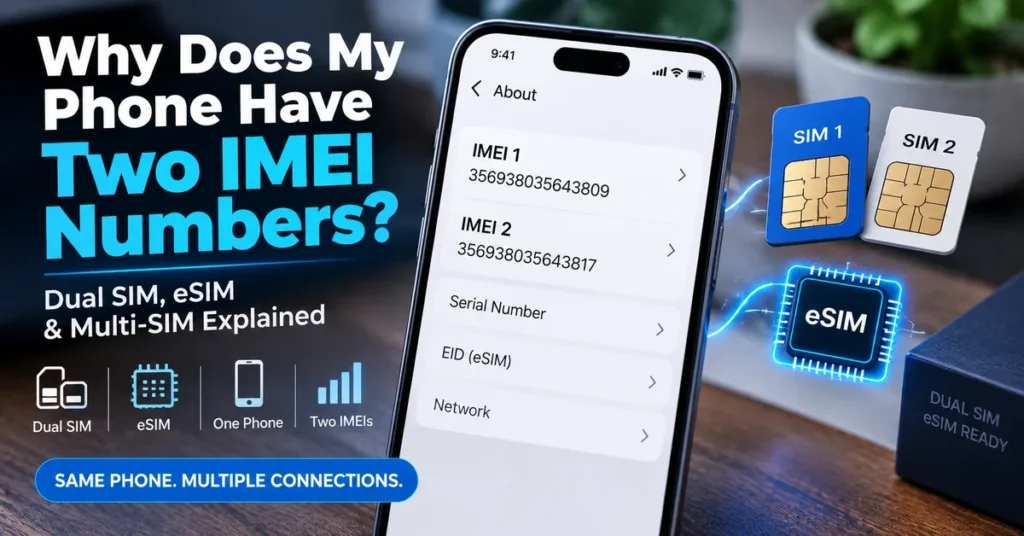
Why does my phone have two IMEI numbers? If your smartphone displays IMEI1 and IMEI2, this is usually normal and means the device supports more than one cellular connection. A phone can have two IMEIs because it is designed to work with two SIM connections, such as a physical SIM and an eSIM, two physical SIMs, or another multi-SIM configuration.
The important part is understanding what those two numbers actually represent.
They are not two phone numbers, they do not mean you own two devices, and IMEI2 is not a backup copy of IMEI1.
Instead, the two identifiers can be associated with separate cellular connections inside the same physical phone.
The GSM Association’s current multi-SIM requirements specifically recognize both single-IMEI multi-SIM devices and devices with multiple cellular connections that use multiple IMEIs.
The Short Answer: Why Are There Two IMEIs?
A modern smartphone can support more than one cellular connection.
For example, your phone might support:
- Physical SIM + eSIM
- SIM 1 + SIM 2
- Two eSIM profiles
- Other manufacturer-specific multi-SIM configurations
When a device has multiple cellular connections that require separate equipment identities, it can have multiple IMEIs.
So you might see:
IMEI 1: 356789012345671
IMEI 2: 356789012345689
Both numbers can legitimately belong to the same physical phone.
The difference is that each identifier can be associated with a different cellular connection.
Two IMEIs Does Not Mean Two Phones
This is the first misconception to eliminate.
If your phone shows two IMEIs, you do not have two devices.
You have one physical device with more than one cellular identity.
Think about a Dual SIM phone this way:
One phone → two cellular connections → two device identifiers
The phone remains a single piece of hardware.
The IMEIs allow the cellular system to distinguish the supported connections.
This is also why IMEI1 and IMEI2 should not be confused with your two phone numbers.
A phone number identifies a mobile service or line.
An IMEI identifies cellular equipment.
Why Modern Phones Need Multiple IMEIs
Older phones were generally designed around a single cellular connection.
Modern smartphones are different.
People increasingly want to:
- Keep personal and business numbers on one phone
- Use a local SIM while traveling
- Combine a physical SIM with an eSIM
- Maintain two mobile plans
- Separate voice and data plans
- Switch between cellular plans without changing physical hardware
Apple, for example, documents Dual SIM configurations that allow users to maintain two numbers and use combinations such as a physical SIM plus an eSIM or, on supported models, two eSIMs.
That functionality is one of the main reasons users encounter two IMEI numbers.
IMEI1 vs IMEI2: What Do the Two Numbers Mean?
The simplest interpretation is:
IMEI1 = first cellular equipment identifier
IMEI2 = second cellular equipment identifier
But there is an important detail.
You should not automatically assume that IMEI1 always belongs to the physical SIM and IMEI2 always belongs to the eSIM.
The exact relationship depends on the phone.
Google’s Pixel documentation, for example, says IMEI1 is usually paired with the first SIM set up on the phone and that IMEI2 can be used for the second SIM connection.
Other manufacturers can organize the connections differently.
So if you need to know which IMEI belongs to which SIM, check the phone’s cellular settings or confirm with the carrier.
Does Every Phone With Two SIMs Have Two IMEIs?
No.
This is an important technical distinction.
It is tempting to assume:
Two SIMs = two IMEIs
But that is not universally true.
The GSMA’s current multi-SIM requirements describe devices that can have:
- Multiple SIMs but a single network connection and single IMEI, or
- Multiple network connections and multiple IMEIs, with each IMEI associated with a particular SIM.
So the number of SIMs and the number of IMEIs are related, but they are not identical concepts.
Your phone’s hardware and cellular architecture determine how the identifiers are assigned.
Physical SIM + eSIM: A Common Two-IMEI Setup
One of the most common modern configurations is:
SIM 1 → physical SIM
SIM 2 → eSIM
The phone can maintain two cellular lines without requiring two physical SIM cards.
A compatible Pixel, for example, can use a physical SIM and eSIM and display two IMEIs. Google specifically documents IMEI2 as an identifier a carrier may request when setting up the second connection.
Apple also supports Dual SIM configurations using physical SIM and eSIM on supported iPhone models.
But remember: eSIM and IMEI2 are not the same thing.
The eSIM has its own identifier called an EID.
IMEI2 Is Not the EID
If you look at your phone’s settings, you may see several numbers together:
- IMEI
- IMEI2
- EID
- Serial number
- ICCID
This can make the device-information screen look more complicated than it really is.
The important distinction is:
IMEI → identifies cellular equipment
EID → identifies the eSIM/eUICC environment
ICCID → identifies a SIM or eSIM profile
Serial number → manufacturer’s device identifier
Google explicitly separates IMEI1, IMEI2 and EID in its Pixel documentation.
If a carrier asks for an EID, do not send IMEI2 instead.
If it asks for IMEI2, give it the IMEI2 value.
Why Does My Phone Show IMEI2 Even If I Only Use One SIM?
This is completely possible.
Your phone can be built for two cellular connections even if you currently use only one.
For example, you might have:
IMEI1 → active
IMEI2 → available but currently unused
The existence of IMEI2 does not mean that a second SIM must be activated.
It simply indicates that the device supports a configuration requiring or allowing another cellular identity.
This is similar to having a second SIM slot that you are not currently using.
The capability can exist even when the second line is inactive.
Why Does My Phone Have Two IMEIs If I Don’t Have an eSIM?
Because two IMEIs do not automatically mean eSIM.
A phone may support:
- Two physical SIMs
- Physical SIM + eSIM
- Multiple eSIM configurations
- Other multi-SIM arrangements
Some regional versions of the same phone model can also have different SIM configurations.
Apple is a good example: iPhone SIM configurations vary by model and region, with some models supporting physical SIM + eSIM and others supporting two physical nano-SIMs in certain markets.
Therefore, don’t identify the SIM technology from the presence of IMEI2 alone.
Why Are IMEI1 and IMEI2 Different?
They are supposed to be separate identifiers.
For example:
IMEI1: 490154203237518
IMEI2: 490154203237526
The two numbers identify separate cellular connections associated with the same device.
They are not supposed to be identical copies.
A useful way to think about them is:
Same physical phone
but
different cellular identifiers
This is normal for a device designed to support multiple cellular connections.
Should IMEI1 and IMEI2 Have the Same TAC?
Not necessarily.
The TAC is the first eight digits of an IMEI and identifies the device type associated with that identifier.
Because IMEI1 and IMEI2 are separate IMEIs, you should not assume that their first eight digits must always be identical.
They can be associated with the same general device family, but the exact allocation depends on the device and its IMEI assignment.
If you want to understand this part of the identifier in more detail, see our guide:
What Is a TAC Number? How TAC Identifies a Phone
How to Find Both IMEI Numbers
The easiest method on many compatible phones is:
Dial *#06#
The device may display one or more IMEIs.
You can also check the phone’s settings.
Android
On many Android phones, go to:
Settings → About phone
Look for:
- IMEI
- IMEI 1
- IMEI 2
- SIM information
The exact menu depends on the manufacturer and Android version.
Google documents Settings → About phone as a location for IMEI information on Pixel devices.
iPhone
On supported iPhones, go to:
Settings → General → About
The exact information displayed varies by model and cellular configuration.
Apple provides device-identification information through the About screen and its Dual SIM documentation.
Can You Find Two IMEIs on the Phone Box?
Often, yes.
Multi-SIM device packaging can contain multiple IMEIs.
GSMA’s multi-SIM requirements address the presentation of IMEIs to users and include requirements concerning box labeling and displaying the device’s IMEIs.
This makes the original box useful when:
- The phone won’t turn on
- You are checking a used phone
- You want to compare the device with its packaging
- You need an IMEI for carrier activation
However, don’t assume that the box is automatically correct.
For a used phone, compare the numbers from the actual device with the packaging.
What If the IMEI on the Phone Does Not Match the Box?
This is a situation worth investigating.
Suppose the box shows:
IMEI1: A
IMEI2: B
but the phone displays:
IMEI1: C
IMEI2: D
Do not immediately conclude that the phone is stolen or counterfeit.
There can be legitimate explanations, including:
- The phone was replaced
- The packaging belongs to another device
- A motherboard was replaced
- The device was repaired
- The seller supplied incorrect packaging
- The device information is not being displayed correctly
But it is still a red flag that deserves an explanation.
If you are buying the phone second-hand, investigate the discrepancy before paying.
Our IMEI Lookup Tool can be useful for researching the identifiers, but a lookup should be only one part of the inspection.
Should You Check Both IMEI Numbers on a Dual-SIM Phone?
If the phone has two IMEIs, checking both can be useful, especially when buying the device second-hand.
Why?
Because IMEI1 and IMEI2 represent separate identifiers.
Checking only one may leave you with incomplete information about the phone’s multi-SIM configuration.
For example, if you are buying a used Dual SIM phone, record:
- IMEI1
- IMEI2
- Model number
- Serial number
- Carrier information
- SIM configuration
Then compare those details with the actual device.
This is particularly useful if the seller gives you only one IMEI.
Can One IMEI Be Clean and the Other Have a Problem?
Different IMEI records can have different status information.
That means you should not automatically assume that checking one identifier tells you everything about every cellular connection in a multi-IMEI device.
If you are specifically concerned about blacklist status, investigate the relevant IMEI identifiers rather than assuming that IMEI1 represents the entire phone.
Our IMEI Blacklist Checker is the more appropriate resource when the question is specifically about reported or restricted device status.
Does Having Two IMEIs Mean the Phone Is Unlocked?
No.
This is another common misunderstanding.
Two IMEIs do not mean the phone is unlocked.
IMEIs identify cellular equipment.
Carrier locking is a separate issue.
For example, an iPhone can support Dual SIM while still being subject to carrier-lock requirements. Apple notes that using two different carriers requires the iPhone to be unlocked, unless both plans are from the same carrier.
So don’t use the number of IMEIs as evidence that a phone is carrier-unlocked.
Does Having Two IMEIs Mean I Can Use Two Carriers?
Not automatically.
The phone needs to:
- Support the required SIM configuration
- Support the relevant network bands and technologies
- Be compatible with the carriers
- Meet any carrier requirements
- Be unlocked where necessary
Two IMEIs are an indication that the device supports multiple cellular identities, not a guarantee that any two carriers will work together.
This is particularly important when buying imported phones.
A device can have two IMEIs and still lack compatibility with the networks you want to use.
Does Changing the SIM Change IMEI1 or IMEI2?
Normally, no.
Changing a SIM changes the subscriber or SIM information being used by the phone.
It does not normally assign a new IMEI to the hardware.
For example:
Phone remains the same → IMEI remains the same
SIM changes → SIM/subscriber information changes
The same principle applies to both IMEI1 and IMEI2.
This is why an IMEI is useful for identifying the physical cellular equipment rather than simply identifying the current subscriber.
Does Activating an eSIM Create a Second IMEI?
Not necessarily.
A compatible phone can already have IMEI2 assigned before you activate an eSIM.
The IMEI is associated with the device’s cellular architecture.
Activating an eSIM adds or activates a cellular plan; it does not necessarily create a brand-new IMEI at that moment.
Google’s Pixel documentation is a good example: compatible devices can have IMEI2 available for the second SIM connection, and the carrier may request that number when setting up an eSIM.
Can IMEI2 Be Used for an IMEI Lookup?
Yes.
IMEI2 is still an IMEI.
If you want to investigate information associated with it, you can use an appropriate IMEI lookup service.
Our IMEI Lookup Tool can be used when your goal is to research information associated with a device identifier.
Remember, however, that lookup results depend on the database.
Different services may return different information.
What If IMEI2 Is Missing?
If you expected two IMEIs but only see one, don’t immediately assume the phone has a damaged IMEI.
First establish whether the specific model is actually designed to use two independent IMEIs.
Possible explanations include:
- The phone uses a single-IMEI multi-SIM architecture
- The second cellular function is not currently enabled
- The model variant is different from what you expected
- The operating system is not displaying the information correctly
- There is a firmware problem
- There is a modem or hardware problem
The GSMA specifically recognizes multi-SIM devices that use one IMEI as well as devices using multiple IMEIs.
So one IMEI on a multi-SIM phone is not automatically evidence of a problem.
What If My Phone Shows “Unknown” for IMEI2?
If IMEI2 appears as:
- Unknown
- Null
- Blank
- Unavailable
first determine whether the device should actually have a second IMEI.
If it should, investigate what changed before attempting any advanced repair.
Ask yourself:
- Did this happen after a software update?
- Was the phone recently repaired?
- Was the motherboard replaced?
- Was firmware flashed?
- Did the second SIM previously work?
- Does IMEI1 still appear normally?
If the phone has also lost its legitimate primary IMEI, you may be dealing with a broader IMEI or modem problem.
Our IMEI Repair Tool guide is more relevant for missing, invalid or corrupted IMEI situations.
What If IMEI1 Works but IMEI2 Does Not?
This situation can have several causes.
For example:
- The second SIM function is disabled
- The eSIM has not been activated
- The phone has a configuration problem
- The second cellular connection is not supported in the current mode
- A software or firmware issue exists
- There is a hardware or modem problem
The correct diagnosis depends on the phone model.
If IMEI1 is normal and IMEI2 is missing or unavailable, don’t assume that changing the IMEI is the solution.
First establish whether the second connection is actually supposed to be active.
Two IMEIs and Used-Phone Buying
This is probably where understanding two IMEIs becomes most useful.
Imagine you are buying a used Dual SIM phone.
The seller says:
“The phone is clean and works perfectly.”
Instead of checking only the first number, you can inspect the complete device.
Check the physical phone
Confirm the model and configuration.
Check IMEI1
Record the first identifier.
Check IMEI2
Record the second identifier if the device provides one.
Compare with the packaging
Look for matching identifiers.
Check device status
Investigate blacklist or reported status where appropriate.
Check carrier compatibility
Make sure the phone supports the networks you plan to use.
Check locks
A clean IMEI does not automatically mean the phone is unlocked or free from an account lock.
This approach is much safer than treating a single IMEI result as a complete phone inspection.
Why Do Some Phones Have Two IMEIs but Only One Active Line?
Because the phone’s hardware can support more than one cellular identity even when only one line is currently active.
For example:
IMEI1 → active SIM
IMEI2 → second supported connection, currently unused
You don’t have to activate both lines simply because the phone has two IMEIs.
The second identifier can exist as part of the device’s design.
This is particularly common with Dual SIM-capable smartphones.
Can Two IMEIs Belong to the Same Phone Model?
Yes.
Two different IMEIs can belong to the same physical phone, and the same phone model can have many different IMEIs.
This is because the IMEI is not simply a model number.
The TAC portion can provide device-type information, while the complete IMEI distinguishes the individual cellular equipment identifier.
For more detail, read:
What Is a TAC Number? How TAC Identifies a Phone
This distinction is useful when interpreting an IMEI lookup result.
IMEI1, IMEI2 and Serial Number: Three Different Things
A phone can display several identifiers that look similar but serve different purposes.
| Identifier | Main purpose |
|---|---|
| IMEI1 | First cellular equipment identifier |
| IMEI2 | Second cellular equipment identifier |
| Serial number | Manufacturer’s product identifier |
| EID | eSIM/eUICC identifier |
| ICCID | SIM/eSIM profile identifier |
| Phone number | Mobile service/line |
Do not substitute one for another simply because a carrier or website asks for a number.
Use the exact identifier requested.
IMEI2 vs EID: Which Number Does the Carrier Need?
This depends on what the carrier is doing.
If the carrier is identifying the second cellular connection, it may ask for:
IMEI2
If it is provisioning or identifying the eSIM environment, it may ask for:
EID
Google explicitly lists IMEI1, IMEI2 and EID as different identifiers that may be requested during SIM/eSIM setup.
If you’re unsure which number the carrier needs, ask the carrier rather than guessing.
Does a Factory Reset Remove IMEI2?
A normal factory reset is not intended to remove the phone’s hardware/device identifiers.
A reset primarily returns user settings and data to a default state.
If IMEI2 disappears after a reset, firmware operation, repair, or other software event, investigate the underlying cause rather than assuming the reset was supposed to delete it.
If the phone is also showing Invalid, Null, or missing IMEI information, see our IMEI Repair Tool guide.
Does a Software Update Create a New IMEI2?
A normal software update should not turn the phone into a different physical device or arbitrarily assign a new IMEI2.
IMEIs are device identifiers associated with the cellular equipment.
If you suddenly see a different IMEI after a major repair, motherboard replacement, or unusual firmware operation, investigate the reason.
A routine update should not be treated as a normal mechanism for changing the device’s IMEI.
What If the Two IMEIs Have Different Phone Models in a Lookup?
This deserves investigation.
If you enter IMEI1 into a lookup and it identifies one model while IMEI2 identifies a completely different model, don’t immediately assume the phone is fake.
First check:
- The exact device model
- Regional variant
- Manufacturer
- Whether both IMEIs belong to the same hardware configuration
- The reliability of the lookup database
- Whether the phone has been repaired
A database error is possible.
A device-history issue is also possible.
The important point is that a conflicting lookup result is a reason to investigate, not a reason to immediately modify the IMEI.
Why Two IMEIs Are Actually Useful
At first, two IMEIs can look confusing.
But they solve a practical problem.
A single physical smartphone can now support multiple cellular identities without requiring users to carry two separate phones.
That makes it possible to:
- Separate personal and work numbers
- Use a travel SIM
- Maintain a local and international plan
- Use physical SIM + eSIM
- Keep multiple cellular plans available
- Switch between supported connections
Apple specifically highlights business/personal separation and travel use as examples of Dual SIM functionality.
The two IMEIs are part of the infrastructure that makes these multi-connection configurations possible.
Frequently Asked Questions
Why does my phone have two IMEI numbers?
Usually because the phone supports multiple cellular connections, such as Dual SIM, physical SIM + eSIM, or another multi-SIM configuration.
Is it normal to have two IMEI numbers?
Yes. Many modern smartphones legitimately have two IMEIs.
Does two IMEIs mean two phones?
No. Both identifiers can belong to the same physical smartphone.
Is IMEI2 fake?
Not normally. If your phone legitimately supports multiple cellular connections, IMEI2 can be a genuine device identifier.
Is IMEI2 the eSIM number?
No. IMEI2 identifies cellular equipment. The eSIM environment has an EID.
Does every Dual SIM phone have two IMEIs?
No. Some multi-SIM devices use one IMEI, while others use multiple IMEIs.
Should IMEI1 and IMEI2 be different?
Yes, they are normally separate identifiers.
Can IMEI1 and IMEI2 have the same TAC?
They may, but you should not assume that they must. The TAC is the first eight digits of an IMEI and relates to the device type.
Can I check both IMEIs?
Yes. If your phone has two IMEIs, checking both can be useful, especially when buying a used phone.
Can one IMEI be blacklisted while the other is clean?
Different IMEI records can have different status information. If you are checking a multi-IMEI phone, consider the relevant identifiers individually.
Does two IMEIs mean the phone is unlocked?
No. IMEI identification and carrier unlocking are separate issues.
Can I use two different carriers because I have two IMEIs?
Not automatically. Carrier compatibility and unlocking requirements still apply.
Does changing the SIM change the IMEI?
Normally, no. The SIM and device identifier serve different purposes.
Does activating an eSIM create IMEI2?
Not necessarily. A compatible phone can already have IMEI2 assigned before the eSIM is activated.
Why does my phone show IMEI2 even though I only use one SIM?
The phone may be capable of supporting a second cellular connection even though you are not currently using it.
Why is IMEI2 missing?
The device may use a single-IMEI architecture, the second connection may not be enabled, or there may be a configuration, firmware, modem or hardware issue.
Why does IMEI2 say Unknown?
First confirm that the device is designed to have a second IMEI. If it should, investigate the device’s software, firmware and cellular configuration.
Can I use IMEI2 for an IMEI lookup?
Yes. IMEI2 is an IMEI and can be investigated through an appropriate lookup service.
What if IMEI1 and IMEI2 don’t match the box?
Investigate before buying or selling the phone. Possible explanations include replacement, repair, incorrect packaging or a device-information problem.
Where can I find IMEI1 and IMEI2?
Try *#06#, Settings → About phone on many Android devices, or Settings → General → About on supported iPhones.
The Bottom Line
If you are wondering why your phone has two IMEI numbers, the answer is usually much simpler than it first appears.
Your phone supports more than one cellular connection.
That could mean:
Physical SIM + eSIM
SIM 1 + SIM 2
Two eSIM connections
or another multi-SIM configuration supported by the device.
The two IMEIs do not represent two phones.
They are separate identifiers associated with cellular connections within the same device.
And there is one particularly important detail to remember:
Not every Dual SIM phone has to use two IMEIs.
Some multi-SIM architectures can use a single IMEI, while others use multiple IMEIs. The GSMA explicitly recognizes both configurations.
So if your phone displays IMEI1 and IMEI2, that is generally a normal part of its design.
If you’re investigating a phone rather than simply trying to understand the numbers, use the identifiers for the specific purpose you have in mind.
For general device information, use our IMEI Lookup Tool.
For reported or restricted device status, use our IMEI Blacklist Checker.
If you are dealing with an Invalid, Null, Unknown or missing IMEI, read our IMEI Repair Tool guide instead.
And if you want to understand what the first eight digits of either IMEI mean, see our guide on What Is a TAC Number?.
The key is not to ask which IMEI is “the real one.”
If the phone legitimately supports multiple cellular connections, both identifiers can be real—and both can matter.