IMEI vs Serial Number: What Is the Difference?
IMEI vs serial number is a common point of confusion when checking a smartphone, buying a used device, contacting a carrier, or trying to identify a phone. They may both appear in the phone’s information screen or on its original packaging, but they serve different purposes. The IMEI identifies the cellular device, while the serial number is a manufacturer-assigned identifier used to identify and manage the individual product.
Knowing which number you need can save you from entering the wrong information into a checker, giving a carrier the wrong identifier, or misunderstanding a device report.
IMEI and Serial Number Are Not the Same Thing
The easiest way to separate them is to think about what each identifier is designed to identify.
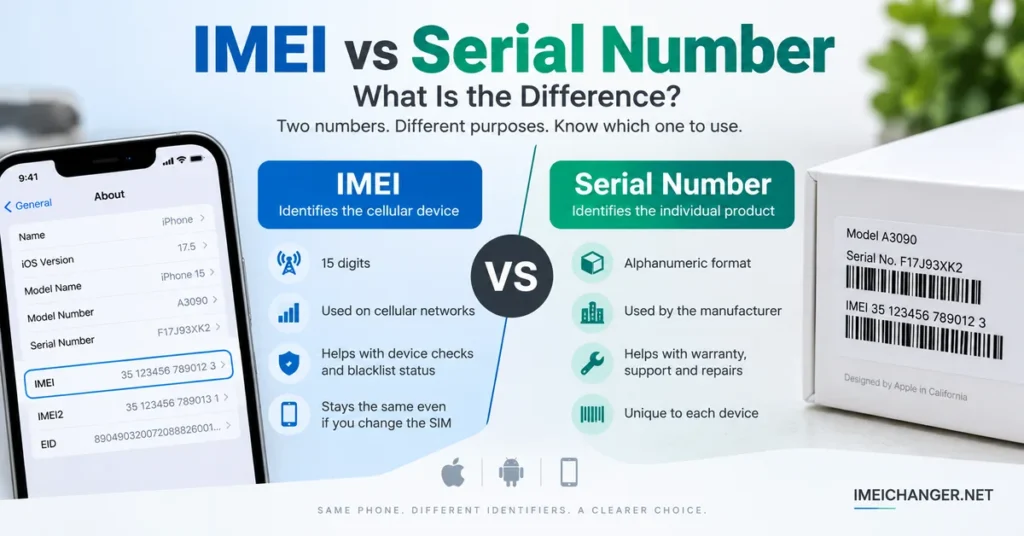
An IMEI is associated with the mobile equipment used on cellular networks. A standard IMEI normally contains 15 digits, and a phone with multiple cellular connections may have more than one IMEI.
A serial number is assigned by the manufacturer to identify a particular physical product.
That means the two numbers can appear next to each other, but they answer different questions:
| Identifier | What it identifies | Common uses |
|---|---|---|
| IMEI | Cellular mobile equipment | Device checks, carrier-related information, blacklist checks |
| Serial number | Individual product/device | Warranty, service, manufacturer support, product records |
| Phone number | Mobile service/subscriber | Calls, messages, account services |
| SIM identifier | SIM/subscription environment | Cellular subscription identification |
| EID | eSIM environment | eSIM identification on supported devices |
The distinction becomes particularly important when you are checking a second-hand smartphone.
What Is an IMEI Number?
IMEI stands for International Mobile Equipment Identity.
It is a device identifier used in cellular-network environments and other systems to distinguish mobile equipment.
An IMEI is normally 15 digits long. Modern phones can support multiple cellular connections, so you may see IMEI 1 and IMEI 2 rather than a single number.
The IMEI is tied to the cellular equipment rather than to the person’s mobile subscription.
For example, changing your SIM card does not normally mean that the phone suddenly receives a new IMEI. The phone’s cellular hardware remains the same.
This is one reason the IMEI is useful when investigating a used phone, checking device information, or discussing a device with a carrier.
If you need to investigate information associated with an IMEI, our IMEI Lookup Tool explains what an online lookup can and cannot tell you.
What Is a Serial Number?
A serial number is a manufacturer-assigned identifier for a particular product.
Unlike the IMEI, the serial number is not primarily designed to identify cellular equipment on a mobile network.
Manufacturers can use serial numbers for purposes such as:
- Product registration
- Warranty records
- Technical support
- Repairs
- Manufacturing records
- Device service history
- Identifying a particular unit
The format is also different from an IMEI.
A serial number does not have to be 15 digits. Depending on the manufacturer and product, it can contain letters, numbers, or a combination of both.
This is why you should never assume that a long alphanumeric code printed on a phone box is an IMEI.
Why Does a Phone Have Both Numbers?
Because the identifiers solve different problems.
Imagine a smartphone sitting on a repair technician’s desk.
The serial number helps the manufacturer identify the particular product.
The IMEI identifies the cellular equipment.
A carrier may be interested in the IMEI when dealing with network or device-status issues. The manufacturer may ask for the serial number when handling a warranty or support request.
The same physical phone can therefore have both identifiers without either one being redundant.
In practical terms:
IMEI = cellular device identity
Serial number = manufacturer product identity
That distinction is the key to understanding the entire topic.
Updated: September 8, 2026
IMEI vs Serial Number When Buying a Used Phone
This is where knowing the difference becomes much more useful than simply memorizing definitions.
Suppose someone is selling you a used iPhone or Android phone.
The seller gives you a serial number and an IMEI.
You should not treat them as interchangeable numbers.
Instead, use each one for the type of information it is designed to provide.
For the IMEI, you may want to investigate:
- Device information
- Cellular-device identity
- Reported or restricted status
- Carrier-related information
- Compatibility information available from a particular service
For the serial number, you may want to investigate:
- Manufacturer records
- Warranty or service information
- Product identification
- Support information
- Whether the number corresponds to the device being sold
For a used phone, it is better to compare multiple identifiers and pieces of information rather than relying on a single number.
If you are specifically checking whether a device may have a reported or restricted status, use the IMEI Blacklist Checker.
Which Number Should You Check First?
It depends on what you are trying to find out.
You want to investigate the cellular device
Start with the IMEI.
This is particularly relevant when your question involves a carrier, mobile network, device status, or an IMEI-based lookup.
You want manufacturer support
The serial number may be the more appropriate identifier.
Manufacturers commonly use serial numbers to distinguish individual products and manage service or support records.
You are buying a used phone
Check both where possible.
The IMEI and serial number should be treated as two separate pieces of device information.
You can also compare the numbers shown on the phone with those printed on the original packaging or provided by the seller.
A mismatch does not automatically prove that a phone is fraudulent or stolen. There can be legitimate explanations, including repairs, replacement devices, packaging mistakes, or previous component replacement.
But a discrepancy is a reason to stop and investigate before completing a purchase.
How to Find the IMEI Number
There are several ways to locate an IMEI.
Use *#06#
On many compatible mobile phones, opening the dialer and entering:
*#06#
can display the IMEI information.
Depending on the device, you may see one or multiple IMEI numbers.
Check Android Settings
On many Android phones, the IMEI can be found through a section such as:
Settings → About Phone → Status
The exact menu varies between manufacturers and Android versions.
If your Android phone is not showing an IMEI, do not automatically assume that it is blacklisted. A missing IMEI can be related to software, firmware, configuration, hardware, or previous repair work.
Our guide What To Do If IMEI Is Not Showing On Android covers this separate problem.
Check an iPhone
On an iPhone, open:
Settings → General → About
The device information page can contain both the IMEI and serial number.
Apple devices can also display other identifiers, depending on the model and cellular configuration.
How to Find the Serial Number
The exact location varies by manufacturer.
On many smartphones, the serial number can be found inside the device’s information or settings section.
For an iPhone, for example, the serial number is available through:
Settings → General → About
You may also find device identifiers on the original packaging or in manufacturer-supported account and device information.
If you own an Apple device, our dedicated guide How To Check The Serial Number Of An Apple iPhone provides a more focused explanation.
Can the IMEI and Serial Number Be Used Interchangeably?
No.
This is one of the most important things to remember.
If a website asks for an IMEI, entering the serial number will not turn it into an IMEI.
Likewise, if a manufacturer support page asks for a serial number, entering the IMEI may not produce the correct result.
Even if both numbers identify the same physical phone, they belong to different identification systems.
Think of them like two different labels attached to the same product.
The phone is one object, but different organizations and systems may need different identifiers to work with it.
Does the IMEI Identify the Owner?
No.
An IMEI identifies the mobile equipment, not the person who owns or uses it.
This is another important distinction.
The IMEI is not the same thing as:
- Your name
- Your phone number
- Your email address
- Your SIM card
- Your mobile account
- Your Apple or Google account
An IMEI-based lookup may return information associated with a device, but that does not automatically establish legal ownership of the phone.
If you are buying a used device, proof of purchase and a trustworthy transaction remain important.
Can a Serial Number Check Tell You If a Phone Is Blacklisted?
A serial number is generally not the identifier used for an IMEI blacklist check.
When the question is whether a mobile device has a reported or restricted cellular status, the IMEI is the relevant identifier.
That is why entering a serial number into an IMEI blacklist checker is the wrong approach.
If blacklist status is your concern, use the device’s correct IMEI and check it through an appropriate service.
You can read our dedicated IMEI Blacklist Checker guide for more information about what a blacklist check actually means.
Does the IMEI Change When You Change the SIM Card?
Normally, no.
The SIM card and the phone’s IMEI serve different purposes.
The SIM is associated with the subscriber or cellular service environment, while the IMEI identifies the cellular equipment.
So if you remove one SIM and insert another compatible SIM, you have changed the subscription environment—not the phone’s basic device identifier.
This is also why confusing the SIM number, phone number, IMEI, and serial number can create problems when troubleshooting a device.
Can One Phone Have More Than One IMEI?
Yes.
Many modern phones support multiple cellular connections, such as dual-SIM configurations or other multi-line arrangements.
As a result, the device may display:
- IMEI 1
- IMEI 2
These are still IMEI identifiers associated with the device’s cellular connections.
If you are performing a device check, pay attention to which IMEI you are using and where it came from.
Do not automatically assume that IMEI 1 and IMEI 2 are two completely different phones.
Why You Should Record Both Numbers
If you own a smartphone, keeping a record of its important identifiers can be useful.
For example, before selling or sending a phone for repair, you may want to have available:
- IMEI 1
- IMEI 2, if applicable
- Serial number
- Exact model
- Purchase information
- Manufacturer
- Carrier information, where relevant
This information can make future troubleshooting and support conversations much easier.
It can also help you compare the device with its original packaging if you still have the box.
IMEI vs Serial Number: A Simple Example
Imagine you have a Samsung Galaxy phone.
The device has:
IMEI: 15-digit cellular equipment identifier
Serial number: Manufacturer-assigned product identifier
Now imagine you contact your mobile carrier because the phone cannot connect to the network.
The carrier may ask for the IMEI because the problem concerns cellular equipment.
Later, you contact Samsung about a warranty or repair question.
The manufacturer may request the serial number because it is useful for identifying the individual product.
Same phone.
Two identifiers.
Different purposes.
That is the simplest way to understand the difference.
What If the IMEI and Serial Number Don’t Match the Box?
Do not immediately conclude that the phone is fake.
First determine exactly what does not match.
For example:
- The IMEI on the phone may differ from the number on the box.
- The serial number may differ from the packaging.
- The seller may have accidentally provided information belonging to another device.
- The phone may have undergone a major repair.
- The packaging may not originally belong to the device.
If you are buying the phone, ask the seller for an explanation and supporting documentation.
If the discrepancy cannot be explained, it is safer to investigate further before paying.
For an IMEI-specific investigation, you can use an IMEI Lookup to investigate available device information.
IMEI vs Serial Number vs Phone Number
These three identifiers are frequently confused.
Here is the practical difference:
IMEI: identifies the mobile equipment.
Serial number: identifies the manufacturer’s individual product.
Phone number: identifies the mobile service/subscriber.
They are connected because they can all exist on the same smartphone, but they are not interchangeable.
A phone number can change.
A SIM can be replaced.
A device can be sold to another person.
The manufacturer’s serial number and device IMEI remain associated with the physical device, subject to legitimate manufacturer or hardware circumstances.
What Number Should You Give a Repair Technician?
Give the technician the identifier they request.
If the problem involves cellular connectivity, IMEI information may be relevant.
If the repair concerns warranty or manufacturer service, the serial number may be requested.
For an IMEI-related problem, it can be useful to provide both identifiers along with:
- Exact model number
- Software version
- Baseband information
- Error messages
- Description of when the problem started
- Previous repair information
If your IMEI is missing, invalid, or showing as unknown, do not confuse the issue with a serial-number problem. Those are separate identifiers and can involve different troubleshooting steps.
Final Answer: IMEI vs Serial Number
The difference between an IMEI and a serial number is straightforward once you understand what each one identifies.
The IMEI identifies the cellular mobile equipment.
The serial number identifies the manufacturer’s individual product.
Both can belong to the same smartphone, both can appear in the phone’s settings, and both can be printed on the original packaging. But they are designed for different purposes.
If you are checking a used phone, it makes sense to verify both where possible. Use the IMEI when investigating cellular-device information or reported status, and use the serial number when dealing with manufacturer identification, support, warranty, or service information.
If you need to investigate an IMEI, start with our IMEI Lookup Tool.
If you are specifically concerned about a reported or restricted device, see the IMEI Blacklist Checker.
And if you need help finding an iPhone’s serial number, use our iPhone Serial Number Guide.
The important thing is simple: don’t use the wrong identifier just because both numbers belong to the same phone.