IMEI vs SIM Number: What Is the Difference?
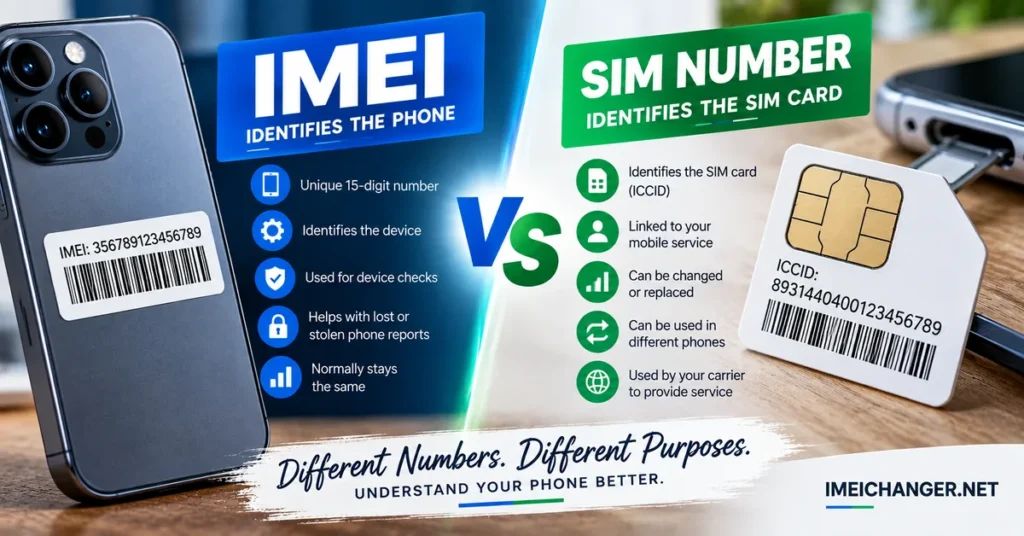
IMEI vs SIM number can be confusing because both are numbers associated with a mobile phone, yet they identify completely different parts of the cellular system. The IMEI identifies the phone’s cellular equipment, while the SIM number identifies the SIM or subscriber identity associated with the mobile service. Understanding that difference is important when changing SIM cards, switching phones, troubleshooting network problems, or checking a used device.
The easiest way to remember it is:
IMEI = the device
SIM number = the SIM/subscriber identity
They work together, but one does not replace the other.
IMEI and SIM Number Are Two Different Identifiers
A smartphone needs several different identifiers to operate on a mobile network.
The IMEI is associated with the physical cellular device. The SIM contains subscriber-related information that allows the mobile network to recognize and authenticate the service.
That means you can remove a SIM from one phone and put it into another compatible phone without transferring the original phone’s IMEI.
For example:
| Identifier | Primarily identifies | Associated with |
|---|---|---|
| IMEI | Cellular equipment | The phone |
| SIM number / ICCID | Individual SIM card | Physical SIM or eSIM profile |
| Phone number | Mobile service/contact number | Subscriber/service |
| Serial number | Manufacturer product | Individual device |
| EID | eSIM hardware | Device’s eSIM environment |
This is why entering a SIM number into an IMEI checker will not produce the same type of information as entering an IMEI.
What Is an IMEI?
IMEI stands for International Mobile Equipment Identity.
It is the identifier associated with cellular mobile equipment and is normally a 15-digit number.
Depending on the phone’s configuration, a device may have more than one IMEI. Dual-SIM phones, for example, can display IMEI 1 and IMEI 2.
The IMEI is relevant when you are investigating the phone itself.
It can be used in situations involving:
- Device identification
- IMEI lookup
- Device-status checks
- Blacklist checks
- Carrier-related device information
- Used-phone investigations
- Certain cellular troubleshooting situations
If you want to investigate information associated with your phone’s IMEI, you can use the IMEI Lookup Tool.
What Is a SIM Number?
When people say SIM number, they can mean several different things, so it is important to be precise.
The number most commonly meant is the ICCID, or Integrated Circuit Card Identifier.
The ICCID identifies the individual SIM card or SIM profile.
A physical SIM card can therefore have an ICCID that is different from:
- The phone’s IMEI
- The phone’s serial number
- The phone number
- The carrier account number
The SIM number is associated with the SIM itself rather than being the permanent identity of the phone.
This distinction becomes obvious when you remove a SIM card from your smartphone.
The SIM goes with you.
The phone stays behind.
The phone still has its IMEI.
The SIM still has its own identifier.
What Does a SIM Number Actually Identify?
The SIM number identifies the SIM card or SIM profile within the cellular ecosystem.
A physical SIM can be thought of as a small piece of network-access hardware containing subscriber-related information.
The ICCID is one identifier associated with that SIM.
It helps distinguish one SIM from another.
This is different from the IMEI, which distinguishes the cellular equipment.
That is why a carrier can know which SIM is being used and which device is using it.
The two identifiers provide different pieces of information.
IMEI vs SIM Number: The Simplest Real-World Example
Imagine you have an Android phone with:
IMEI: 35XXXXXXXXXXXXX
SIM number / ICCID: 89XXXXXXXXXXXXXXX
Phone number: +1 XXX XXX XXXX
Now remove the SIM and insert it into another compatible phone.
The result is approximately:
Old phone: keeps its IMEI.
SIM: keeps its own SIM identifier.
New phone: has a different IMEI.
Mobile service: can continue using the same SIM and, where applicable, the same phone number.
Nothing about this situation requires the IMEI and SIM number to become the same.
They continue identifying different things.
Does Removing the SIM Change the IMEI?
No.
Removing a SIM card does not normally change the phone’s IMEI.
The IMEI belongs to the cellular equipment.
If you remove the SIM, the phone still has its hardware and therefore still has its device identifier.
This is why a phone can show its IMEI even when no SIM card is installed.
The phone’s cellular identity and the SIM’s subscriber identity are separate.
Does Changing the SIM Change the IMEI?
Normally, no.
This is one of the most important differences between the two identifiers.
Suppose your phone currently contains SIM A.
You remove SIM A and replace it with SIM B.
The phone’s IMEI normally remains unchanged.
What has changed is the SIM and potentially the mobile service associated with it.
So:
New SIM ≠ new IMEI
This also means that changing a SIM is not the same thing as changing the identity of the phone.
Does Changing the SIM Change the Phone Number?
It can, but it does not have to.
If you replace one SIM with another SIM from a different mobile service, the phone number may change.
If you replace a SIM because your carrier issued a replacement SIM while keeping your existing service, your phone number may remain the same.
The phone number is therefore another separate concept.
This gives us three different identifiers:
IMEI → device
SIM/ICCID → SIM
Phone number → mobile service
Keeping those three concepts separate eliminates most of the confusion surrounding this topic.
Can the Same SIM Be Used in Another Phone?
Yes, provided the SIM and phone are compatible and the service allows it.
This is one of the clearest demonstrations that the SIM number is not the same as the IMEI.
Suppose SIM A is installed in Phone A.
Phone A has:
IMEI A
SIM A has:
ICCID A
Move SIM A to Phone B.
Now you have:
IMEI B
ICCID A
The SIM identifier has stayed the same.
The phone’s IMEI has changed because the physical phone has changed.
That is exactly why these identifiers cannot be treated as interchangeable.
Can One Phone Use Different SIM Cards?
Yes.
A phone can use different SIM cards over its lifetime.
You might:
- Change carriers
- Replace a damaged SIM
- Upgrade from one SIM to another
- Travel internationally
- Use a temporary SIM
- Switch between personal and business services
- Move from a physical SIM to eSIM
In each situation, the phone’s IMEI normally remains associated with the same cellular hardware.
The SIM identifier can change.
The phone number can also change.
The device itself has not necessarily changed.
What About Dual-SIM Phones?
Dual-SIM phones make this distinction even more important.
A dual-SIM device can support two cellular services at the same time or provide multiple SIM configurations depending on the model.
You may therefore encounter:
IMEI 1
IMEI 2
and potentially:
SIM 1
SIM 2
These do not mean that the phone has two completely separate device identities.
The exact configuration varies by device, but the important point is that IMEI numbers identify cellular equipment, while SIM identifiers identify the SIMs or profiles being used.
If your phone displays two IMEIs, make sure you know which one is associated with the cellular connection you are troubleshooting or checking.
Physical SIM vs eSIM: Does the Identifier Change?
Modern phones increasingly use eSIM technology, which changes the physical form of the subscriber identity but does not eliminate the distinction between the phone and the cellular service.
A traditional SIM is a removable physical card.
An eSIM is an embedded SIM environment that can store or activate a cellular profile without requiring a removable plastic card.
The device can still have its own IMEI.
The eSIM environment can have its own identifiers.
The mobile service can have a phone number.
So moving from physical SIM to eSIM does not mean that the phone’s IMEI becomes the SIM identifier.
They remain separate.
Is the SIM Number the Same as the ICCID?
In most everyday discussions, when someone says SIM number, they are referring to the SIM’s ICCID.
The ICCID is typically a longer numeric identifier associated with an individual SIM card or eSIM profile.
It is not the same as the IMEI.
It is also not necessarily the same thing as the phone number printed or assigned to the service.
This distinction matters when a carrier asks you for a “SIM number.”
If you are unsure whether they mean the ICCID, phone number, account number, or another identifier, use the carrier’s exact terminology rather than guessing.
Where Can You Find the SIM Number?
The exact location depends on the phone, SIM type, carrier, and operating system.
For a physical SIM, the ICCID may be printed on the SIM card itself, although the tiny text can be difficult to read.
It may also be available through the phone’s settings or carrier documentation.
On some devices, SIM-related information can be found under sections such as:
Settings → About Phone
or:
Settings → SIM / Mobile Network
The exact menus vary significantly between Android manufacturers and software versions.
For an eSIM, the relevant identifier may be available through the device’s cellular or SIM information screens.
If your goal is to identify the phone rather than the SIM, you should look for the IMEI, not the SIM number.
Where Can You Find the IMEI?
There are several common ways to find an IMEI.
Use *#06#
On many compatible phones, enter:
*#06#
into the phone dialer.
The device may display one or more IMEI numbers.
Check Android Settings
On many Android phones, the IMEI can be found under:
Settings → About Phone
The exact location depends on the manufacturer and Android version.
Check an iPhone
On an iPhone, open:
Settings → General → About
The IMEI is normally listed alongside other device information.
You may also find the IMEI on the original packaging or manufacturer documentation.
If you need to investigate the device after finding the number, use the IMEI Lookup Tool.
What Happens If a Phone Has No SIM?
A phone can still have an IMEI even when there is no SIM installed.
This is another useful way to understand the difference.
Without a SIM, the device still exists.
Its cellular hardware still exists.
Its IMEI still identifies that equipment.
What is missing is the active subscriber identity provided by the SIM or eSIM configuration.
The phone may still connect to Wi-Fi, use apps, take photos, access stored information, and perform many other functions without a SIM.
The absence of a SIM therefore does not mean the phone has lost its IMEI.
What Happens If the IMEI Is Missing?
This is a different situation.
If a phone displays Invalid IMEI, Null IMEI, Unknown IMEI, or simply does not show an IMEI, changing the SIM is not automatically the solution.
A missing or invalid IMEI can be associated with software, firmware, configuration, hardware, modem, or repair-related problems.
Do not assume:
No SIM = No IMEI
Those are unrelated situations.
If you are using an Android device and the IMEI is missing, see our guide on what to do if the IMEI is not showing on Android.
Can a SIM Number Be Used for an IMEI Check?
No.
A SIM number and an IMEI are different identifiers.
An IMEI checker is designed to investigate information associated with an IMEI.
Entering an ICCID or another SIM identifier where an IMEI is required will not provide the same result.
This is similar to entering a phone number into a serial-number field: the numbers may all belong to the same smartphone, but they identify different things.
Our IMEI Lookup guide explains what information an IMEI lookup can provide and why using the correct identifier matters.
Can an IMEI Tell You the SIM Number?
Not in the way people often expect.
An IMEI identifies the cellular equipment.
The SIM has its own identification information.
A carrier may maintain records associating a device with a SIM or subscriber at a particular time, but that does not mean the IMEI itself contains the SIM’s ICCID.
Think of them as two labels that can be associated in a network record without becoming the same label.
Can the SIM Number Tell You the IMEI?
Again, not directly.
A SIM number does not function as a universal public lookup key for retrieving the IMEI of whatever phone happens to contain that SIM.
A carrier may have internal records showing which device was using a particular SIM at a particular time, but ordinary users should not assume that entering an ICCID into a public search will reveal the phone’s IMEI.
If your goal is to find an IMEI, use the phone itself, its settings, *#06#, packaging, or legitimate carrier/manufacturer records.
IMEI vs SIM Number When Changing Carriers
Switching carriers is another situation where these identifiers are easy to confuse.
Imagine you keep the same smartphone but move to a new carrier.
Your phone’s:
IMEI → normally stays the same
Your SIM/eSIM:
May change
Your phone number:
May stay the same if you port it
The important point is that the physical device did not change.
The cellular service relationship changed.
That is why the IMEI normally remains associated with the same handset.
IMEI vs SIM Number When Buying a Used Phone
When buying a second-hand smartphone, the IMEI is generally more useful for investigating the device itself.
The SIM number tells you about the SIM being used, not the complete history or identity of the physical phone.
Before purchasing a used phone, consider checking:
- IMEI
- IMEI blacklist status
- Exact model
- Serial number
- Carrier compatibility
- Activation/account status
- SIM functionality
- Physical condition
- Ownership information
- Proof of purchase where available
A blacklist check is particularly useful if you are concerned that the device may have been reported or restricted.
Use the IMEI Blacklist Checker when that is the specific question you need answered.
A SIM that works perfectly does not automatically prove that the phone itself is free from every device-related restriction.
Can a SIM Work in a Blacklisted Phone?
The answer depends on the network, country, and type of restriction.
A SIM can be perfectly functional while the phone’s IMEI is reported or restricted.
This is because the SIM and the device are separate components.
For example, you could put the same working SIM into another phone and discover that cellular service works normally there.
That does not prove that the original phone has no IMEI-related problem.
When troubleshooting, test the SIM separately from the phone whenever possible.
IMEI Blacklist vs SIM Lock
These are also commonly confused.
An IMEI blacklist concerns the reported or restricted status of the device identifier.
A SIM/network lock concerns whether the phone is restricted to a particular carrier or network.
They are different problems.
| Problem | What is affected? |
|---|---|
| IMEI blacklist | Device/network status |
| SIM/network lock | Carrier compatibility |
| SIM PIN | SIM security |
| PUK lock | SIM access |
| Invalid IMEI | Device identifier/software or hardware issue |
| Activation/account lock | Device ownership/account access |
If your phone asks for a network unlock code, that is not automatically an IMEI problem.
Our SIM Network Unlock PIN guide explains the difference between network unlocking and IMEI-related problems.
What If You Replace a Damaged SIM?
Replacing a damaged SIM can give you a new SIM identifier while leaving the phone completely unchanged.
For example:
Old SIM → ICCID A
New replacement SIM → ICCID B
Same phone → same IMEI
Your carrier may also keep the same phone number associated with the replacement SIM.
This is a normal example of how one identifier can change while another remains unchanged.
What If You Change Phones but Keep the SIM?
Now the opposite happens.
Same SIM → same SIM identifier
New phone → new IMEI
The service can move from one handset to another because the subscriber identity is being used with different cellular equipment.
This is why the IMEI is not a property of your mobile account.
It belongs to the device.
What If You Use eSIM Instead of a Physical SIM?
Moving to eSIM changes how the cellular profile is stored and activated.
It does not make the eSIM identifier equivalent to the phone’s IMEI.
The phone still has its device identifiers.
The eSIM environment has its own identifiers.
The mobile service may still have a phone number.
The same basic principle remains:
Device identity and subscriber identity are separate.
Why Carriers Need Both Device and SIM Information
A cellular network needs to distinguish between the equipment connecting to it and the subscriber attempting to use the service.
That is why device and subscriber identifiers can appear together in carrier systems.
The relationship can be thought of as:
Phone → IMEI
SIM/eSIM → subscriber credentials and SIM identifiers
Service → phone number/account
The network can use these different pieces of information to manage access and service.
But the existence of a relationship does not make the identifiers interchangeable.
Common IMEI vs SIM Number Mistakes
“My SIM number is my phone’s IMEI.”
No. The SIM number identifies the SIM; the IMEI identifies the cellular device.
“Changing my SIM gives my phone a new IMEI.”
Normally, no.
“A phone without a SIM has no IMEI.”
Incorrect. The device can retain its IMEI without a SIM.
“If my SIM works, my phone cannot be blacklisted.”
Not necessarily. SIM functionality and device status are separate questions.
“I can enter my SIM number into an IMEI checker.”
No. An IMEI checker expects an IMEI.
“An IMEI is the same as my carrier account number.”
No. The IMEI identifies the device, while the account belongs to the service relationship.
“Replacing a SIM means I replaced the phone’s identity.”
No. Replacing the SIM changes the subscriber-side identifier, not normally the device’s IMEI.
IMEI vs SIM Number vs Phone Number
These three identifiers are often mixed together, so here is the practical version:
IMEI
Identifies the cellular device.
SIM number / ICCID
Identifies the individual SIM card or SIM profile.
Phone number
Identifies the number used by the mobile service to make and receive calls and messages.
A single smartphone can therefore have all three at the same time.
For example:
Phone: IMEI 1
SIM: ICCID
Service: Phone number
They describe different parts of the same cellular connection.
Which Number Should You Use?
Choose the identifier based on the question you are trying to answer.
| What you want to know | Use |
|---|---|
| What device is this? | IMEI |
| Is this device reported or restricted? | IMEI |
| What SIM is installed? | SIM number / ICCID |
| What number can people call? | Phone number |
| Is the phone carrier locked? | Carrier/device information |
| Is the SIM PIN locked? | SIM information / carrier support |
| Is the device’s IMEI missing? | IMEI troubleshooting |
| Is the used phone potentially blacklisted? | IMEI blacklist check |
The key is not to ask one identifier to answer a question that belongs to another.
Final Answer: IMEI vs SIM Number
The difference between an IMEI and a SIM number becomes much easier to understand when you separate the device from the subscriber.
The IMEI identifies the cellular equipment inside the phone.
The SIM number, commonly referring to the ICCID, identifies the individual SIM or SIM profile.
Changing a SIM does not normally change the phone’s IMEI. Replacing a SIM can give you a different SIM identifier while allowing the same phone number to remain active. Moving the same SIM into another phone can keep the SIM identity while introducing a completely different IMEI.
That is why these numbers should never be treated as interchangeable.
If you need information about the physical phone, start with its IMEI using the IMEI Lookup Tool.
If you are buying a used phone and want to investigate whether its device identifier may be reported or restricted, use the IMEI Blacklist Checker.
If the phone is asking for a network unlock code, that is a different issue from an IMEI problem. See the SIM Network Unlock PIN guide for that situation.
And if your Android phone is showing an invalid, missing, or unknown IMEI, see what to do if the IMEI is not showing on Android.
The simplest rule to remember is:
IMEI identifies the phone.
SIM number identifies the SIM.
Phone number identifies the mobile service.