IMEI vs ESN: What Is the Difference?
IMEI vs ESN is a common comparison when you are trying to identify a mobile phone, check a used device, or understand why different phones use different identification numbers. Although both IMEI and ESN are device identifiers used in mobile communications, they are not interchangeable terms. The biggest difference is that an IMEI is primarily associated with GSM and other cellular networks, while ESN was historically used to identify devices on CDMA networks.
If you are checking a modern smartphone today, you will most often encounter an IMEI, but understanding ESN is still useful—especially when dealing with older CDMA phones, carrier records, second-hand devices, or older mobile terminology.
IMEI vs ESN at a Glance
The easiest way to understand the difference is to look at what each identifier was designed to do.
| Identifier | Full Name | Main Use | Commonly Associated With |
|---|---|---|---|
| IMEI | International Mobile Equipment Identity | Identifies cellular equipment | GSM and modern mobile networks |
| ESN | Electronic Serial Number | Identified mobile devices | Older CDMA networks |
| MEID | Mobile Equipment Identifier | Replaced many ESN applications | CDMA and later mobile devices |
The important point is that IMEI and ESN identify the device, not the person using it.
Your phone number, SIM information, account details, and device identifier are separate pieces of information.
What Is an IMEI?
IMEI stands for International Mobile Equipment Identity.
It is a device identifier associated with cellular equipment and is normally represented as a 15-digit number. A phone with multiple cellular connections may have more than one IMEI.
The IMEI can be useful when:
- Identifying a mobile device
- Checking information associated with a phone
- Investigating a used smartphone
- Checking reported or restricted device status
- Troubleshooting certain network problems
- Providing device information to a carrier or repair professional
If you need to identify your phone’s IMEI, many devices support the familiar:
*#06#
You can also normally find the IMEI through the phone’s settings or device-information screen.
For a broader explanation of what an IMEI can be used for, see our IMEI Lookup Tool.
What Is an ESN?
ESN stands for Electronic Serial Number.
It was used primarily to identify mobile devices operating on older CDMA-based networks.
Unlike the IMEI, which became strongly associated with GSM networks and later evolved into a broadly used identifier for modern cellular devices, ESNs belong largely to an older generation of mobile technology.
You may encounter an ESN when researching:
- Older CDMA phones
- Legacy Verizon devices
- Legacy Sprint devices
- Older CDMA carrier databases
- Used phones from the pre-LTE era
- Historical phone activation records
This is why someone researching an older phone may see the terms ESN, IMEI, and MEID used in different contexts.
Why Did Phones Use Different Identifiers?
The difference comes largely from the way mobile networks developed.
For many years, the cellular industry was divided between different technologies and standards.
GSM networks commonly relied on the IMEI for equipment identification.
CDMA networks historically used ESN and later MEID identifiers.
This means the identifier you encounter can tell you something about the technology and generation of the device you are researching.
It is not simply a case of one number being a newer version of the other.
A Simplified Timeline
The terminology becomes easier to understand when viewed historically:
Older CDMA phones → ESN → MEID → modern cellular devices
At the same time:
GSM phones → IMEI → modern cellular devices using IMEI-based identification
Modern smartphones have made the distinction less visible to everyday users because current devices and networks have largely standardized around newer cellular technologies.
IMEI vs ESN: The Main Difference
The fundamental difference is where and how the identifiers were used.
An IMEI identifies cellular equipment and became widely associated with GSM-based mobile networks.
An ESN was an identifier used for mobile equipment on older CDMA networks.
So if you find an ESN on an old phone, that does not mean the phone is missing an IMEI. The device may simply belong to a different network technology generation.
Likewise, seeing an IMEI instead of an ESN does not indicate that something is wrong with the phone.
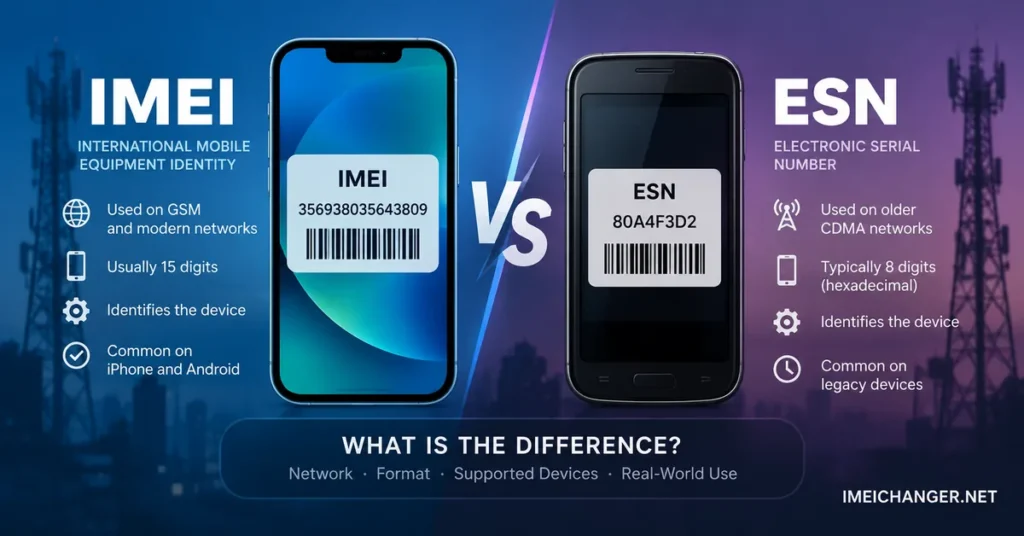
IMEI
- Used as a mobile equipment identifier
- Common on modern smartphones
- Historically associated with GSM networks
- Normally 15 digits
- Commonly used for device checks and blacklist investigations
ESN
- Used to identify older CDMA mobile equipment
- Common on legacy CDMA devices
- Associated with older carrier activation systems
- Can appear in older carrier records
- Largely replaced by newer identifiers such as MEID
What Is MEID and Where Does It Fit?
MEID stands for Mobile Equipment Identifier.
If you are researching an older CDMA phone, MEID can be just as important as ESN.
MEID was introduced as a larger identifier space than the original ESN system and became common on later CDMA devices.
This gives us three terms that can easily become confusing:
IMEI → commonly associated with GSM and modern cellular equipment
ESN → older CDMA device identifier
MEID → later CDMA device identifier that replaced many ESNs
Therefore, an old CDMA phone might have an ESN or MEID rather than the type of IMEI information you expect to see on a modern smartphone.
Is an IMEI the Same as an ESN?
No.
An IMEI is not the same as an ESN.
Both are used to identify mobile equipment, but they originated in different cellular technology environments.
Think of them as different identification systems developed for different generations and types of mobile networks.
This distinction becomes particularly useful when buying an older phone. If a seller gives you an ESN instead of an IMEI, the first question should be whether the phone is an older CDMA device.
Is ESN the Same as a Serial Number?
Not exactly.
This is another source of confusion.
A manufacturer’s serial number is generally used to identify a particular product for manufacturing, service, warranty, inventory, and support purposes.
An ESN, on the other hand, was used as a mobile equipment identifier within CDMA network systems.
The same physical phone could therefore have:
- A manufacturer serial number
- An ESN or MEID
- Other hardware identifiers
These numbers serve different purposes.
For example, if you are checking an iPhone, the serial number and IMEI are not interchangeable. They can both help identify the device, but they belong to different identification systems.
Our guide on how to check the serial number of an Apple iPhone explains the serial-number side of this process.
IMEI vs ESN When Buying a Used Phone
This is where the distinction becomes practical.
If you are buying a modern used smartphone, you will usually be more concerned with its IMEI than its ESN.
Before paying for a used phone, you should compare the device identifier shown by the phone with the information supplied by the seller.
For a modern smartphone, you may want to check:
- IMEI
- Device model
- Serial number
- Blacklist status
- Carrier compatibility
- Activation status
- Ownership information
- Physical condition
- Network functionality
An identifier by itself does not tell you everything about a phone.
A phone can have a valid IMEI and still be carrier locked, incompatible with your network, activation locked, damaged, or otherwise unsuitable for purchase.
For this reason, an IMEI Number Check Online can be one part of a broader used-phone inspection.
Can an ESN Be Blacklisted?
Yes, historically an ESN could be associated with a device that was reported or restricted by a CDMA carrier.
This is why you may encounter expressions such as:
- Clean ESN
- Bad ESN
- ESN check
- ESN blacklist
- ESN status
These terms are particularly relevant when researching older CDMA phones.
A bad ESN generally meant that the identifier was associated with a carrier restriction or other issue that could prevent the device from being activated normally.
The terminology is different from today’s common IMEI blacklist discussions, but the practical concern can be similar: can the device be legitimately activated and used on the intended network?
What Does a Clean ESN Mean?
A clean ESN generally indicated that the device’s ESN was not showing the type of carrier restriction that would prevent normal activation in the relevant system.
However, “clean” did not automatically mean that the phone was perfect.
The device could still have:
- Hardware damage
- Account-related issues
- Compatibility limitations
- Activation problems
- Software problems
- Other carrier restrictions
The same principle applies to modern IMEI checks.
A clean device identifier is useful information, but it is not a complete inspection of the phone.
What Does a Bad ESN Mean?
A bad ESN generally indicates that the device has a problem in the relevant carrier’s records.
Depending on the circumstances, this could be connected with:
- A reported lost device
- A reported stolen device
- An unpaid account or financial obligation
- A carrier restriction
- An activation issue
The exact meaning depends on the carrier and the historical system involved.
If you are buying an older CDMA phone and the seller cannot provide a convincing explanation for a bad ESN, it is safer to investigate the device before paying.
IMEI Blacklist vs Bad ESN
These concepts are related, but they should not be treated as identical.
| Modern terminology | Older CDMA terminology |
|---|---|
| IMEI blacklist | Bad ESN |
| IMEI check | ESN check |
| IMEI status | ESN status |
| Reported IMEI | Restricted ESN |
| Device identifier | Device identifier |
The underlying idea is similar: the carrier or network system can use a device identifier to determine whether equipment should be accepted.
However, the databases, network technologies, terminology, and historical systems involved are different.
If you are checking a modern phone, our IMEI Blacklist Checker is the more relevant resource.
Does Every Phone Have an IMEI?
No—not every phone from every era used an IMEI in the same way.
Older mobile devices were built for different network technologies, and some CDMA devices were identified using ESN or MEID systems.
Modern smartphones, however, commonly use IMEI information.
If you are holding an older phone and cannot find an IMEI, do not immediately conclude that the device is defective.
First identify:
- The phone model
- Its release period
- The network technology it was designed for
- The original carrier
- Whether it uses IMEI, ESN, MEID, or another identifier
That context can explain why the number you are looking for is not where you expected it to be.
Can an ESN Be Converted Into an IMEI?
Not in the sense of simply converting one number into another.
An ESN and an IMEI are different identification systems. You cannot take an ESN, run it through a conversion formula, and produce the phone’s legitimate IMEI.
If a device originally uses an ESN, its hardware and network architecture determine the identifiers associated with that device.
Be particularly cautious with websites claiming that they can “convert” an ESN into a clean IMEI.
A device identifier is not a simple unit of data that can be converted like inches to centimeters.
Why You Might See IMEI, ESN and MEID on the Same Website
Older carrier documentation and phone databases sometimes use several terms because their systems have supported multiple generations of devices.
A database may therefore contain fields such as:
- IMEI
- ESN
- MEID
- Serial number
- Model number
This does not mean that all five numbers are interchangeable.
It simply reflects the fact that mobile-device identification has changed over time.
If you are researching a specific device, always determine which identifier the carrier or service is actually asking for.
IMEI vs ESN for Carrier Activation
Carrier activation is another area where the distinction matters.
An older CDMA phone may have been activated using its ESN or MEID.
A modern phone may be identified through its IMEI.
The carrier uses the identifier to associate the physical device with its network systems.
This is why entering the wrong type of number into a carrier’s activation or compatibility tool can result in an error.
If a carrier asks for an IMEI, provide the IMEI.
If an older carrier database asks for an ESN or MEID, provide the identifier associated with that device.
Do not substitute one simply because the numbers appear to serve similar purposes.
Does an IMEI Identify the SIM Card?
No.
The IMEI identifies the mobile equipment.
The SIM or eSIM environment has its own identifiers.
This distinction is important because people sometimes assume that changing a SIM card changes the phone’s IMEI.
It does not.
The phone remains the same physical device even when you:
- Replace the SIM
- Change your phone number
- Switch carriers
- Move to another account
- Activate a different cellular plan
The device identifier and subscriber information are separate.
Does Changing the SIM Change the ESN?
No.
An ESN was associated with the mobile device, not the subscriber’s SIM card.
This is one of the reasons device identifiers are useful to carriers: the identifier remains associated with the equipment even when the user or account changes.
The same principle applies to the IMEI on modern phones.
What Should You Check on a Modern Phone?
If you are dealing with a current Android phone or iPhone, the IMEI will usually be much more relevant than the ESN.
Start by finding the IMEI through the device’s settings or by using *#06# where supported.
Then determine what you actually need to investigate.
Want basic device information?
Use an IMEI Lookup.
Want to investigate a reported or restricted phone?
Use the IMEI Blacklist Checker.
Is the IMEI missing or showing as invalid?
Read the IMEI Repair Tool guide before attempting any advanced changes.
Researching an older CDMA phone?
Look for its ESN or MEID and determine which identifier the relevant carrier or service requires.
What Should You Check on an Older CDMA Phone?
When buying an older CDMA device, the ESN or MEID can be more important than the terminology used by modern IMEI check websites.
Before purchasing, verify:
- The ESN or MEID
- Carrier compatibility
- Activation eligibility
- Device model
- Device condition
- Whether the phone has been reported
- Whether the carrier still supports the device
- Whether the device’s network technology is still usable
This last point is particularly important.
A phone can have a clean historical ESN and still be a poor purchase if the networks it depends on are no longer supported in your area.
IMEI vs ESN: Which One Should You Use?
There is no universal winner because they belong to different device and network environments.
Use the IMEI when:
- You are checking a modern smartphone
- You are investigating an Android or iPhone
- A carrier asks for the IMEI
- You want to investigate blacklist status
- You are researching a modern used phone
Use the ESN when:
- You are researching an older CDMA device
- A legacy carrier system specifically asks for an ESN
- You are checking an older phone’s activation history
- You are working with historical CDMA terminology
Use the MEID when:
- An older CDMA device provides a MEID
- A carrier specifically requests the MEID
- You are working with a device or database that uses the newer CDMA identifier
The correct identifier is therefore determined by the device and the system you are using.
IMEI, ESN, MEID and Serial Number Are Not the Same
It is worth keeping these four terms separate:
IMEI — cellular equipment identifier commonly found on modern mobile devices.
ESN — older electronic serial number used primarily with CDMA equipment.
MEID — later CDMA mobile equipment identifier that replaced many ESN implementations.
Serial number — manufacturer-assigned identifier used to identify the physical product for manufacturing, support, warranty, and service purposes.
A phone can have several of these identifiers at the same time.
They are not different names for the same number.
Frequently Asked Questions
Is IMEI better than ESN?
Neither is simply “better.” They were developed for different mobile network technologies and generations. IMEI is the identifier you are more likely to encounter on a modern smartphone, while ESN is mainly relevant when researching older CDMA devices.
Is an ESN the same as an IMEI?
No. Both identify mobile equipment, but ESN and IMEI belong to different identification systems and network histories.
What replaced ESN?
MEID became a common replacement for the original ESN system on later CDMA devices. Modern smartphones are more commonly identified using IMEI information.
Do iPhones have an ESN?
Modern iPhones are generally identified using IMEI and other Apple device identifiers rather than the older ESN terminology associated with CDMA phones.
Do Android phones have an ESN?
Modern Android phones generally use IMEI information. An older CDMA Android phone may have used ESN or MEID depending on the model and network technology.
Can I use an IMEI instead of an ESN?
Only if the particular carrier or service accepts that identifier. If a system specifically asks for an ESN, do not assume that entering an IMEI will produce the same result.
Can I check an old ESN online?
Some historical or carrier-specific services may support ESN-related checks, but availability depends on the carrier, country, device, and age of the phone. For modern devices, IMEI-based checking is generally more relevant.
Does a clean IMEI mean the phone is unlocked?
No. A clean IMEI and an unlocked phone are different things. A device can have no reported blacklist status and still be restricted to a particular carrier.
Does a clean ESN mean the phone is unlocked?
Not necessarily. A clean ESN generally concerns the device’s carrier status, while network compatibility and carrier locking are separate questions.
Final Thoughts
The IMEI vs ESN question becomes much easier once you stop thinking of these identifiers as competing versions of the same number.
They belong to different chapters of mobile-network history.
IMEI is the identifier you will normally encounter when dealing with modern smartphones and current IMEI-based device checks. ESN belongs primarily to older CDMA equipment, while MEID became the later identifier used by many CDMA devices.
If you are checking a modern iPhone or Android phone, start with its IMEI and determine whether you need a device lookup, blacklist check, or another type of verification.
If you are dealing with an older CDMA phone, ESN or MEID may be the identifier that matters.
And if you are buying a used phone, don’t stop at the number itself. Compare the identifier with the actual device, verify the model and carrier compatibility, investigate any reported status, and make sure the phone can still be used on the network you intend to use.
Understanding which identifier belongs to which device and network is the key. Once that distinction is clear, IMEI, ESN and MEID stop being confusing abbreviations and become useful clues about the phone you are researching.