How to Block and Report a Stolen Phone Using the IMEI Number
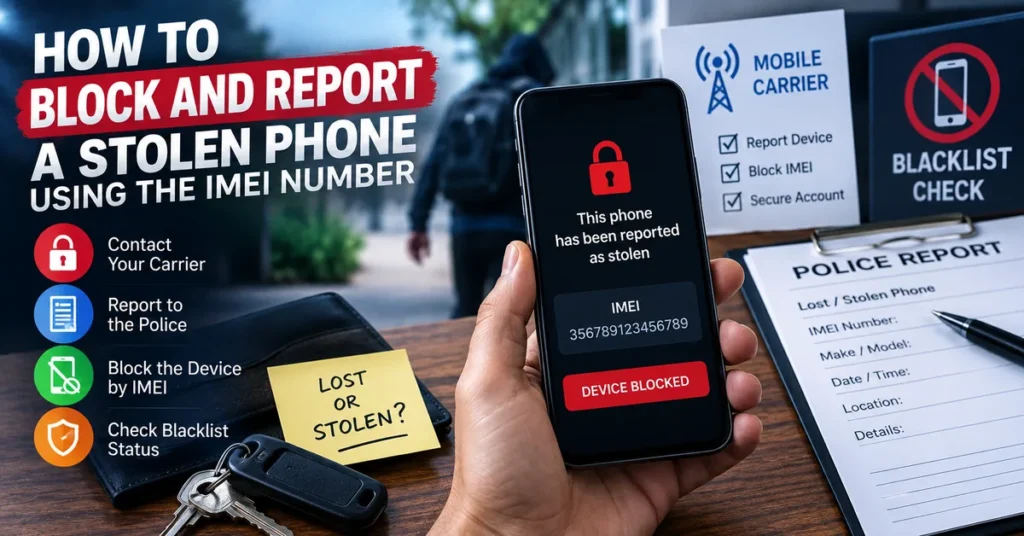
If your phone has been stolen, knowing how to block and report a stolen phone using the IMEI number can help you take the right steps quickly. The IMEI identifies the cellular device, which makes it useful when communicating with your mobile carrier, filing a theft report, checking device status and dealing with an insurance claim. It is important, however, to understand that the IMEI itself is not a public GPS tracking system.
A stolen smartphone is more than an expensive piece of hardware. It may contain access to email, banking applications, photographs, contacts, authentication codes, social networks and other private information. The best response is therefore not simply to “block the IMEI.” You should secure the phone, protect your accounts, contact your carrier, report the theft and use the IMEI as part of the device-identification process.
What the IMEI Actually Does After a Phone Is Stolen
The IMEI is a device identifier used by cellular networks to distinguish one mobile device from another.
That makes it particularly useful after theft because your carrier can associate the reported device with its IMEI. Depending on the carrier, country and applicable device-blocking system, a stolen phone may then be restricted from normal cellular network use.
The important distinction is this:
- IMEI: identifies the cellular device.
- SIM/eSIM: identifies the subscriber or cellular service.
- Find My / Find Hub: provides device-location and recovery functions.
- Blacklist or device block: restricts a reported device from participating cellular networks where supported.
These functions work together, but they are not interchangeable.
Do This First: Secure the Phone Before Focusing on the IMEI
If you have just discovered that your phone is missing, do not start by searching random websites for an “IMEI tracker.” Start with the security features already associated with your device.
Android Phones
Use Google’s Find Hub when available. Depending on the device and circumstances, you may be able to see its location, play a sound, secure it or erase its contents.
If you can see a location, do not attempt to confront whoever has the phone. Give relevant information to law enforcement instead.
iPhone
Use Apple’s Find My system and activate Lost Mode when appropriate. This can help protect the device while preserving the possibility of recovering it.
Do not remove a stolen iPhone from your Apple Account simply because somebody else may currently have possession of it.
Step 1: Locate Your IMEI
The first practical problem is often finding the IMEI after the phone is no longer in your hands.
Fortunately, you may already have the number recorded somewhere.
- Original phone box
- Purchase invoice
- Carrier account
- Device records
- Previous screenshots
- Manufacturer account information
- Saved device documentation
On a phone that is still accessible, *#06# can normally display the IMEI. With a stolen phone, however, the box, receipt or carrier records may be much more useful.
If you want to understand the role of an IMEI and check device information, you can also use our IMEI Number Check Online Tool.
Step 2: Contact Your Mobile Carrier
Once you have reported the phone as stolen to yourself, the next important contact is your mobile carrier.
Tell the carrier that the device has been lost or stolen and ask what procedure applies in your country and on your network.
The carrier may ask for information such as:
- Your mobile number
- Account details
- IMEI
- Phone make and model
- Approximate date and location of the theft
- Proof of ownership
- Police report information
Ask specifically whether the carrier can place the stolen device on its applicable device-blocking or blacklist system.
This is important because an IMEI blacklist is not something an ordinary IMEI website can simply switch on or off. The carrier or relevant authority controls the reporting process.
Step 3: Suspend the SIM or eSIM
Blocking the phone and protecting your mobile account are two different tasks.
A thief can remove your physical SIM card, but that does not change the phone’s IMEI. Likewise, if your device uses an eSIM, your carrier may need to deactivate the cellular profile and issue a replacement.
Ask your carrier to secure the mobile service associated with the stolen device.
This can prevent unauthorized use of your number and gives you a cleaner starting point for transferring your service to another phone.
Step 4: File a Police Report
If the phone was stolen rather than simply misplaced, a police report can provide an important official record.
The IMEI can be particularly useful because it identifies the specific cellular device involved in the report.
When possible, provide:
- IMEI
- Serial number
- Phone model
- Phone number
- Purchase receipt
- Proof of ownership
- Date and approximate time of theft
- Location where the theft occurred
- Insurance information
If your device-location service provides a current location, do not attempt to recover it yourself. Share the information with the appropriate authorities.
What Happens When an IMEI Is Reported Stolen?
The exact process differs between countries and mobile operators.
In supported systems, the reported IMEI can be placed on a blacklist or another device-restriction database. Participating networks may then prevent the device from registering normally for cellular service.
The result is intended to make a stolen device considerably less useful on participating networks, even if someone removes your SIM card and inserts another one.
That is one of the main reasons the IMEI remains relevant after the original SIM has been removed.
IMEI Blocking Is Not the Same as IMEI Tracking
This distinction is especially important because many websites use the words “IMEI tracking” in ways that can be misleading.
IMEI blocking concerns the status and network access of the device.
Device tracking concerns the physical location of the device and normally relies on services such as Find Hub or Find My, together with the device’s available connectivity and location features.
Entering an IMEI into a normal online checker does not give you a public live GPS map of the stolen phone.
Our IMEI Number Tracker guide explains this distinction in more detail and is useful if you are trying to understand what an IMEI can and cannot reveal about a phone’s location.
How to Check Whether the Phone Has Been Blacklisted
After contacting your carrier, you may want to check the reported status of the device.
Our IMEI Blacklist Checker guide explains how blacklist status works and why an online result should be interpreted carefully.
A blacklist result may indicate that a device has been reported because of theft, loss, fraud or another carrier-related restriction. Different databases can also have different coverage, so an online result should not replace confirmation from the carrier handling your account.
What If the Thief Changes the SIM?
Changing the SIM does not turn the stolen phone into a different device.
The IMEI remains associated with the cellular hardware, while the SIM or eSIM represents the subscriber’s mobile service.
This is precisely why reporting the device to the carrier matters. The theft report concerns the phone itself rather than only the SIM card that was inside it when it disappeared.
What If the Phone Has Two IMEI Numbers?
Modern dual-SIM devices can have two IMEI numbers.
This is common on phones that support two cellular configurations, such as physical SIM plus eSIM or dual physical SIM arrangements.
If your stolen phone has two IMEIs, keep both numbers with your records and provide the carrier with the identifiers it requests.
If you need help understanding device identifiers and IMEI information, our IMEI Lookup Tool guide covers the subject separately.
Updated: September 8, 2026
What If You Recover the Stolen Phone?
Finding the phone does not necessarily mean that everything is immediately back to normal.
If you recover a device that was already reported stolen, contact the carrier and explain that the phone has been recovered.
Check:
- Whether the original IMEI is still displayed
- Whether the SIM or eSIM works
- Whether the phone connects to the cellular network
- Whether your accounts remain secure
- Whether the device was reset
- Whether unknown applications or changes were made
- Whether the phone has physical damage
If the carrier placed a restriction on the device, ask the carrier what documentation or verification is required to update the status.
What If the IMEI Is Missing After You Recover the Phone?
A missing IMEI after recovery is a different problem from a blacklisted IMEI.
If the phone displays “Unknown,” “Null,” “Not Available” or another missing-IMEI message, the problem may be related to firmware, baseband software, previous repair work or another device-specific issue.
For Android devices, our IMEI Not Showing on Android guide focuses specifically on diagnosing this situation.
For broader technical background, our IMEI Repair Tool guide covers invalid, null, unknown and missing IMEI situations and explains when professional repair may be appropriate.
Qualcomm-related restoration issues are discussed separately in our IMEI Rebuilder guide.
What You Should Not Do After a Phone Is Stolen
Do Not Confront the Person With the Phone
If Find Hub or Find My shows the device at an unfamiliar location, do not attempt a private recovery operation. Give the information to law enforcement.
Do Not Trust Websites Promising Instant IMEI Tracking
Be careful with websites that claim an IMEI alone can provide a live GPS location. Normal IMEI checking and device-location services are not the same thing.
Do Not Attempt to Defeat a Blacklist by Altering the Device Identity
If a phone has been reported stolen, changing its identifier is not a legitimate recovery solution and can create additional legal and technical problems.
If you own a device with a genuine IMEI problem after a repair or software failure, use a legitimate diagnostic and restoration process instead.
Do Not Publish Your Complete IMEI Online
Your IMEI may be required by your carrier, insurer, manufacturer or authorities, but there is rarely a good reason to publish the complete number publicly on social media, forums or advertisements.
Can You Report a Stolen Phone Without the IMEI?
In many cases, you can still begin the reporting process without knowing the IMEI.
Your carrier or authorities may be able to work with other identifying information, including:
- Phone number
- Serial number
- Device model
- Purchase receipt
- Carrier account
- Apple Account information
- Google Account information
- Original packaging
However, finding the IMEI can make the device-identification process much easier, so it is worth checking your records before contacting the carrier.
What If You Bought the Phone Second-Hand?
A stolen or blacklisted phone can become a serious problem for a second-hand buyer, which is why device verification should happen before money changes hands.
Before buying a used phone, check the IMEI, blacklist status, carrier lock, device identity and ownership information.
You can begin with our IMEI Number Check Online Tool and then use the IMEI Blacklist Checker when you specifically need to investigate reported-device status.
If you need broader information about the device identifier itself, our IMEI Lookup Tool provides another useful starting point.
Stolen Phone IMEI Checklist
If your phone has just been stolen, work through these steps in order:
- Locate the device using Find Hub or Find My when available.
- Secure the device and activate the appropriate lost-device mode.
- Protect your mobile account by contacting your carrier.
- Find the IMEI from your box, receipt, account or saved records.
- Report the theft to your carrier.
- Ask about IMEI blocking and the applicable blacklist process.
- File a police report and provide the IMEI and proof of ownership.
- Protect important accounts, especially banking, email and authentication services.
- Check device status when appropriate.
- If recovered, contact the carrier again and explain that the phone has been found.
Can a Stolen Phone Be Removed From a Blacklist?
If the original owner recovers a device that was reported stolen, the correct approach is to contact the organization responsible for the restriction.
The carrier can determine whether the report can be withdrawn and what proof of ownership or other documentation is required.
Do not rely on an online service claiming that it can simply erase a stolen-device report from a carrier database.
A legitimate status change needs to come from the organization that controls the relevant record.
Final Takeaway
The IMEI is valuable after a phone is stolen because it identifies the device, but it should not be confused with a public tracking number.
The strongest response combines several actions:
Locate the phone → Secure it → Protect your account → Contact the carrier → Report the theft → Provide the IMEI → File a police report → Check the device status.
If the phone is recovered, work with the carrier to resolve the theft report and restore normal service where appropriate.
The most important thing is to use the IMEI for what it is designed to do: help identify the specific cellular device when dealing with carriers, authorities, insurers and legitimate device-status systems.