How to Find ICCID on iPhone and Android
If you need to find ICCID on iPhone and Android, the number is usually available inside your phone’s SIM or mobile-network information. ICCID is tied to the SIM or eSIM profile rather than the phone itself, so its location can differ depending on whether you use a physical SIM, eSIM, iPhone, Samsung Galaxy, Google Pixel, or another Android device.
You may need the ICCID when activating a SIM, troubleshooting mobile service, replacing a SIM, checking an eSIM profile, or giving information to your carrier. The good news is that you normally do not need a special app to locate it.
This guide shows where to look on both major mobile platforms and explains what to do when ICCID is missing, hidden, or different from the number you expected.
ICCID vs. IMEI: Make Sure You Are Looking for the Right Number
Phones can display several long identification numbers in the same area, which makes it easy to copy the wrong one.
The ICCID identifies the SIM card or eSIM profile. The IMEI identifies the cellular device.
If you want a broader explanation before looking for the number, our guide to what an IMEI number is explains why the two identifiers serve different purposes.
| Identifier | What it identifies | Usually associated with |
|---|---|---|
| ICCID | SIM or eSIM profile | Cellular subscription |
| IMEI | Cellular device | Phone hardware |
| EID | eSIM hardware | eSIM-capable device |
| Phone number | Subscriber’s assigned number | Mobile service |
This distinction matters because an ICCID can change when you replace a SIM or activate a different eSIM profile, while the phone’s IMEI normally remains associated with the device.
How to Find ICCID on an iPhone
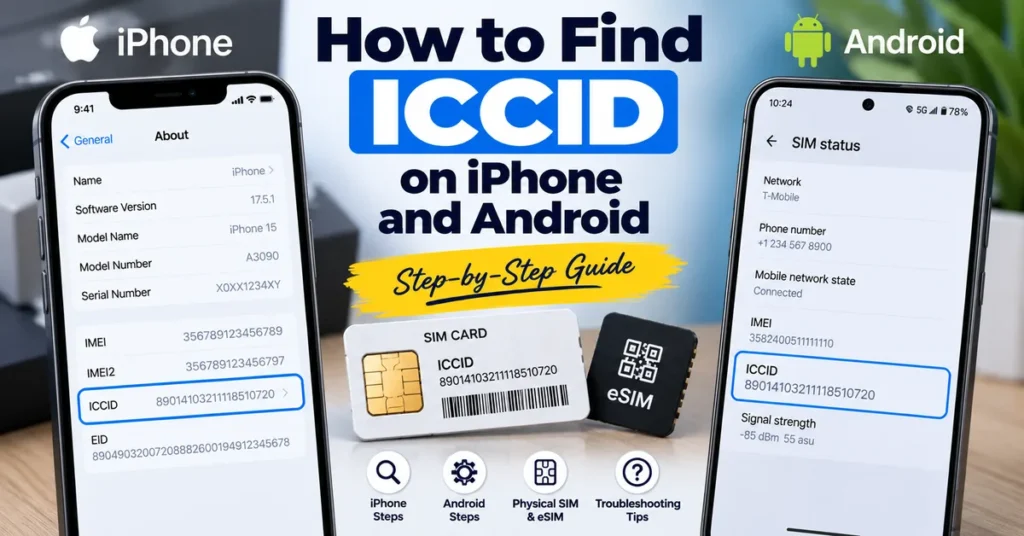
On many iPhones, the ICCID is displayed directly in the About section of the Settings app.
The standard iPhone method
- Open Settings.
- Tap General.
- Select About.
- Scroll through the device information.
- Look for ICCID.
The number shown next to ICCID is the identifier associated with the SIM or eSIM information currently available to the iPhone.
You may also see other identifiers nearby, including IMEI, IMEI2, EID, and SEID. Do not confuse these numbers with ICCID.
What if ICCID is not immediately visible?
The information shown in About can depend on the iPhone model, cellular configuration, and whether a SIM or eSIM is currently active.
If you use an eSIM, for example, the phone can display several identifiers together. If you see EID and IMEI but cannot immediately find ICCID, check the cellular or SIM-related information available on the device and make sure the relevant line or profile is active.
If your goal is specifically to understand the difference between these identifiers, see our guide explaining what an EID number is on a phone.
How to Find ICCID on Android
Android does not use one universal Settings layout. Samsung Galaxy, Google Pixel, Motorola, Xiaomi, OnePlus, and other manufacturers can place SIM information in different sections.
That means there is no single Android menu path that works on every phone.
Start with About Phone
On many Android devices, the first place to check is:
Settings → About phone
Look for sections such as:
- SIM status
- SIM information
- Status
- Phone information
- Network information
- SIM card status
If the phone exposes the ICCID through its software, it may appear inside one of these sections.
Google Pixel
On supported Google Pixel devices, SIM-related information can be found through the phone’s settings and SIM status information.
A typical route is:
Settings → About phone → SIM status
Look through the displayed SIM information for ICCID or related SIM identification details.
The exact screen can vary between Android versions and Pixel models, so do not assume that every Pixel will display identical information.
Samsung Galaxy
On many Samsung Galaxy phones, begin with:
Settings → About phone → Status
Depending on the model and software version, SIM-related identifiers may be displayed there or within another SIM information section.
If ICCID does not appear, check the SIM manager and other cellular settings as well.
Other Android phones
For manufacturers other than Google and Samsung, try searching Settings for terms such as:
ICCID
SIM
SIM status
SIM information
About phone
Using the Settings search function can be faster than manually opening every submenu.
If your device is primarily showing IMEI information and you need help understanding what that number is used for, you can also use our IMEI lookup tool for Android and iPhone.
Finding ICCID When You Use a Physical SIM
A physical SIM card can have an ICCID associated with it even when the phone does not display the complete number in its Settings.
Depending on the SIM and carrier, the ICCID may be printed directly on the SIM card or its original packaging.
However, the tiny physical SIM is not always the easiest place to read the complete number. Some cards have very small markings, while others may not display the entire identifier clearly.
If the phone can display the ICCID, the software-based method is usually easier to read and copy accurately.
Why the ICCID follows the SIM
The important point is that ICCID is associated with the SIM, not simply with the handset.
You can move a physical SIM from one compatible phone to another. The phone changes, but the SIM remains the same. The ICCID therefore continues to identify that SIM.
This is one of the easiest ways to remember the difference between ICCID and IMEI.
How to Find ICCID for an eSIM
eSIMs work differently from removable physical SIM cards, but ICCID is still relevant.
An eSIM-capable phone has dedicated hardware identified by an EID, while an individual eSIM profile can have its own ICCID.
In other words:
EID → identifies the eSIM hardware
ICCID → identifies the SIM/eSIM profile
If you are trying to locate the EID instead, our guides explain how to find EID on iPhone and how to find EID on Android.
This distinction becomes particularly useful when a carrier asks for an EID during eSIM activation but asks for an ICCID when referring to the actual SIM or eSIM profile.
Can You Find ICCID Without the SIM?
Sometimes, but it depends on what information remains available.
If a physical SIM has been removed, the phone may no longer show its ICCID. Likewise, an eSIM profile that has been deleted may no longer be available through the phone’s normal settings.
You may still be able to recover the information from:
- The original SIM packaging
- Carrier documentation
- An eSIM activation record
- Your carrier account
- Previous activation information
- Support records associated with the SIM
The important distinction is that an ICCID is not something that can reliably be calculated from an IMEI.
What If Your iPhone or Android Does Not Show ICCID?
Not seeing ICCID does not automatically mean that something is wrong with the phone.
There are several possible reasons.
1. The SIM is not active
A phone may show limited information when a SIM or eSIM profile is not currently active.
2. The manufacturer hides the value
Android manufacturers control their own Settings interfaces, so one model may display ICCID while another does not.
3. The carrier controls some information
Carrier configuration can affect what cellular information is exposed through the device interface.
4. You are checking the wrong identifier
It is easy to see IMEI, IMEI2, or EID and assume one of them is the ICCID.
If you are unsure which number you have, our IMEI number check online tool can help with the device-identification side of the problem, while ICCID remains the SIM-related identifier.
Can an Online IMEI Tool Find Your ICCID?
Generally, you should not expect an online IMEI checker to reveal a private SIM’s ICCID.
The two identifiers belong to different parts of the mobile system. IMEI is associated with the phone’s cellular hardware, while ICCID identifies the SIM or eSIM profile.
That is why entering an IMEI into an online lookup service does not normally give you the ICCID of the SIM currently being used.
If you need to check whether a phone’s IMEI has a blacklist status, you can use our IMEI Blacklist Checker.
ICCID Can Change Even When Your Phone Does Not
One useful thing to understand is that the phone and SIM have separate identities.
Imagine that you keep the same iPhone but replace your physical SIM with another SIM from your carrier. The phone’s IMEI has not suddenly changed. The SIM has.
The same principle applies when changing eSIM profiles.
This is why an ICCID you recorded months ago may no longer match the ICCID currently shown on the phone.
If you are trying to understand ICCID itself rather than simply locate it, read our complete explanation of what an ICCID number is.
How to Check That You Copied the ICCID Correctly
ICCID values are long strings of digits, so a single typing mistake can make the information useless for activation or support.
Before submitting an ICCID to a carrier:
- Compare the number character by character.
- Make sure you did not copy the IMEI instead.
- Check whether the carrier requested ICCID specifically.
- Avoid adding spaces or punctuation unless the carrier’s form requires them.
- If possible, copy the number directly from the phone instead of typing it manually.
If the number is being entered into a carrier activation form, double-check it before submitting because ICCID and IMEI are not interchangeable.
ICCID on iPhone vs. Android
The main difference is not what ICCID represents. It is where the operating system chooses to display it.
| Device | Where to start looking | What to watch for |
|---|---|---|
| iPhone | Settings → General → About | ICCID may appear alongside IMEI and EID |
| Google Pixel | Settings → About phone → SIM status | Menu names vary by model/software |
| Samsung Galaxy | Settings → About phone → Status | SIM information may be located in another section |
| Other Android | Settings search → ICCID/SIM | Manufacturer menus vary |
So if you switch from an iPhone to Android, the ICCID itself does not suddenly become a different type of identifier. The interface used to access it changes.
ICCID, IMEI, IMEI2 and EID on Dual-SIM Phones
Modern phones can make device identification even more confusing because one handset may have multiple cellular identities.
For example, a compatible dual-SIM phone may have:
- IMEI
- IMEI2
- EID
- One or more ICCIDs
- Multiple cellular lines
These numbers do not necessarily represent the same thing.
IMEI / IMEI2: associated with cellular device interfaces.
EID: associated with the eSIM hardware.
ICCID: associated with a SIM or individual eSIM profile.
If you are specifically trying to locate IMEI2 on an iPhone, our guide on how to find IMEI2 on iPhone covers that identifier separately.
When You Might Need Your ICCID
Most people never need to memorize their ICCID. It becomes useful when a specific mobile-service task requires it.
Common situations include:
- Activating a SIM
- Activating or troubleshooting an eSIM
- Replacing a SIM
- Transferring cellular service
- Contacting carrier support
- Checking which SIM profile is installed
- Troubleshooting SIM registration
- Matching a SIM with carrier records
- Working with multiple SIM profiles
Because ICCID is a SIM-related identifier, it can help a carrier distinguish one SIM or eSIM profile from another.
A Simple Way to Remember the Three Main Identifiers
If you regularly work with phone identification numbers, this shortcut can prevent a lot of confusion:
IMEI = the phone
EID = the eSIM hardware
ICCID = the SIM or eSIM profile
That is the key difference.
Your phone can keep the same IMEI while its ICCID changes because you replaced the SIM. Likewise, an eSIM-capable phone can have an EID that remains associated with its eSIM hardware while different eSIM profiles are installed over time.
Frequently Asked Questions
Is ICCID the same as the SIM card number?
ICCID is the formal identifier associated with a SIM or eSIM profile. People sometimes casually call it the SIM card number, but it should not be confused with the phone number assigned to the mobile service.
Is ICCID the same as IMEI?
No. ICCID identifies the SIM or eSIM profile, while IMEI identifies the cellular device.
Where is ICCID on an iPhone?
On many iPhones, open Settings → General → About and look for ICCID among the device and SIM-related information.
Where is ICCID on Android?
The location varies by manufacturer. Start with Settings → About phone, then check SIM status, SIM information, or Status. You can also search the Settings app for “ICCID” or “SIM.”
Does an eSIM have an ICCID?
Yes. An eSIM profile can have an ICCID. This is different from the EID, which identifies the eSIM hardware.
Can ICCID change?
Yes. Replacing a physical SIM or changing to another eSIM profile can result in a different ICCID even though you continue using the same phone.
Can I find ICCID from IMEI?
Not normally. IMEI and ICCID identify different components of the mobile system, so an IMEI does not provide a reliable way to determine a SIM’s ICCID.
Final Takeaway
Finding your ICCID is usually a matter of knowing which identifier you actually need and where your phone places SIM information.
On iPhone, the first place to check is Settings → General → About. On Android, start with About phone and then look through SIM status, SIM information, or Status, depending on the manufacturer.
Remember the simplest distinction: IMEI identifies the phone, EID identifies eSIM hardware, and ICCID identifies the SIM or eSIM profile.
Once you understand that separation, finding the correct number becomes much easier—and you are far less likely to send your carrier an IMEI when they actually requested an ICCID.