Samsung IMEI Check: How to Check Samsung IMEI Number
Looking for a Samsung IMEI check to identify your Galaxy phone, verify device information, check a used Samsung phone, or investigate an IMEI-related problem?
The IMEI is one of the most important identifiers associated with a Samsung Galaxy phone. It can help identify the device, support warranty and repair processes, assist with carrier-related issues, and provide useful information when buying a used phone.
This guide explains how to find and check a Samsung IMEI number, where to locate the IMEI on Galaxy phones, how to compare the IMEI with the phone’s model and packaging, what an online Samsung IMEI check can tell you, and what to do if the IMEI is missing or invalid.
What Is a Samsung IMEI Number?
An IMEI stands for International Mobile Equipment Identity.
It is a device identifier used for cellular mobile equipment. Samsung explains that the IMEI and serial number are different identifiers, while the model number identifies a particular device variant.
A standard IMEI normally contains 15 digits.
Some Samsung Galaxy devices support multiple cellular connections and can therefore display more than one IMEI, such as IMEI 1 and IMEI 2.
When performing a Samsung IMEI check, make sure you are checking the correct IMEI for the cellular connection you are investigating.
How to Check Samsung IMEI Number
Samsung provides several ways to find the IMEI on a Galaxy phone.
The easiest methods are:
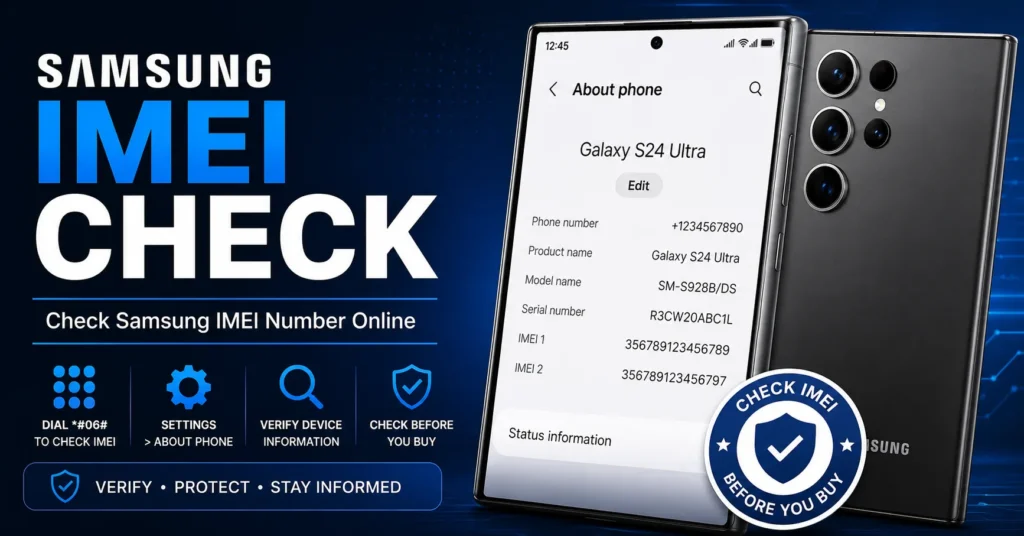
- Dial *#06# in the Phone app.
- Open Settings → About phone.
- Check the original Samsung packaging.
- Use Samsung Members on supported devices.
- Check the device itself on models where the IMEI is printed externally.
Samsung’s current support documentation confirms that the IMEI can be displayed by dialing *#06# or by opening Settings → About phone.
Samsung IMEI Check Using *#06#
The fastest way to perform a basic Samsung IMEI check is usually the Phone app.
Step 1: Open the Phone App
Open the standard Phone application on your Samsung Galaxy device.
Step 2: Enter *#06#
Enter:
*#06#
Step 3: View the IMEI
The phone should display its available IMEI and, depending on the device, other identification information.
Samsung documents this method as one of the standard ways to retrieve the IMEI and serial number.
Samsung IMEI Check Through Settings
You can also find the IMEI directly through the Galaxy settings.
On many recent Samsung devices, use:
Settings → About phone
The screen can display information such as:
- Phone number
- Model name
- Model number
- Serial number
- IMEI
Samsung notes that the exact screens can vary depending on the phone model, software version and wireless service provider.
Samsung IMEI Check on Older Galaxy Phones
Older Samsung Galaxy phones can use slightly different menu structures.
On some older versions of Android, you may need to open:
Settings → About phone → Status → IMEI information
The exact menu depends on the Android version and Samsung software installed on the phone.
Samsung’s support documentation also notes that older devices may require you to open Status to find the IMEI.
Samsung IMEI Check Using Samsung Members
Samsung Members can provide device information on supported devices that have been registered with a Samsung account.
Depending on the current version of the Samsung Members application, you may find device information through the support or device-information section.
Samsung’s support documentation lists Samsung Members as another method for finding the model, serial number and IMEI on supported Galaxy devices.
Samsung IMEI Check Without Turning On the Phone
If the Galaxy phone cannot be turned on, there may still be other ways to find its IMEI.
Depending on the model, check:
- Original Samsung box
- Purchase documentation
- Carrier account
- Samsung account or Samsung Members information
- Printed information on the device
- Removable battery area on supported older models
Samsung currently lists the original packaging, carrier information and certain physical locations as alternative places to find device identification information.
Samsung IMEI Check on Galaxy S Series
The Galaxy S family includes many generations of Samsung smartphones, and the exact interface can change between models.
Whether you own an older Galaxy S phone or a recent Galaxy S model, the most useful starting points are usually:
- *#06#
- Settings → About phone
- Original packaging
Samsung’s current support guidance applies these general methods across Galaxy phones, although menus can vary by model and software version.
Samsung IMEI Check on Galaxy A Series
Galaxy A phones also have an IMEI associated with their cellular hardware.
If you are checking a used Galaxy A phone, retrieve the IMEI directly from the device whenever possible and compare it with the information supplied by the seller.
This is especially useful when buying an older or second-hand Galaxy A model.
Samsung IMEI Check on Galaxy Z Fold and Z Flip
Samsung’s foldable Galaxy devices can support multiple cellular configurations, so some models may display more than one IMEI.
When checking a Galaxy Z Fold or Galaxy Z Flip, record all relevant IMEI values displayed by the device.
Samsung notes that devices with multiple cellular connections can have multiple IMEIs, and its support information explains that device screens and available information can vary by model.
Samsung IMEI Check for Dual-SIM Phones
If your Samsung phone supports Dual SIM, you may see:
- IMEI 1
- IMEI 2
Do not assume that these are duplicate numbers.
They can correspond to different cellular connections on the same device.
If you are checking a used Dual-SIM Samsung phone, record both numbers before performing additional checks.
Samsung IMEI Check Before Buying a Used Phone
One of the most useful reasons to perform a Samsung IMEI check is before buying a second-hand Galaxy phone.
An IMEI check should be part of a larger inspection.
Before paying for a used Samsung phone, check:
- IMEI number
- Model name
- Model number
- Serial number
- Blacklist status
- Carrier compatibility
- Activation status
- Ownership information
- Physical condition
- Battery condition
- Camera functionality
- Charging port
- SIM functionality
- Mobile network connection
Why Check Samsung IMEI Before Buying?
The information associated with an IMEI can help you compare the device you are holding with the information supplied by the seller.
For example, if the lookup identifies a different model from the phone being sold, investigate the discrepancy before purchasing.
Whenever possible, obtain the IMEI directly from the actual phone rather than relying only on a number sent to you by the seller.
Samsung IMEI Check vs Serial Number
The IMEI and serial number are not the same thing.
| Identifier | Purpose |
|---|---|
| IMEI | Identifies cellular mobile equipment. |
| Serial number | Manufacturer-assigned identifier for an individual device. |
| Model number | Identifies a particular Samsung device variant. |
| Phone number | Identifies the mobile service or subscriber. |
Samsung specifically distinguishes the IMEI, serial number and model number as separate forms of device identification.
Samsung IMEI Check vs Samsung Model Number
A Samsung model number identifies a particular device variant, while the IMEI identifies the individual cellular device.
For example, many phones can share the same model number, while each individual cellular device has its own IMEI.
When buying a used Samsung phone, check both the model number and IMEI.
Samsung IMEI Check Online
A Samsung IMEI check online can be used to investigate information associated with the IMEI after you have obtained the correct number.
The information available depends on the particular service and database.
Depending on the service, an online check may provide information about:
- Manufacturer
- Device model
- Device type
- Carrier-related information
- Reported device status
- Blacklist-related information
- Other available device data
Not every online IMEI service provides the same information, so always check what a particular service actually reports.
For a broader guide covering IMEI checks across different phone brands, see our IMEI Number Check Online Tool.
Samsung IMEI Blacklist Check
A Samsung IMEI check and a blacklist check are related but different.
An IMEI check can help identify the device, while a blacklist check focuses specifically on whether the device identifier has been reported or restricted in a relevant database.
If you are buying a used Samsung phone, checking blacklist status can be an important additional step.
For this specific search intent, use our IMEI Blacklist Checker.
What Does a Blacklisted Samsung IMEI Mean?
A blacklisted IMEI generally means that the device identifier has been reported or restricted in a relevant carrier or device-status database.
Possible reasons can include:
- Lost-device report
- Stolen-device report
- Insurance-related report
- Carrier-related restriction
- Other device-status issues
The exact reason depends on the carrier, country and organization maintaining the status.
If you believe a Samsung device has been incorrectly reported, contact the relevant carrier, seller or organization responsible for the status.
What If Samsung IMEI Does Not Match the Box?
If the IMEI displayed by the Samsung phone does not match the IMEI printed on the original box, investigate the discrepancy.
Possible explanations include:
- Previous motherboard replacement
- Previous authorized repair
- Incorrect packaging
- Incorrect documentation
- Device replacement
- Other service history
Do not automatically assume that the phone needs an IMEI change.
If you are buying the device, ask the seller to explain the discrepancy before completing the purchase.
What If Samsung IMEI Is Missing?
If your Galaxy phone does not display an IMEI, this is different from performing a normal Samsung IMEI check.
A missing IMEI can be associated with:
- Firmware problems
- Modem problems
- Configuration problems
- Previous software modification
- Failed firmware flashing
- Previous repair
- Hardware problems
If your phone originally had a legitimate IMEI, the goal should generally be to diagnose and restore the original device information rather than assign an unrelated identifier.
For this situation, read our IMEI Repair Tool guide.
What If Samsung IMEI Says Invalid?
An Invalid IMEI can indicate that the phone cannot correctly retrieve or validate its expected device-identification information.
If the problem appeared after flashing firmware, resetting the phone, installing modifications or performing a repair, record what happened immediately before the problem appeared.
This can help determine whether the problem involves firmware, modem configuration, protected device data or another component.
What If Samsung IMEI Says Unknown?
If the Galaxy phone reports an unknown or unavailable IMEI, investigate the device’s cellular and software status.
Also check whether the phone displays a normal baseband version.
If both IMEI and baseband information are missing, the issue may be broader than an IMEI display problem.
For more detailed troubleshooting, see our IMEI Repair Tool guide.
Samsung IMEI Check and Baseband Status
Baseband information is associated with the phone’s cellular modem software.
If a Samsung phone has both an IMEI problem and a Baseband Unknown message, investigate the modem and firmware environment as part of the diagnosis.
An online IMEI check cannot repair a damaged baseband configuration.
Samsung IMEI Check and Warranty Information
The IMEI can be useful when dealing with Samsung support, repair services and device records.
However, an IMEI alone does not necessarily provide every piece of warranty information.
Warranty availability can depend on country, purchase date, product, seller, registration and Samsung’s own records.
If you are specifically researching Samsung warranty status, see our Samsung Warranty Status guide.
Samsung IMEI Check and Lost or Stolen Phones
The IMEI can be important when a Samsung phone is lost or stolen.
Samsung explains that the IMEI and serial number are device identifiers that can be useful in situations involving lost or stolen devices.
If your phone is lost or stolen, contact your carrier and follow the appropriate reporting and account-security procedures.
Do not publish your complete IMEI publicly.
Can a Samsung IMEI Check Track a Phone?
No.
An ordinary public Samsung IMEI check does not provide a phone’s live GPS location.
The IMEI is a device identifier, not a public location-tracking system.
If you have lost your Galaxy phone, use Samsung and Google device-location services, contact your carrier and report the loss when appropriate.
Can a Samsung IMEI Check Unlock a Phone?
No.
Checking an IMEI and unlocking a carrier-locked phone are different processes.
If your Samsung phone displays a network or SIM lock, investigate the carrier’s official unlocking process.
For related information, see our SIM Unlock guide.
Can a Samsung IMEI Check Remove a Blacklist?
No.
An IMEI check can investigate available device information or status, but it does not remove a blacklist.
If the status is incorrect, contact the carrier or organization responsible for the report.
Do not use IMEI modification as a method of concealing a reported or restricted device.
Samsung IMEI Check vs Samsung IMEI Changer
These are completely different search intents.
| Search | Purpose |
|---|---|
| Samsung IMEI check | Check or investigate Samsung device information. |
| Samsung IMEI blacklist check | Investigate reported or restricted status. |
| Samsung IMEI repair | Troubleshoot a missing, Invalid or damaged IMEI. |
| Samsung IMEI changer | Information about IMEI modification tools and terminology. |
This page is intentionally focused on Samsung IMEI check.
For the broader Samsung IMEI changer topic, see our Samsung IMEI Change Tool guide.
Samsung IMEI Check for Used Galaxy Phones
If you are buying a used Galaxy phone, an IMEI check should be part of a complete inspection.
Before buying, ask the seller to let you:
- Open Settings → About phone.
- View the IMEI.
- Compare the IMEI with the packaging.
- Check the exact model number.
- Check the serial number.
- Insert a compatible SIM if appropriate.
- Test mobile network connectivity.
- Check the phone’s physical condition.
Then investigate the IMEI through an appropriate checking service.
Samsung IMEI Check for Refurbished Phones
Refurbished Samsung phones require additional attention because components may have been replaced during refurbishment.
A difference between the IMEI on the original box and the IMEI displayed by the device can therefore require additional investigation.
Ask the seller or refurbisher for documentation explaining any relevant repair or component replacement.
Samsung IMEI Check for Dual-SIM Galaxy Phones
If the phone displays two IMEIs, record both.
Do not assume that checking only IMEI 1 provides every piece of information about a Dual-SIM device.
When purchasing a used Dual-SIM Samsung phone, check the cellular functionality associated with the SIM slot or eSIM configuration you intend to use.
How Accurate Is a Samsung IMEI Check?
The accuracy of an online IMEI check depends on the database and information available to the service.
Different services can return different information.
For this reason, an IMEI result should be treated as one part of your device research rather than absolute proof of every aspect of a phone’s history.
For important purchases, combine the IMEI check with ownership verification, physical inspection and carrier-related checks.
Samsung IMEI Check vs IMEI Lookup
These terms overlap significantly.
An IMEI lookup generally focuses on finding information associated with an IMEI.
An IMEI check can include verifying device information or investigating status.
If you are looking for the broader IMEI lookup topic, see our IMEI Lookup guide.
Samsung IMEI Check vs General IMEI Check
The general IMEI Number Check Online Tool page covers IMEI checking across different phone manufacturers.
This page is narrower and focuses specifically on Samsung Galaxy devices.
That distinction is useful for visitors searching specifically for Samsung instructions.
Samsung IMEI Check: Important Privacy Advice
An IMEI is a device identifier.
Samsung advises users to keep their IMEI information available for legitimate support and lost-device situations, but you should avoid posting your complete IMEI publicly or sharing it unnecessarily.
When using an online IMEI service, avoid providing additional personal information unless it is genuinely required.
Frequently Asked Questions About Samsung IMEI Check
How do I check my Samsung IMEI?
Open the Phone app and dial *#06#, or open Settings → About phone. Samsung lists both methods as standard ways to find the IMEI.
How many digits does a Samsung IMEI have?
A standard IMEI contains 15 digits. Some Samsung phones can display more than one IMEI because they support multiple cellular connections.
Where is the IMEI on a Samsung Galaxy?
Depending on the model, you can find it through *#06#, Settings → About phone, Samsung Members, the original packaging or certain physical locations on the device.
Can I check Samsung IMEI online?
Yes. Once you have the correct IMEI, you can use an appropriate online IMEI checking service to investigate available device information.
Can I check Samsung IMEI without the phone?
If you have the original box, purchase documentation, carrier records or previously recorded device information, you may be able to obtain the IMEI without turning on the phone.
Can I check Samsung IMEI before buying a used phone?
Yes. It is a useful precaution when buying a used Galaxy phone, but it should be combined with a physical inspection and ownership verification.
What if the Samsung IMEI does not match the box?
Investigate the discrepancy. Previous repairs, motherboard replacement, incorrect packaging or documentation can be possible explanations.
What if my Samsung IMEI is missing?
Investigate the firmware, modem, configuration and repair history. For troubleshooting information, see our IMEI Repair Tool guide.
What if my Samsung says Invalid IMEI?
An Invalid IMEI can indicate a software, firmware, modem, configuration or hardware problem. It should be diagnosed rather than treated as a normal IMEI-checking issue.
What if my Samsung has Baseband Unknown?
If Baseband Unknown appears together with an IMEI problem, investigate the modem and firmware environment as well as the IMEI itself.
Can Samsung IMEI check tell me if the phone is blacklisted?
Some IMEI services provide blacklist-related information. For dedicated blacklist checking, use our IMEI Blacklist Checker.
Can Samsung IMEI check track my phone?
No. An ordinary IMEI check does not provide the phone’s live location.
Can Samsung IMEI check unlock a carrier lock?
No. IMEI checking and carrier unlocking are separate processes.
Can Samsung IMEI check remove a blacklist?
No. A check can investigate status but does not remove a reported or restricted status.
Is the Samsung IMEI the same as the serial number?
No. Samsung identifies the IMEI and serial number as separate device identifiers.
Is the Samsung IMEI the same as the model number?
No. The model number identifies a device variant, while the IMEI identifies the individual cellular device.
Where can I check Samsung warranty information?
Warranty information depends on Samsung’s records, country and purchase details. For our dedicated guide, see Samsung Warranty Status.
Related Samsung and IMEI Resources
- IMEI Number Check Online — general IMEI checking across phone brands.
- IMEI Lookup — broader IMEI lookup information.
- IMEI Blacklist Checker — investigate reported or restricted device status.
- IMEI Repair Tool — Invalid, Null, Unknown and missing IMEI troubleshooting.
- Samsung IMEI Change Tool — Samsung-specific IMEI changer information.
- Samsung Warranty Status — Samsung warranty-related information.
- SIM Unlock Guide — SIM and carrier unlocking information.
Final Thoughts on Samsung IMEI Check
A Samsung IMEI check is a simple but useful way to investigate a Galaxy phone.
Start by finding the IMEI directly on the device using *#06# or Settings → About phone. Samsung officially documents both methods, along with additional options such as Samsung Members and the original packaging.
If you are buying a used Samsung phone, compare the IMEI with the model, serial number and available documentation. Then investigate the device’s status through an appropriate IMEI checking service.
Remember that a Samsung IMEI check is not the same as an IMEI blacklist check, IMEI repair, SIM unlock or IMEI changer.
If you want a general IMEI check across different phone brands, visit our IMEI Number Check Online Tool.
If you are specifically investigating a potentially blacklisted Samsung phone, use our IMEI Blacklist Checker.
If your Galaxy phone has a missing or Invalid IMEI, use our IMEI Repair Tool guide.
For Samsung IMEI changer information, see our Samsung IMEI Change Tool resource.
This page is specifically focused on the Samsung IMEI check search intent, keeping Samsung checking information separate from your broader IMEI lookup, blacklist, repair and changer pages.
Updated: August 30, 2026