What Is an ICCID Number?
What Is an ICCID Number? An ICCID is the unique identifier associated with a SIM card or, in the case of an eSIM, a specific SIM profile. It is different from your phone number, IMEI, EID, and account information, even though these identifiers can appear together when you inspect a modern smartphone. Understanding the ICCID is particularly useful when activating a SIM, troubleshooting cellular service, moving an eSIM between devices, or trying to identify which SIM profile is being used.
The easiest way to think about it is simple:
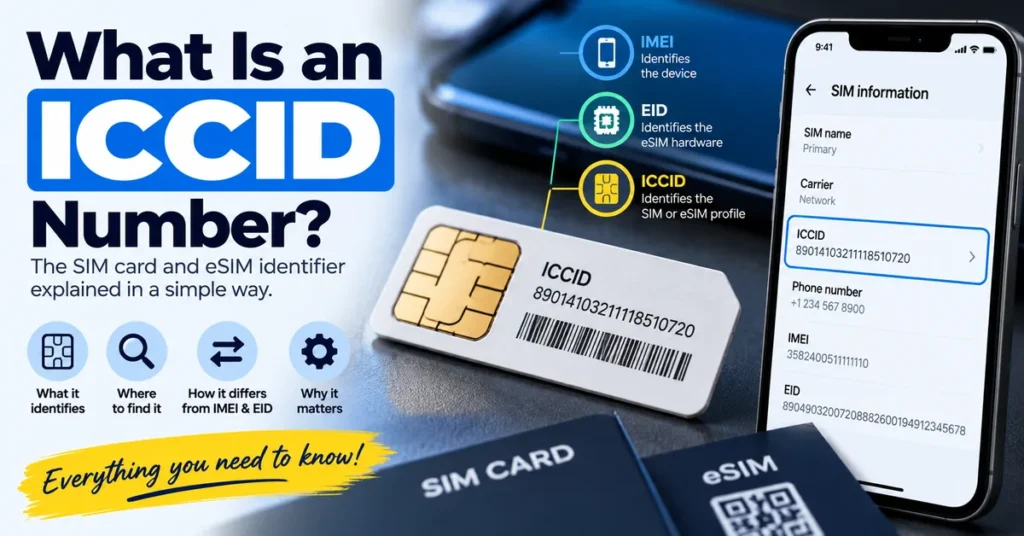
IMEI identifies the cellular device.
EID identifies the eSIM hardware.
ICCID identifies the SIM or eSIM profile.
That distinction becomes much more important as phones move between physical SIM cards, eSIMs, dual-SIM configurations, and multiple cellular plans.
What Does ICCID Stand For?
ICCID stands for Integrated Circuit Card Identifier.
It is a unique identifier associated with a SIM. NIST describes the ICCID as a unique identifier maintained within the SIM, while the ITU defines the ICCID as the number used to identify a SIM/UICC or a profile on an eUICC.
With a traditional physical SIM, the ICCID is associated with the SIM card itself and is commonly printed on the card.
With an eSIM, the situation is slightly different.
The eSIM hardware has its own EID, while an individual eSIM profile has an ICCID.
That distinction is one of the most important things to understand about modern SIM identification.
What Does an ICCID Number Identify?
An ICCID identifies the SIM or SIM profile rather than the physical phone.
For example, if you move a physical SIM from one compatible phone to another, the SIM’s ICCID remains associated with that SIM even though the phone’s IMEI changes.
Likewise, an eSIM-capable phone can have an EID identifying its eSIM hardware while an installed cellular plan has its own ICCID.
This creates a useful separation between the device and the mobile subscription:
| Identifier | What it identifies |
|---|---|
| IMEI | Cellular device |
| IMEI 2 | Additional cellular-device identity on supported devices |
| EID | eSIM hardware |
| ICCID | SIM or eSIM profile |
| Phone number | Mobile service number |
| Serial number | Manufacturer’s device identifier |
If you are still getting these numbers mixed up, our guide What Is an EID Number on a Phone? explains the EID side of the equation in more detail.
ICCID vs IMEI: What Is the Difference?
ICCID and IMEI are often confused because both can be displayed in the same phone settings screen.
They identify completely different things.
IMEI Identifies the Phone
The IMEI is associated with the cellular equipment inside the phone.
If you replace the SIM card, the phone’s IMEI normally remains unchanged.
Our What Is an IMEI Number? guide goes deeper into how IMEI identification works and why it matters when checking a phone.
ICCID Identifies the SIM
The ICCID is associated with the SIM or eSIM profile.
Changing the SIM can therefore mean that the phone is now using a different ICCID while the device continues to have the same IMEI.
A Simple Example
Imagine you have one Android phone with IMEI:
IMEI: 123456789012345
You remove SIM A and insert SIM B.
The phone’s IMEI does not normally change.
But the ICCID being used by the phone can change because you are now using a different SIM.
That is why an ICCID should never be treated as another form of IMEI.
ICCID vs EID: Why Are They Different?
This is especially important for eSIM users.
An eSIM-capable phone can contain an eSIM hardware component with an EID.
That hardware can contain or manage one or more cellular profiles, each associated with its own ICCID.
In simplified form:
EID → identifies the eSIM hardware
ICCID → identifies an individual SIM/eSIM profile
This distinction is recognized in industry standards. ITU-T E.118 describes the ICCID as identifying a UICC or a profile in an eUICC, while the EID is used to identify the eSIM hardware itself.
If you are specifically trying to locate the EID on an Android phone, see our How to Find EID Number on Android guide.
If you use an iPhone, our How to Find EID Number on iPhone guide covers the Apple-specific process.
What Does an ICCID Number Look Like?
An ICCID is a long numeric identifier.
Depending on the SIM and numbering scheme, it can contain a relatively large number of digits, so it should not be confused with a typical phone number or IMEI.
A physical SIM may have the ICCID printed directly on it, although the exact presentation depends on the SIM and carrier.
For an eSIM, you normally won’t have a physical card to inspect. Instead, the ICCID may be available through the phone’s settings or cellular-plan information.
The important point is that the ICCID is an identifier rather than something you should interpret like a normal telephone number.
Where Can You Find an ICCID Number?
The exact location depends on your phone, operating system, SIM type, and carrier.
Common places include:
- Phone Settings
- SIM or cellular-plan information
- About/device information
- Original SIM card
- SIM packaging
- Carrier documentation
- Account or activation records
Finding ICCID on iPhone
On supported iPhones, Apple provides the ICCID through:
Settings → General → About
Apple’s current documentation lists ICCID alongside other device identifiers such as the EID and IMEI/MEID. Apple also provides other ways to access these identifiers through connected computers, an Apple Account, and original packaging.
If you are looking for several iPhone identifiers at once, our How to Find EID Number on iPhone guide can help you distinguish the EID from the ICCID.
Finding ICCID on Android
Android manufacturers use different menu structures, so there is no universal path.
Depending on the phone, look under areas such as:
Settings → About phone
or:
Settings → SIM / Mobile network
or:
Settings → SIM status
The exact wording can vary between Samsung, Google Pixel, Xiaomi, Motorola, OnePlus, and other manufacturers.
If the ICCID is not displayed, the carrier or SIM documentation may provide another way to identify the SIM.
Can You Find the ICCID on a Physical SIM Card?
Often, yes.
The ICCID is commonly printed on the physical SIM or associated SIM packaging.
However, the amount of information printed on a SIM varies.
Some SIM cards have a long number visibly printed on the plastic, while others may show only limited identifying information.
If you can remove the SIM safely, inspect the card and compare the number with the information shown by the phone.
Do not assume that every long number printed on SIM packaging is automatically the ICCID without checking the labeling.
Does an eSIM Have an ICCID?
Yes.
An eSIM does not eliminate the concept of an ICCID.
Instead, the relationship changes.
The EID identifies the eSIM hardware, while the ICCID identifies the individual SIM profile installed or associated with that eSIM environment.
This is why an eSIM-capable phone can show both an EID and an ICCID.
A phone may therefore contain:
- EID
- ICCID
- IMEI
- IMEI 2
- Phone number
- Carrier information
These numbers can appear together but represent different layers of the cellular system.
Can One Phone Have Multiple ICCIDs?
Yes.
A modern phone can potentially use more than one SIM or eSIM profile, depending on its hardware and software capabilities.
For example, a dual-SIM device may have different identifiers associated with its active SIM configurations.
An eSIM can also support multiple downloaded profiles, although the exact behavior and active-profile rules depend on the device, carrier, and eSIM implementation.
The important point is that one phone does not necessarily equal one ICCID.
The phone itself has its device identifiers, while individual SIM or eSIM profiles have their own identifiers.
Does the ICCID Change When You Change SIM Cards?
Yes, changing the SIM can mean that the phone is now using a different ICCID.
For example:
SIM A → ICCID A
SIM B → ICCID B
The phone can remain the same physical device:
Phone → same IMEI
This is one of the clearest ways to understand the difference between IMEI and ICCID.
The device stays the same while the SIM identity changes.
Does the Phone Number Match the ICCID?
No.
A phone number and ICCID are different identifiers.
The phone number is associated with your mobile service.
The ICCID identifies the SIM or eSIM profile.
This means you should not expect the digits in your phone number to match the ICCID.
A carrier can associate a mobile number with a particular SIM profile, but that does not make the two numbers interchangeable.
ICCID vs IMSI: Are They the Same?
No.
ICCID and IMSI are both related to mobile subscriptions, but they serve different identification purposes.
ICCID
The ICCID identifies the SIM or SIM profile.
IMSI
The IMSI is associated with the mobile subscriber identity used by the cellular network.
They may be stored or managed within the same SIM environment, but they should not be treated as the same number.
This distinction is particularly useful when reading technical documentation about SIM cards, mobile networks, or eSIM technology.
What Is the ICCID Used For?
The ICCID can be useful in several legitimate cellular-service situations.
SIM Identification
A carrier can use the ICCID to identify a particular SIM or eSIM profile.
Activation
During SIM or eSIM activation, the ICCID can be relevant to identifying the profile being provisioned or managed.
Carrier Support
A support representative may ask for SIM-related information when troubleshooting cellular service.
SIM Replacement
When replacing a SIM, the old and new SIMs have different identifiers.
The ICCID can help distinguish the particular SIM involved.
eSIM Troubleshooting
For eSIM users, the ICCID can help distinguish one cellular profile from another.
The carrier may ask for the ICCID, EID, IMEI, or another identifier depending on the problem.
The safest approach is to provide exactly the identifier the carrier requests.
Can an ICCID Identify Your Phone?
Not by itself.
The ICCID identifies the SIM or eSIM profile, not the physical phone.
The IMEI is the more relevant identifier when the question is:
“Which cellular device is this?”
The ICCID is more relevant when the question is:
“Which SIM or eSIM profile is this?”
This distinction is particularly useful when troubleshooting a used phone or switching service between devices.
Can You Track a Phone With an ICCID?
An ICCID is not a public phone-location tool.
Knowing an ICCID does not give an ordinary user a method for viewing the live GPS location of a phone.
The ICCID is a SIM-related identifier.
Location services and device-finding systems are separate technologies.
Be cautious with websites that claim that entering an ICCID will reveal the exact live location of a phone.
Can You Find an ICCID From an IMEI?
An IMEI and ICCID are separate identifiers.
An IMEI identifies the cellular device, while an ICCID identifies the SIM or eSIM profile.
A service may have access to both types of information in a particular carrier database, but there is no universal public conversion in which you simply enter an IMEI and calculate the correct ICCID.
If your goal is to investigate the phone itself, use our IMEI Lookup Tool.
If your goal is to identify the SIM or eSIM profile, look for the ICCID through the phone’s SIM information or the carrier’s records.
Can You Check an ICCID Online?
There is no universal public ICCID checker that provides the same information for every SIM and carrier.
The information available depends heavily on the carrier, country, service provider, and database.
If you are trying to investigate a phone’s device status, an IMEI check is generally the more appropriate route.
Our IMEI Number Check Online Tool is designed around that different search intent.
For a second-hand phone, you can also investigate whether the device’s IMEI has a reported or restricted status using our IMEI Blacklist Checker.
What If the ICCID Is Missing?
A missing ICCID can have several explanations.
The Phone Does Not Display It
Some manufacturers simply expose less SIM information through their settings.
The SIM Is Not Properly Detected
If the physical SIM is not being recognized, SIM-related information may also be unavailable.
The eSIM Profile Is Not Active
An eSIM profile that has not been properly installed or activated may not appear in the same way as an active cellular profile.
The Carrier Configuration Is Different
Carrier and regional settings can influence what information is displayed.
The SIM May Need to Be Replaced
If the SIM is damaged or malfunctioning, contact the carrier rather than assuming the ICCID itself is the problem.
What If the ICCID Does Not Match the SIM?
If you have a physical SIM and the ICCID printed on it appears different from the ICCID shown by the phone, stop and verify what information you are comparing.
Possible explanations include:
- You are looking at the wrong SIM.
- The phone has multiple SIMs.
- An eSIM profile is active instead.
- The printed number is not the ICCID.
- The SIM was replaced.
- The phone is displaying a different active profile.
On a dual-SIM or eSIM-capable device, this becomes particularly important because several SIM-related identifiers may exist.
Is the ICCID the Same on a SIM and eSIM?
The concept is the same, but the physical implementation is different.
A traditional physical SIM has an ICCID associated with that SIM card.
An eSIM uses an eUICC with an EID for the hardware and ICCIDs associated with individual profiles.
So:
Physical SIM → ICCID identifies the SIM
eSIM hardware → EID identifies the hardware
eSIM profile → ICCID identifies the profile
This is one of the most useful distinctions to remember when working with modern cellular devices.
Should You Share Your ICCID?
Treat the ICCID as a device and service-related identifier rather than something to publish unnecessarily.
If a legitimate carrier or service provider asks for the ICCID as part of account support or activation, provide it through the appropriate official channel.
Avoid posting complete SIM identifiers publicly in screenshots, forums, or social media unless there is a specific reason to do so.
Also remember that an ICCID alone is not a substitute for account authentication.
ICCID When Buying a Used Phone
The ICCID can sometimes provide useful information during a used-phone inspection, but it should not be treated as proof that a phone is legitimate or safe to purchase.
For a second-hand device, focus on the complete picture.
Check:
- IMEI
- IMEI status
- Blacklist status
- eSIM capability
- SIM functionality
- Carrier compatibility
- Account locks
- Device condition
- Proof of ownership
The ICCID can help you understand which SIM or eSIM profile is being used, but it does not replace an IMEI check.
Why ICCID Matters More With eSIM
The transition from physical SIM cards to eSIM makes the difference between ICCID and EID more important.
With a traditional SIM, people often thought of the SIM card and its identifier as essentially the same thing.
With eSIM, the hardware and the cellular profile are more clearly separated.
The hardware has an EID.
The individual profile has an ICCID.
This allows the eSIM hardware to host or manage cellular profiles without treating the hardware identifier and profile identifier as the same thing.
That distinction is part of why modern phones can show several identifiers that all appear to relate to “the SIM.”
Quick Comparison: IMEI, EID, ICCID and Phone Number
| Identifier | Identifies | Changes when you change SIM? |
|---|---|---|
| IMEI | Cellular device | Normally no |
| IMEI 2 | Additional device cellular identity | Normally no |
| EID | eSIM hardware | Normally no |
| ICCID | SIM/eSIM profile | Yes, when you switch to a different SIM/profile |
| Phone number | Mobile service | Can change independently |
This table is useful because it shows why asking for “the SIM number” without specifying the identifier can create confusion.
Frequently Asked Questions
What is an ICCID number?
An ICCID is a unique identifier associated with a SIM card or an individual eSIM profile.
What does ICCID stand for?
ICCID stands for Integrated Circuit Card Identifier.
Is an ICCID the same as a phone number?
No. The phone number identifies your mobile service, while the ICCID identifies the SIM or eSIM profile.
Is an ICCID the same as an IMEI?
No. The IMEI identifies the cellular device, while the ICCID identifies the SIM or eSIM profile.
Is an ICCID the same as an EID?
No. The EID identifies the eSIM hardware, while the ICCID identifies the individual SIM or eSIM profile.
Where can I find my ICCID?
Depending on your phone and SIM type, the ICCID may be available in Settings, SIM or cellular-plan information, on the physical SIM, on SIM packaging, or through carrier documentation.
Can I find ICCID on iPhone?
Yes. Apple currently lists ICCID under Settings → General → About on supported iPhones.
Can I find ICCID on Android?
Often, but the exact location varies by manufacturer and Android version. Look through About phone, SIM status, SIM information, or mobile-network settings.
Does an eSIM have an ICCID?
Yes. An individual eSIM profile can have an ICCID, while the eSIM hardware itself has an EID.
Can one phone have multiple ICCIDs?
Yes. A phone can have multiple SIM or eSIM profiles depending on its hardware, software, and carrier configuration.
Does changing my SIM change the ICCID?
If you replace the SIM with another SIM, the phone will generally be using a different ICCID.
Can an ICCID track a phone?
No. An ICCID is a SIM-related identifier and is not a public live-location tracking tool.
Can I find an ICCID from an IMEI?
There is no universal public conversion from IMEI to ICCID. They are separate identifiers associated with different parts of the cellular system.
Can I check an ICCID online?
There is no universal public ICCID checker that provides complete information for every SIM or carrier. Carrier systems determine what information is available.
Why does my phone show an ICCID and EID?
On an eSIM-capable device, this is normal. The EID identifies the eSIM hardware, while the ICCID identifies an individual cellular profile.
What should I do if my ICCID is missing?
Check the SIM status or cellular-plan settings, verify that the SIM or eSIM is active, and contact your carrier if the profile is not being detected correctly.
The Simple Way to Remember ICCID
The easiest way to remember what an ICCID number means is to separate the phone, the eSIM hardware, and the SIM profile.
IMEI → the phone
EID → the eSIM hardware
ICCID → the SIM or eSIM profile
Phone number → the mobile service
Once these four identifiers are separated, many common SIM and eSIM questions become much easier to understand.
If you need to investigate the physical phone, continue with our What Is an IMEI Number? guide or IMEI Lookup Tool.
If you are dealing specifically with eSIM hardware, read What Is an EID Number on a Phone?.
And if you are trying to locate the EID on your device, see our guides for finding the EID on Android or finding the EID on iPhone.
The ICCID itself is simply the identifier for the SIM or eSIM profile. Knowing what it identifies—and what it does not identify—is the key to using the number correctly.