How to Find EID Number on Android
How to Find EID Number on Android depends on the manufacturer, model, Android version, and whether the phone supports eSIM. Unlike iPhone, Android does not have one universal menu path for every device. On many compatible phones, the EID can be found under About phone, Status, or SIM status, but the exact location differs between Google Pixel, Samsung Galaxy, and other Android brands.
If your carrier has asked for your EID during eSIM activation, you need to locate the actual EID rather than providing your IMEI, IMEI 2, or ICCID. This guide shows where to look, how the EID differs from other phone identifiers, and what to do when the number does not appear.
What Is an EID Number on Android?
EID stands for Embedded Identity Document.
It is the identifier associated with the eSIM hardware inside a compatible phone. In other words, the EID relates to the hardware that allows the device to use an embedded SIM.
That makes it different from the other identifiers you may see on an Android phone.
- EID — identifies the eSIM hardware.
- IMEI — identifies the cellular device.
- IMEI 2 — identifies a second cellular connection on supported devices.
- ICCID — identifies a particular SIM or eSIM profile.
- Serial number — identifies the physical device for the manufacturer’s purposes.
- Phone number — identifies the mobile service rather than the phone hardware.
If you want to understand the EID in more detail before looking for it on your phone, read our guide What Is an EID Number on a Phone?.
Where Is the EID Number on Android?
There is no single location that works for every Android phone.
Depending on the manufacturer, the EID may be located under:
- Settings → About phone
- Settings → About device
- Settings → Status
- Settings → SIM status
- Settings → SIM information
- Settings → Device information
The simplest approach is to open Settings and then search for EID if your Android version provides a Settings search function.
If that does not produce a result, open About phone and look for status or SIM-related information.
The important thing is not to assume that the menu structure on one Android phone will be identical to another.
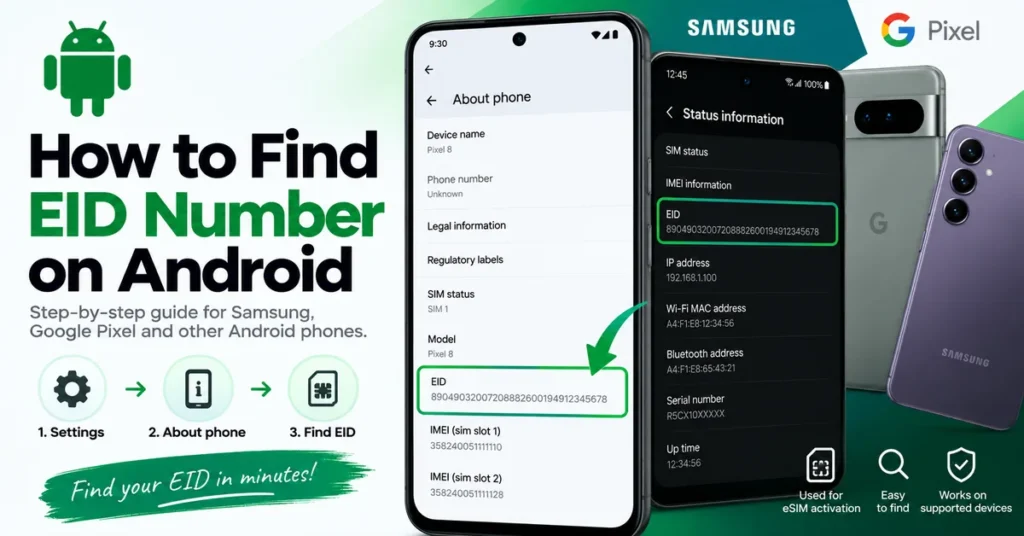
How to Find EID Number on Android Step by Step
Start with the phone’s built-in Settings rather than installing a third-party application.
Step 1: Open Settings
Open the Settings application on your Android phone.
Step 2: Select About Phone
Scroll through the Settings menu and select About phone.
Some manufacturers may use About device or slightly different wording.
Step 3: Open Status or SIM Information
Look for an option such as:
- Status
- SIM status
- SIM information
- Status information
- Device information
Step 4: Find EID
Look for the entry labeled EID.
If your phone supports eSIM and exposes the identifier through its software, the EID should be displayed in the appropriate device-information area.
Step 5: Copy the EID
If you need the number for eSIM activation, copy it directly from the phone when possible.
Because an EID is a long identifier, manually typing it creates an unnecessary opportunity for an incorrect digit.
How to Find EID on Google Pixel
Google Pixel phones have a relatively straightforward route to the EID on supported models.
Google Pixel EID Location
Start with:
Settings → About phone → SIM status → EID
The SIM status screen can contain several pieces of cellular information, so make sure you select the entry specifically labeled EID.
You may also see IMEI information on the same device.
Do not confuse those numbers.
Google documents the EID separately from IMEI 1 and IMEI 2, which is important when a carrier requests a specific identifier.
What If the EID Is Not on Your Pixel?
First confirm that your particular Pixel model and regional version support eSIM.
If eSIM is supported but you still cannot locate the number, check the original packaging or Google’s documentation for the exact model.
How to Find EID on Samsung Galaxy
Samsung Galaxy phones use a somewhat different organization for device information.
Samsung Galaxy EID Location
On supported Galaxy phones, start with:
Settings → About phone → Status
Look through the Status information for an entry labeled EID.
The exact location can vary according to the Galaxy model, Android version, region, and carrier configuration.
If you do not see it immediately, use the Settings search function and search for EID.
Why Samsung EID Locations Can Differ
Samsung produces Galaxy devices for many markets, and not every variant has identical cellular capabilities.
Two phones with similar model names can differ in:
- eSIM support
- SIM configuration
- software
- carrier configuration
- regional hardware
For that reason, always verify the exact model rather than assuming that every Galaxy phone has the same EID menu.
What If You Cannot Find the EID?
Not finding an EID does not automatically mean that your Android phone has a problem.
There are several possible explanations.
Your Phone Does Not Support eSIM
Some Android phones only support physical SIM cards.
If the phone does not have eSIM hardware, there may be no EID available to display.
Your Regional Variant Is Different
An Android model sold in one country may have different SIM capabilities from the same model sold elsewhere.
This is especially important when dealing with imported phones.
The EID Is Located Somewhere Else
Check:
- About phone
- Status
- SIM status
- SIM information
- Device information
- Mobile or SIM settings
Also try searching EID from the Settings search bar.
The Original Box May Have the Information
If you still have the phone’s original packaging, inspect the identification label.
Depending on the manufacturer and model, several device identifiers may be printed there.
The Carrier Can Confirm What You Need
If you are trying to activate an eSIM and cannot find the EID, contact the carrier through its official support channel and ask which identifier is required for your specific device.
EID vs IMEI: What Is the Difference?
EID and IMEI are not two versions of the same number.
They identify different things.
EID
The EID is associated with the phone’s eSIM hardware.
IMEI
The IMEI is associated with the cellular device.
IMEI 2
IMEI 2 is an additional cellular-device identifier found on supported dual-SIM configurations.
ICCID
The ICCID is associated with an individual SIM or eSIM profile.
A simple way to remember the difference is:
EID = eSIM hardware
IMEI = cellular device
ICCID = SIM/eSIM profile
If you want to learn more about finding and understanding IMEI information across Android and iPhone, see our IMEI Lookup Tool guide.
EID vs IMEI 2 on Android
EID and IMEI 2 can be confusing because they may appear close together in the phone’s information screen.
They are nevertheless completely different identifiers.
A compatible Android phone could display:
- IMEI 1
- IMEI 2
- EID
IMEI 1 and IMEI 2 relate to cellular-device identities.
The EID relates to the eSIM hardware.
Therefore, having two IMEIs does not automatically mean that a phone has an EID.
Likewise, an EID should not be treated as another form of IMEI.
EID vs ICCID
The EID and ICCID are also easy to mix up when dealing with eSIM activation.
EID Identifies the eSIM Hardware
The EID is associated with the eSIM hardware built into the device.
ICCID Identifies a SIM Profile
The ICCID is associated with a particular SIM or eSIM subscription profile.
This means a carrier may potentially request either identifier depending on the operation being performed.
If the carrier specifically asks for an EID, do not substitute the ICCID.
Why Does a Carrier Ask for the EID?
The EID can be important when a carrier is working with an eSIM.
You may be asked for it when:
- Activating a new eSIM
- Setting up cellular service
- Troubleshooting an eSIM activation
- Moving service to another compatible device
- Confirming eSIM compatibility
- Resolving an eSIM provisioning problem
A carrier may also request your IMEI or IMEI 2.
Always provide the identifier specifically requested by the carrier.
If you are unsure which number you are looking at, our IMEI Number Check Online Tool guide can help you understand the difference between the major device identifiers.
Can You Find EID With *#06#?
The *#06# code is widely associated with displaying IMEI information on mobile phones.
However, it should not be considered a universal method for finding an Android EID.
What appears after entering the code can depend on:
- Manufacturer
- Model
- Android version
- eSIM support
- Carrier configuration
- Region
If *#06# displays an IMEI but no EID, return to Settings → About phone and investigate the Status or SIM information sections.
How to Find EID Without Opening Settings
There are situations where you may not be able to access the normal Settings menu.
For example, you might be inspecting a used phone or dealing with a device that cannot be fully activated.
Check the Original Phone Box
Look at the manufacturer’s identification label.
Depending on the device, you may find:
- EID
- IMEI
- IMEI 2
- Serial number
- Model number
Do not assume that every Android box will contain every identifier.
Check During Device Setup
Some Android devices provide access to certain device or SIM information during setup.
The exact options depend on the manufacturer and Android version.
Check Manufacturer Information
If you know the exact model number, use it when checking the manufacturer’s documentation.
This is particularly useful for imported devices where the regional variant may have different eSIM capabilities.
How to Copy an EID Correctly
An EID is a long string of numbers, so accuracy matters.
If the phone allows you to copy the identifier:
- Open the screen displaying the EID.
- Press and hold the EID.
- Select Copy if the option is available.
- Paste it into the carrier’s official activation or support form.
- Verify the number before submitting it.
Avoid manually entering a long EID when copying is possible.
You should also avoid publishing the complete identifier in a public screenshot or social media post.
Does Every Android Phone Have an EID?
No.
An EID is associated with eSIM hardware, so Android phones without eSIM capability generally will not have an EID available.
This is why the first question should be whether your exact phone model and regional variant support eSIM.
Android is a large ecosystem, and SIM capabilities can vary substantially between models and regions.
Why Does My Android Have Two IMEIs but No EID?
This is possible because IMEI configuration and eSIM capability are separate characteristics.
A phone can have two IMEIs because it supports multiple cellular connections or SIM configurations without necessarily having eSIM hardware.
If you see two IMEIs but cannot find an EID:
- Confirm the exact model.
- Check whether that model supports eSIM.
- Check the SIM status and About phone sections.
- Search Settings for EID.
If the device is supposed to support eSIM but the EID is still unavailable, check the manufacturer’s documentation or contact the carrier.
Does Changing a SIM Change the EID?
The EID is associated with the phone’s eSIM hardware rather than being the identifier of a physical SIM card.
Changing a physical SIM therefore does not normally mean that the phone receives a new EID.
This is also why the EID should not be confused with the ICCID of a particular SIM or eSIM profile.
Can You Find an EID From an IMEI?
No, you should not assume that an IMEI lookup will reveal the EID.
IMEI and EID are separate device identifiers.
If you need the EID, check the phone itself, the original packaging, manufacturer information, or the appropriate carrier activation process.
If your actual goal is to investigate the IMEI, use our IMEI Number Check Online Tool instead.
Can You Check an EID Online Like an IMEI?
Not generally.
IMEI information is commonly used for device identification and status checks, while the EID is primarily associated with eSIM hardware and carrier activation.
If you are checking a second-hand Android phone, finding its EID should therefore not replace an IMEI check.
For a used device, you can also use our IMEI Blacklist Checker to investigate the device’s IMEI status.
What If the EID Disappeared After a Repair?
If an Android phone previously supported eSIM and the EID is no longer visible after a repair, firmware change, motherboard replacement, or other major service, investigate before making further changes.
Check:
- Exact model number
- Regional variant
- eSIM support
- Android version
- IMEI 1
- IMEI 2
- SIM functionality
- Any displayed error messages
If the phone is also showing Invalid IMEI, IMEI Unknown, Null IMEI, or similar messages, that may be a separate device-identity problem.
Our IMEI Repair Tool guide explains legitimate troubleshooting considerations for IMEI-related problems.
Do not replace device identifiers with information belonging to another phone.
Finding EID When Buying a Used Android Phone
If eSIM capability is important to you, checking for an EID can be useful when inspecting a used Android phone.
However, an EID alone does not prove that the phone is legitimate, unlocked, or free from other problems.
Confirm the Exact Model
Check the full model number rather than relying only on the commercial product name.
Verify eSIM Support
Make sure the specific regional variant supports eSIM.
Check the EID
Look under About phone, Status, SIM status, or the manufacturer’s documented location.
Check the IMEI
Compare the phone’s IMEI information with the seller’s information where appropriate.
Check Blacklist Status
If you are purchasing second-hand, perform an appropriate IMEI status check.
Test the Phone
Where possible, test cellular connectivity, SIM functionality, charging, Wi-Fi, Bluetooth, cameras, and other important functions.
The EID is therefore one useful part of a used-phone inspection rather than a complete verification method.
EID Troubleshooting Checklist
If you cannot locate the EID, work through these checks:
1. Confirm eSIM Support
Verify that the exact model and regional variant supports eSIM.
2. Check About Phone
Open:
Settings → About phone
3. Check Status or SIM Status
Look for:
- Status
- SIM status
- SIM information
- Device information
4. Search Settings
Search for:
EID
5. Check the Original Box
If available, inspect the manufacturer’s identification label.
6. Check Other Identifiers
See whether IMEI 1 and IMEI 2 are present.
7. Contact Your Carrier
If the purpose is eSIM activation, ask the carrier to confirm which identifier it needs.
Android EID Quick Reference
| Device or situation | Where to start |
|---|---|
| Google Pixel | Settings → About phone → SIM status |
| Samsung Galaxy | Settings → About phone → Status |
| Other Android phones | Settings → About phone → Status/SIM information |
| EID not visible | Confirm eSIM support |
| Carrier requests EID | Provide EID |
| Carrier requests IMEI | Provide requested IMEI |
| Used Android purchase | Check eSIM capability and IMEI status |
| EID disappeared after repair | Investigate hardware/software and SIM functionality |
Menu names can vary according to the manufacturer, Android version, region, and carrier.
Frequently Asked Questions
Where can I find the EID on Android?
Start with Settings → About phone and look for Status, SIM status, or SIM information. On supported devices, the EID should appear within the relevant device-information section.
How do I find EID on Samsung Galaxy?
On supported Galaxy phones, start with Settings → About phone → Status and look for the EID.
How do I find EID on Google Pixel?
On supported Pixel phones, check Settings → About phone → SIM status → EID.
Why can’t I find EID on my Android phone?
The phone may not support eSIM, your regional model may have different hardware, or the EID may be located in a different status or SIM-information section.
Is EID the same as IMEI?
No. The EID identifies the eSIM hardware, while the IMEI identifies the cellular device.
Is EID the same as IMEI 2?
No. IMEI 2 is an additional cellular-device identifier. EID identifies the eSIM hardware.
Is EID the same as ICCID?
No. ICCID identifies a particular SIM or eSIM profile, while EID identifies the eSIM hardware.
Does every Android phone have an EID?
No. Android phones without eSIM capability generally do not have an EID available.
Can *#06# show the EID?
Some phones may display additional identifiers, but *#06# is not a universal method for finding EID. The Settings menu is the better starting point.
Can I find the EID on the phone box?
Some manufacturers include EID information on the original packaging. Check the identification label if you still have the box.
Does changing my SIM change the EID?
The EID is associated with the phone’s eSIM hardware, so changing a physical SIM does not normally change the EID.
Can I use another phone’s EID?
No. Device identifiers belong to the devices they are associated with. Do not substitute another phone’s EID.
Can I use my IMEI instead of my EID for eSIM activation?
If your carrier specifically requests the EID, provide the EID. IMEI and EID serve different purposes.
Can I check an EID online like an IMEI?
Not generally. EID is primarily associated with eSIM hardware and activation, while IMEI is more commonly used for device identification and status checks.
What should I do if my EID disappeared after repair?
Confirm the exact model, eSIM capability, IMEI information, SIM functionality, and software state. If multiple identifiers or cellular functions are affected, professional diagnosis may be appropriate.
Final Takeaway
Finding an EID on Android starts with the phone’s own device information, but the exact path depends on the manufacturer.
For a supported Google Pixel, start with:
Settings → About phone → SIM status
For a supported Samsung Galaxy, start with:
Settings → About phone → Status
For other Android phones, check About phone, Status, SIM status, or SIM information.
If the EID is missing, first confirm that the exact phone variant supports eSIM. Do not assume that every Android phone should have one.
And remember the basic distinction:
EID = eSIM hardware
IMEI = cellular device
IMEI 2 = additional cellular-device identity
ICCID = SIM/eSIM profile
If you want to understand the EID itself in greater detail, continue to our What Is an EID Number on a Phone? guide.
If your next question is about an IMEI, use our IMEI Lookup Tool or IMEI Number Check Online Tool.
For a used device where you want to investigate the IMEI’s blacklist status, visit our IMEI Blacklist Checker.