Android Change IMEI: What It Means, How IMEI Works & Repair Options
Android change IMEI is a search term used by people looking for information about Android phone identifiers, IMEI-related tools, device problems, and the difference between changing an IMEI and repairing one that has become invalid or missing. Because Android phones use different hardware, chipsets, firmware and security systems, there is no single approach that applies to every device.
If you are researching Android IMEI tools or trying to understand an IMEI problem on your own phone, the first step is identifying what the IMEI actually does and what problem you are trying to solve. In many cases, a phone showing an invalid or missing IMEI requires diagnosis or legitimate repair rather than simply changing the identifier.

What Does Android Change IMEI Mean?
The phrase “android change imei” can describe several different types of searches.
Someone may be looking for information about:
- Android IMEI identifiers
- IMEI changer terminology
- IMEI-related Android software
- Invalid or missing IMEI problems
- IMEI repair after firmware work
- Android root and IMEI discussions
- Xposed and other Android modification frameworks
- Checking the IMEI of a used Android phone
These situations should not automatically be treated as the same thing. A person whose phone has lost its original IMEI after a software problem has a very different situation from someone researching how Android device identifiers work.
That distinction is important because the IMEI belongs to the cellular device itself. If you want to understand the basics first, read our guide explaining what an IMEI number is and what it is used for.
What an IMEI Identifies on an Android Phone
IMEI stands for International Mobile Equipment Identity. It is used to identify cellular equipment on a mobile network.
That makes the IMEI different from several other numbers and identifiers found on a smartphone.
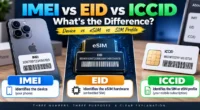
| Identifier | What it identifies or relates to |
|---|---|
| IMEI | Cellular device |
| Phone number | Mobile service or subscriber number |
| Serial number | Manufacturer and device identification |
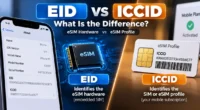
| ICCID | SIM card or eSIM profile |
| EID | eSIM hardware on supported devices |
| Android device identifiers | Software-related device identification |
This is one reason why searching for an “Android ID changer” and searching for an “IMEI changer” can produce very different results. An Android software identifier is not the same thing as the cellular device’s IMEI.
Why Android IMEI Problems Can Be Difficult to Diagnose
Android is not a single hardware platform. Thousands of phones from different manufacturers use different chipsets, firmware versions, modem implementations and security configurations.
For that reason, two Android phones can display a similar IMEI-related error while having completely different underlying causes.
Important variables can include:
- Phone manufacturer
- Exact model number
- Android version
- Chipset
- Modem or baseband implementation
- Firmware version
- Previous software modifications
- Recent repair or flashing activity
- Hardware condition
This is why an application advertised as a universal Android IMEI solution should be approached carefully. Compatibility with one model does not prove compatibility with another.
When an Android Phone Shows Invalid IMEI
One of the more important situations associated with Android IMEI searches is an Invalid IMEI message.
A phone may also show terminology such as:
- Invalid IMEI
- Null IMEI
- IMEI Unknown
- Missing IMEI
- Baseband Unknown
These symptoms can have different causes. Software problems, firmware operations, modem or baseband issues, damaged configuration data and hardware faults can all be relevant depending on the device.
If the phone previously had a legitimate IMEI and the identifier disappeared after a firmware or repair problem, the situation is better approached as an IMEI restoration or diagnostic problem.
Our IMEI Repair Tool guide is the more relevant resource when the problem involves a missing, invalid or corrupted IMEI.
Changing an IMEI Is Not the Same as Repairing One
The words “change” and “repair” are often mixed together in online discussions, but they describe different concepts.
Changing an IMEI generally refers to modifying the identifier associated with a device.
Repairing an IMEI problem means addressing a situation in which the phone’s legitimate device information has become unavailable, corrupted or incorrectly reported.
Consider a phone that worked normally for years and then displayed an invalid IMEI immediately after a firmware operation. The useful question is not simply which number could be entered into the phone. The more important question is what caused the original device information to stop being reported correctly.
For a legitimate repair situation, the objective should be to restore the phone’s own correct information rather than substitute an unrelated identifier.
How to Check an Android Phone’s IMEI
Before investigating any IMEI problem, establish what the phone currently reports.
On many Android phones, entering *#06# in the phone application can display the available IMEI information. The exact behavior can vary by manufacturer and device.
You can also find IMEI information through the phone’s settings. Menu names differ between manufacturers and Android versions, but the information is commonly located within device or phone information sections.
Some Android phones support multiple cellular connections and may display more than one IMEI, such as IMEI 1 and IMEI 2.
If you need to investigate an existing IMEI, you can also use our IMEI Lookup Tool for Android and iPhone.
What Root Has to Do With Android IMEI Searches
If you have searched for Android change IMEI information, you have probably encountered the word root.
Root access gives an Android user elevated permissions that are not normally available to ordinary applications. Older Android modification communities frequently discussed root access in connection with system-level changes and protected device information.
However, rooting an Android phone does not automatically mean that its IMEI can be changed, nor does root access guarantee compatibility with IMEI-related software.
Modern Android phones can use additional security protections, manufacturer-specific implementations and hardware-level controls. Consequently, information that worked on an older device may not apply to a current model.
Why Xposed Appears in Android IMEI Discussions
Xposed is another term that frequently appears alongside older Android modification discussions.
The Xposed framework became known for allowing certain Android system and application behaviors to be modified through modules. Because of that history, older forums and software pages sometimes associate Xposed with device-identifier experimentation.
That does not mean Xposed is a universal solution for cellular identifiers.
Compatibility can depend on the Android release, device architecture, framework configuration, root environment and manufacturer implementation. An Xposed-related reference therefore should be treated as technical background rather than proof that a particular phone supports a specific IMEI operation.
Android IMEI Changer Apps: What to Consider
Search results for Android change IMEI can include APK files and applications that claim to modify device information.
The problem is that the name of an application does not establish what the software can actually do.
A claimed “IMEI changer” may:
- Be designed for an old Android version
- Support only particular hardware
- Require root access
- Depend on a specific chipset
- Be incompatible with newer security systems
- Provide only informational functions
- Make claims that are broader than its actual capabilities
Installing unknown APK files simply because they contain the words “IMEI changer” is therefore not a good troubleshooting strategy.
If you are researching what an IMEI changer tool means rather than looking for a specific Android repair situation, our IMEI Changer Tool guide provides the broader context.
Does an Android Device ID Have Anything to Do With IMEI?
This is another common source of confusion.
Android phones can expose software-related identifiers that are separate from the device’s cellular IMEI.
A change to an application or software identifier does not automatically mean that the phone’s cellular IMEI has changed.
This distinction matters because searches for “device ID changer” and “IMEI changer” can overlap in search results even though the technologies and purposes are different.
If your objective is simply to understand which identifier you are dealing with, identify the exact term shown by the phone or application before looking for software.
What If the IMEI Disappeared After Flashing?
A firmware operation is one event that can be relevant when an Android phone suddenly develops an IMEI problem.
If the phone was functioning normally and the IMEI became unavailable after flashing or another major software operation, record the sequence of events before trying additional tools.
Useful information includes:
- The exact phone model
- The Android version
- The firmware that was installed
- Whether the baseband is recognized
- Whether the IMEI is completely missing or simply reported as invalid
- Whether cellular service stopped at the same time
This information can help distinguish an IMEI problem from a wider modem, firmware or hardware problem.
IMEI, Baseband and Mobile Network Problems
An IMEI problem can sometimes appear alongside a baseband problem, but the two terms should not automatically be treated as interchangeable.
The baseband system is involved in the phone’s cellular communication. If the device reports something such as “Baseband Unknown” together with an IMEI problem, the issue may extend beyond the identifier itself.
This is another reason why repeatedly trying different IMEI applications may not solve the underlying problem.
The symptom needs to be identified first.
Does Changing an IMEI Unlock a Carrier-Locked Android Phone?
No. An IMEI and a carrier lock are different things.
If an Android phone is locked to a particular mobile network, the appropriate solution is to follow the carrier’s unlocking requirements.
Changing or investigating an IMEI should not be confused with removing a network restriction.
Likewise, an IMEI lookup service, blacklist checker and repair tool each serve different purposes.
Does an IMEI Change Remove a Blacklist?
An IMEI blacklist is a device-status issue, not simply a software setting.
A phone can be reported or restricted because of circumstances such as loss, theft or other carrier-related reasons. An IMEI modification should not be treated as a legitimate method for bypassing such restrictions.
If you are purchasing a used Android phone, checking its reported status before completing the transaction can be much more useful than discovering a restriction afterward.
Our IMEI Blacklist Checker guide explains this part of the process in more detail.
Why the Original IMEI Matters
The IMEI associated with a phone is device-specific information. If you own an Android phone, it is sensible to keep its original identification information available through legitimate records.
Useful sources can include:
- The phone itself
- Original packaging
- Purchase documentation
- Carrier records
- Manufacturer documentation
- Professional repair records
Keeping this information can be especially useful if the phone later develops an IMEI-related problem.
It also helps distinguish the phone’s legitimate identifier from numbers found on websites, forums or provided by unknown sources.
Android IMEI Differences Between Manufacturers
There is no single Android hardware design.
Samsung
Samsung Galaxy phones use manufacturer-specific firmware, hardware and security implementations. Information intended for another Android manufacturer should not automatically be applied to a Samsung device.
MediaTek-Based Phones
MediaTek-powered Android devices can use different firmware and configuration structures from other Android platforms. Even two MediaTek phones can have different requirements because of their individual models and software.
Qualcomm-Based Phones
Qualcomm-powered devices can also use different modem and configuration implementations. A troubleshooting approach suitable for one Qualcomm phone may not apply to another.
This variety is one of the strongest reasons to identify the exact model before investigating an Android IMEI problem.
What to Check Before Looking for an Android IMEI Tool
Before downloading software, answer a few basic questions about the phone.
- What is the exact manufacturer and model?
- What Android version is installed?
- What IMEI does the phone currently report?
- Does it show IMEI 1, IMEI 2, or neither?
- Is the baseband recognized?
- Did the problem appear after flashing, updating or repairing the phone?
- Is the phone actually carrier locked?
- Is the issue related to a blacklist?
These questions can prevent you from treating completely different problems as if they were all “IMEI changing” problems.
Android Change IMEI vs IMEI Lookup vs IMEI Repair
Each IMEI-related search should lead to the resource that matches the actual need.
| What you need | Most relevant topic |
|---|---|
| Understand the IMEI | What Is an IMEI Number? |
| Research Android IMEI modification terminology | Android Change IMEI |
| Understand IMEI changer software | IMEI Changer Tool |
| Investigate a missing or invalid IMEI | IMEI Repair Tool |
| Look up an existing IMEI | IMEI Lookup |
| Investigate reported device status | IMEI Blacklist Checker |
| Check an IMEI online | IMEI Number Check |
This separation is useful because an Android user searching for “change imei” may actually be trying to solve an entirely different phone problem.
Common Mistakes When Researching Android Change IMEI
Assuming One Tool Works on Every Android Phone
Android devices differ substantially in hardware and software. Compatibility must be considered on a device-by-device basis.
Confusing Android ID With IMEI
These are different identifiers. Changing one does not automatically change the other.
Assuming Root Is a Universal Solution
Root provides additional permissions, but it does not eliminate hardware, firmware or security restrictions.
Using Another Device’s IMEI
An IMEI is associated with a particular device. An identifier belonging to another phone should not simply be substituted for it.
Confusing a Blacklist With an IMEI Error
A reported device is not necessarily suffering from a corrupted IMEI. Blacklist status and IMEI integrity are separate issues.
Ignoring What Happened Before the Problem
If an IMEI disappeared immediately after firmware work, that event may be much more important than the name of the tool you found in a search result.
A Practical Way to Approach an Android IMEI Problem
Rather than beginning with software, begin with diagnosis.
First, identify the phone. Write down the exact manufacturer and model.
Next, check the current IMEI. Determine whether the phone displays a normal IMEI, multiple IMEIs, an invalid value, or no value.
Then check the cellular information. If the baseband or modem is also showing an abnormal status, the issue may be broader than the IMEI itself.
Finally, consider the phone’s recent history. Firmware flashing, system modifications, repairs and hardware work can all be relevant clues.
Only after establishing the actual problem should you decide whether you need an IMEI lookup, blacklist check, repair resource or general information about IMEI tools.
Frequently Asked Questions About Android Change IMEI
What does Android change IMEI mean?
Android change IMEI is a search term associated with modifying, researching or troubleshooting the IMEI of an Android phone. The exact intention depends on the user’s situation.
Is Android ID the same as IMEI?
No. Android software identifiers and the IMEI serve different purposes. The IMEI is associated with the cellular device.
Can every Android phone use the same IMEI tool?
No. Compatibility can depend on the manufacturer, exact model, chipset, firmware, Android version and security architecture.
Why does my Android phone show Invalid IMEI?
An Invalid IMEI message can have several possible causes, including firmware problems, modem or baseband issues, damaged configuration data or hardware faults. The exact cause depends on the device.
What does Null IMEI mean?
Null IMEI is a term commonly used when an Android phone fails to report a valid IMEI. If the phone previously had a legitimate IMEI, the cause should be investigated rather than assuming that replacing the identifier is the correct solution.
Does rooting Android automatically change the IMEI?
No. Rooting provides elevated permissions but does not automatically change the phone’s IMEI.
Can a factory reset normally change the IMEI?
A standard factory reset is not intended to replace the phone’s IMEI.
Does changing an IMEI unlock a carrier-locked phone?
No. Carrier unlocking and IMEI identification are separate matters. A carrier’s official unlocking process should be used for a network lock.
Can an IMEI change remove a blacklist?
An IMEI modification should not be treated as a legitimate way to bypass a blacklist or other reported-device restriction.
What should I do if my Android IMEI disappeared?
Start by identifying the exact model, checking the current baseband and determining what happened immediately before the IMEI disappeared. If the phone previously had a legitimate IMEI, investigate an appropriate repair or restoration option.
Where can I check an Android IMEI?
You can use an IMEI lookup tool or an online IMEI check tool, depending on the information you need.
Should I publish my complete IMEI online?
It is better not to publish a complete device-specific IMEI unnecessarily on public websites, forums or social media.
Final Thoughts
Android change IMEI is a broad search phrase, but the real-world situations behind it are not all the same.
Some users are researching Android IMEI tools. Others are dealing with an invalid, missing or unknown IMEI after firmware work or a repair. Some are actually looking for information about Android device identifiers, root access or older modification terminology.
The safest way to approach the subject is to identify the actual problem first.
If you need to understand the identifier itself, start with our IMEI number guide. If you need information about an existing device, use the IMEI Lookup Tool. If you are investigating reported device status, see the IMEI Blacklist Checker. If your phone has lost or incorrectly reports its legitimate IMEI, our IMEI Repair Tool guide is the more appropriate starting point.
Most importantly, do not assume that every Android phone uses the same hardware, firmware or IMEI-related system. The exact device matters, and understanding that difference is the key to making sense of Android IMEI problems.